Activity
Mon
Wed
Fri
Sun
Aug
Sep
Oct
Nov
Dec
Jan
Feb
Mar
Apr
May
Jun
Jul
What is this?
Less
More
Memberships
AI Automatisering Danmark 🇩🇰
33 members • Free
Mester Manualen
21 members • Free
AI Workshop Lite
37.1k members • Free
AI Growth Tribe
2.6k members • $7/month
The Next Level
2.3k members • Free
AI Automation Society
423.3k members • Free
AI Automation Agency Hub
328.5k members • Free
OM
Online Mentorforløb
2.6k members • Free
AI Fellowship Hub
8.6k members • Free
11 contributions to AI Automation Agency Hub

Apr 14 •
AIOS Building
Hey everyone, I've been looking into the idea of an AI operating system (as you see in the video below with Liam). I'm just wondering if any of you guys have put any thought to the process of actually building all your files around AI, on top of i.e. Claude Code inside of Visual Studio Code. If any of you guys are already doing it or are experimenting with it, how do you add a safety feature so Claude can't accidentally delete all of your files or your clients' files? Hope to hear from you 🙏 https://www.youtube.com/watch?v=yd9tr0xqg-Y
1 like • Apr 21
Hi @Muhammad Mehdi I do the exact same thing, and inside of my project I have a settings.json file that tells Claude which commands it can run and which it should ask for permission to run. All the lead commands are manual approvals as well. And I agree as well. I also have a production and a development environment and Claude only touches the development environment. Not really building anything yet, just leaning towards building an entire ecosystem for clients.
1 like • Apr 28
@Muhammad Mehdi Yup! No specific clients in scope yet.

Oct '25 •
First & Second Client Ever Looking For More Now!
Hey everyone, I joined the community over 6 months ago now. I've been learning about AI Automation & reached out to a family friend who allowed me to do some builds for him for free, after working with him for about 3 months. He referred me to some of his colleagues in the inventory management niche. I was able to close 2 deals for $1000 setup + $5 per run. I built an email report automation that took their files & analyzed them, and then generated email reports that they could send out to clients in 5 - 10 minutes. I'm now looking to take on more clients to build automations for & I'm not restricting myself to one niche, I know its nothing crazy yet & its taken alot of work & alot of ups and downs but its a win that means alot & I'm going to have to continue pushing forward to build a full business out of this! I also want to take a moment to say none of this would be possible without trust in God & constant prayers I truly believe none of this would have been possible without it & Im happy to share this small with with others!
0 likes • Oct '25
Well done @Elieser Montalvo! You can be proud of yourself! Just keep on pushing!
Sep '25 •
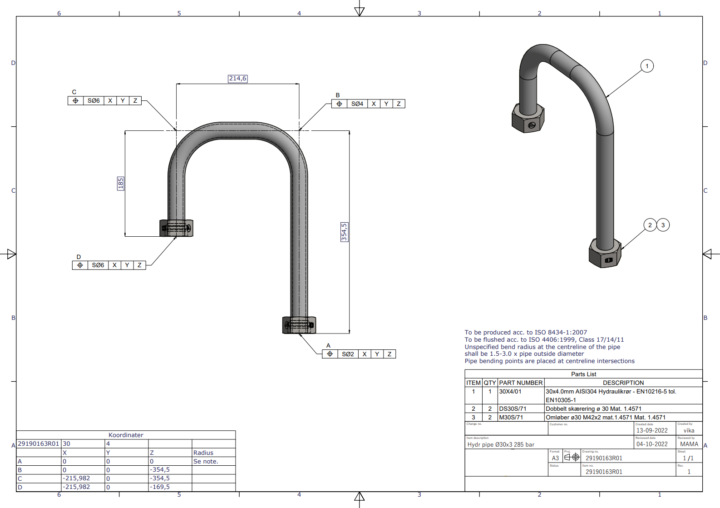
Extract Table data from Technical Drawings Reliably
Hi everyone, If you have coding skills (preferably in Python), this might interest you. It may even be possible to solve without coding, but I haven’t found a reliable no-code approach yet. The challenge: I have attached two types of technical drawings: - The PDF drawing contains one simple table on the first page. - The image drawing contains two tables, but only the one titled “Parts List” needs to be extracted. The task is to reliably extract all information from the correct table. The solution must be bulletproof, with no room for failure. Scope of the system: - Input will always be PDF files (not images). - The target table will always be titled “Parts List”, containing the columns like: - ITEM - QTY - PART NUMBER - DESCRIPTION - Maybe even more columns named something else. - The table’s position in the PDF can vary: right side, left side, or even on a separate page. - OCR is not needed, since I can already extract text from PDFs. - I’ve tried GPT-4.1 for image recognition, but when processing A3 sized PDFs, it struggles - tables appear too small and errors occur. My attempts so far: - I’ve experimented with Python using tools like Camelot and Pdfplumber, together with the “Excel Viewer” extension in VS Code. See the python image (3) attached. - The code correctly extracts all table data (see image 4 for output), but the result is unstructured. - The next step is to transform the extracted data into a structured format (e.g., transform into a spreadsheet) so it can be used effectively. My question - Do you know how I can properly structure the extracted data? - Or do you have an alternative approach to solving this problem? I am no hardcore software developer - yet. Just curious about your inputs.
0 likes • Sep '25
@Mihai Paun That was one helpful mouthful, haha. I'm gonna dive right in! Thanks!
1 like • Sep '25
@Senthil Nagarajan Yes it's a really good challenge! So far, I've actually succeeded in extracting the table by looking for "Parts list" and then remove all other rows and columns around. By then telling the system, that whenever "QTY" and "ITEM" doesn't exist anymore it should stop, I have the full table. And only that! I made it work.
Aug '25 •
Microsoft Teams - External AI transcriber bot
Hey everyone, I’m working on an interesting case. Read below __________________________________ The Challenge: I work in a large organization with over 1,500 employees globally. Due to the scale, we're required to use Microsoft Enterprise licenses to access their services. These licenses are quite costly - especially because Microsoft’s model requires every single employee to have a license in order to unlock certain features. __________________________________ The Task: If you have a Microsoft Teams license, you can generate meeting transcriptions and also access the Microsoft Graph API to retrieve meeting data - perfect for further processing in tools like n8n. However, this approach becomes prohibitively expensive - we're talking $50,000+ per year - because every employee would need such a license. __________________________________ The Question: Is it possible to build a custom AI-powered transcriber (possibly integrated with n8n or another tool) that can be invited into Teams meetings as a participant to transcribe them - without requiring full Microsoft Teams licenses for all employees? In other words, can we create a bot or service that listens in on meetings, performs transcription, and operates independently of Microsoft’s licensing restrictions? __________________________________ A Note on Compliance: The reason this needs to work specifically with Microsoft Teams - and not with Zoom, Google Meet, or other tools - is because Microsoft is a trusted partner within the organization when it comes to confidentiality and data privacy. If anyone has tackled something similar or knows of a workaround, I’d love to hear your thoughts. Thanks in advance! 🙏
1 like • Aug '25
@Muhammad Mehdi I will try it out :) But I've had troubles with the 'Extract From File' before. But once I've tried it out, I will let you know. Thanks Muhammed! Appreciate it!
1 like • Aug '25
@Muhammad Mehdi I sure will! Thank you!
May '25 •
Route Planner Agent - Google Maps Directions API
Hey guys 👋 I'm trying to figure out how I connect my n8n instance with the Google Maps Directions API and ask for an effective route based on a list of addresses 🗺️ So my workflow is intended to work like this: - A have a spreadsheet full of clients with their corresponding addresses, and last inspection dates. - Each client needs inspection of their facilities on a given time each year. - I now want to connect a chat trigger to an AI agent, that has the spreadsheet and the Google Maps Direction API as tools. Based on these tools it should be able to read the 'last inspection date" and address from the sheet and based on my demand from the chat, it should reply with a list in chronological order displaying which clients to visit based on their address and last inspection date. All I know is that I have to connect the Google Maps Directions API by using an HTTP request node - and that's it 😳 Have any of you guys had any luck with this? 🙏
0 likes • May '25
Hey @Jonathon Hinchley - I found a way earlier 🙂 Thanks for your comment! Just so others won't be confused if they see this post - the link you just sent is not the way forward. The way forward is by using the Google Geocoding API, the Google Distance Matrix API and the Google Directions API 😉 The rest is done by using n8n agent logic. With that said, some of the logic from the workflow you sent might come in handy.
1-10 of 11

@peter-kaad-5246
Hi everyone,
I’m from Denmark and work with AI and automation software. I bridge the gab between the dream and reality.
Active 6d ago
Joined Mar 3, 2025
ENFP
Powered by