Activity
Mon
Wed
Fri
Sun
Jul
Aug
Sep
Oct
Nov
Dec
Jan
Feb
Mar
Apr
May
What is this?
Less
More
Memberships
AI Automation Society
389.2k members • Free
AI Automation First Client
1.7k members • Free
AI Automation Agency Hub
320.9k members • Free
16 contributions to AI Automation First Client

Mar 4 •
Thoughts on Cold Emailing structure Below🤔
Here is the Type of Cold Emailing structure i am following right now , Kindly give it a review and what changes should i make to it? what parts can i improve and how to refine it further Hi [Name], You're likely spending hours every week manually chasing down after-hours Appointment inquiries and trying to sync them to the clinic calendar. I built a lightweight system that automates about 80% of that workload. I recorded a quick 90-second video showing exactly how it works for [Company_Name] (we're currently doing 14-day free trials). Want me to send it over? (Or, if that isn't the biggest time-drain right now, what manual task is currently eating up your team's day?) Best, [Sender_Name] Please do share your thoughts

0 likes • Mar 9
I personally don't have any experience with cold emailing. However, I strongly suggest you start to reach out to warm connections and build authority from that rather than emailing random people😅

Mar 5 •
Crossed 5k in revenue
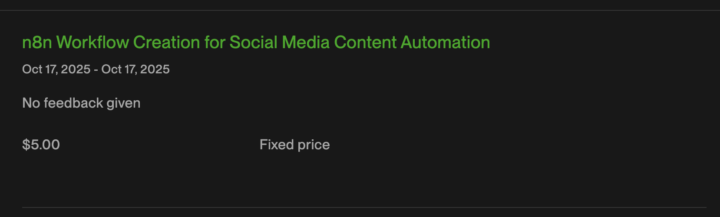
Just crossed 5k on Upwork since I started back in November with a $5 project 😂( Back then people laughed at me because of how little I made, but I kept at it. I've played this game before, you start slow and build over time) Now my next goal is to push every single contract towards the 1k mark. I'll still do some contracts for less than 1k just for the experience to use the tools and be able to say that I've used the tool. But besides that if there is no real upside in terms of skill or money I'll just say no. Which reminds me of, I just received another €300 offer but this was straight up not a €300 build more like a €1000 build minimum or even more 😅
1 like • Mar 6
Congrats Chris! Glad to see you have a win like this!💪 Hope you reach that 1k mark soon. Don't be scared to ask for more😆 You got this!
1 like • Mar 9
@Chris Jadama Hold on, soryy I mistead in that case🤣 CONGRATSSSS
Mar 3 •
Another Client!!!💪🤩 But I need advice...
Hello guys, I was able to get a case-study client today. Their problem: Needs more leads in his niche. I have never worked with lead creation and enrichment before so if you have any tips for me/resources that I could look into I would appreciate it so much. Hope you all have a great day!
1 like • Mar 6
@Chris Jadama Could you please resend it? It gives me the 404 error that video is not found :((
1 like • Mar 6
@Chris Jadama ohhh i see thx so much

Mar 2 •
Claude Code vs OpenClaw
Hello guys, I currently am running an AI agency for 3-4 months now and have been really starting to dive deep into the AIOS's that are currently out there right now. I have had lots of conversations as well with people and getting everyone's opinions and takes on the future of this and what people are recommending. I have had some mixed opinions and both sides seeming to have there pros and cons for sure. I wanted to post in this community and see if anyone in here has any information or feedback that could help make my decision for me. Claude Code or OpenClaw, which one of these is the right path to take and put my full focus into, while also helping with my agency's tasks on a day to day basis and just an overall operating system behind the scenes. Thank you
0 likes • Mar 3
From my experience, Claude Code is extremely potent. OpenClaw is just a weaker wrapper for Claude Code. That's at least what I have heard on this topic since your question was the exact same I had😅 I am no expert yet in this AI space but you can be confident that I believe what I am saying completely since I went all in into Claude Code😆 Plus I believe that the credits for OpenClaw would ruin you... For Claude Code you can use your Pro account from claude.ai, which is not that expensive at all. If you are interested in the setup I could help you cause it was a little messy on my side. On the other hand I would love to hear some input from you how your agency's doing since you are already 3-4 months in and I am just starting out 🙂
0 likes • Mar 4
@Jack Lafata Nope, I run Claude Code on my laptop in VS Code

Feb 25 •
The Client Communication That Prevents 80% of Problems 🔥
Most client problems start with communication failure. Here is the system that prevents them. THE WEEKLY UPDATE: Every Monday, every client gets: "Weekly Update for [Client]: AUTOMATION STATUS: Running normally / Issue detected THIS WEEK'S PROCESSING: - Documents processed: [X] - Success rate: [X%] - Flagged for review: [X] ISSUES (if any): - [Description and resolution] UPCOMING: - [Any planned changes or maintenance] Questions? Reply here or message in Slack." Takes 2 minutes per client. Prevents hours of confusion. THE STATUS LEVELS: GREEN: All systems normal "Everything running smoothly. No action needed." YELLOW: Minor issue detected "Noticed [issue]. Already investigating. Will update by [time]." RED: Major issue "[System] is down. Working on fix. Manual workaround: [steps]. ETA for resolution: [time]." THE PROACTIVE ALERT: Do not wait for client to find problems. Bad: Client emails "Nothing processed today. What is wrong?" Good: You message "Heads up - processing delayed this morning due to [reason]. Already resolved. Backlog clearing now." THE COMMUNICATION CHANNELS: Slack: Quick questions, status updates Email: Formal documentation, contracts Call: Complex issues, quarterly reviews THE RESPONSE TIME COMMITMENTS: Slack: Within 2 hours during business hours Email: Within 24 hours Urgent issues: Within 1 hour THE ESCALATION PATH: Level 1: Message in Slack Level 2: Email with "urgent" in subject Level 3: Phone call (for true emergencies) THE DOCUMENTATION: Every issue gets documented: - Date and time - Issue description - Root cause - Resolution - Prevention steps Share summary with client. Shows professionalism. THE QUARTERLY REVIEW: Every 3 months, schedule 30-minute call: - Review processing statistics - Discuss any challenges - Identify optimization opportunities - Preview upcoming changes - Ask about their evolving needs THE AGENDA TEMPLATE: 1. Performance review (5 min) 2. Issues and resolutions (5 min)
3 likes • Feb 25
Thank you for another valuable post! Just a question though, if you have access to the week's processing that means that your automation is running on your hosting. I have read that this commercial use of n8n(you are hosting and selling "access" to n8n) is legal only with a commercial license and is illegal under other circumstances... Am I mistaken? Or am I missing something🤔 Was that information not true?
2 likes • Feb 28
@Duy Bui Thanks for the reply. Now I understand it far better.
1-10 of 16

@peter-berta-4509
A student from Slovakia trying to improve as much as he can.
Active 15d ago
Joined Jan 18, 2026
Slovakia