Activity
Mon
Wed
Fri
Sun
Jul
Aug
Sep
Oct
Nov
Dec
Jan
Feb
Mar
Apr
May
What is this?
Less
More
Memberships
AI Developer Accelerator
11.3k members • Free
8 contributions to AI Developer Accelerator

3d •
AI Developer Accelerator — Coaching Call - May 26th
🔥 THIS IS A BRANDON WEEK 🔥 Brandon’s only on the call once a month now — and this Tuesday is the one. If you’ve been saving up questions for the founder himself, this is your shot. Don’t catch this one on the replay. Last week we uncovered Base64-encoded prompt injection attacks hiding in AI skills, plotted adversarial code reviews using the "cake method," and watched a golf swing wearable evolve from concept to hardware. If you missed how to make two AIs argue with each other or why domain expertise beats generic coding skills, you’ll want to catch up before Tuesday. 📞 HOW THE CALLS WORK The calls can run 2+ hours. We want to make sure we're respecting everyone's time. Especially those of you who actually show up. Here's the structure: 👉 Reply to this post with your questions before the call 👉 If you submit a question and you're on the call, you go first 👉 We work through questions in the order they came in 👉 Then we open it up for everyone else If you can't make the call but want your question answered, drop it in the comments. We'll get to it. But priority goes to people who are there. The goal is simple: if you're taking the time to show up, you shouldn't have to wait behind questions from people who aren't even on the call. We’ve got open threads to explore: Patrick is preparing that adversarial review demonstration, Ty is meeting with hardware partners on the SwingTrack device (and has free ShipSafe access for the asking), and Juan is investigating a native iPhone port of the AI Photo Booth. If any of those projects spark questions—or if you’re navigating your own domain transition—drop them below. 🔗 ZOOM LINK (save this) https://us06web.zoom.us/j/81995207847 📅 WHEN Tuesday May 26th at 6PM ET Looking forward to seeing you on the call!

1 like • 2d
@Patrick Chouinard where can I find previous calls recordings? thank you
1 like • 2d
@Patrick Chouinard thank you
Nov '25 •
Code Assistant ShipKitAI
@Brandon Hancock As I dive deeper into app development using ShipKitAI, I’ve finally run into the issue of context limits. I’m using Claude Code on the Pro plan, and I’m trying to understand how others handle this. When your context window resets, how do you make sure the model picks up exactly where you left off? Do you create an additional “status” or “progress” markdown document that the code assistant can re-load to re-establish the full implementation state? Also, I’m considering an additional AI subscription (ChatGPT) since it offers Codex-style capabilities. Has anyone here used it, and how does it compare in practice?
0 likes • Nov '25
@Rod Morrison thanks for the feedback. I’ll definitely check out your repo. I’ve been experimenting with the Gemini CLI as well for some of the lighter tasks. Overall, I’m still trying to figure out what the best workflow looks like, especially when it comes to structuring templates once you have the main idea set. For example, whether it’s better to update a claude.md file, having a master_task.md file basically developing my own workflow if that makes sense. I feel I am getting there slowly need to rewatch some of the earlier videos.

Sep '25 •
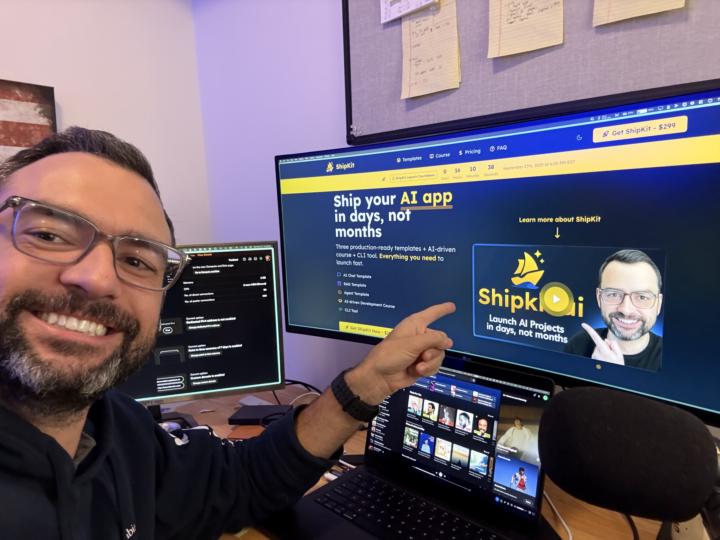
Who needs sleep when it's launch day!?!?!?!
Guys! I'm so excited! 15 more hours till shipkit.ai officially goes live! I'm doing a final round of tests just to make sure that every template works perfect for you! So far, everything is going smooth as butter! If you're thinking about building your own AI application for your own start or to start AI freelancing, shipkit is perfect for you. You are going to be blown away with how easy it is to setup, build, and deploy your own AI application. Over 150 developers have signed up for the prelaunch to jump start their AI Development journey! We'd love to have you as a part of the shipkit fam! Make sure you don't miss out on the $100 prelaunch discount that goes away as soon as shipkit launches here in 15 hours! You can grab shipkit here: 👉 https://shipkit.ai
2 likes • Sep '25
@Tom Welsh I opened an incognito window in chrome and it works fine. thank you
0 likes • Sep '25
@Brandon Hancock no apologies needed, great content and thank you for putting all this together. I started already and I look forward to publish another app!

Sep '25 •
ShipKit's Templates
Hi everyone, I have heard mention of early access to the templates if you have purchased shipkit, just hoping someone can elaborate on how we can access and use them now. I am assuming that they are templates for folders and agents that we can upload to cursor and use in our current projects?
1 like • Sep '25
@Tom Welsh aside from the templates, what are the primary technologies involved when the app is built? Are we mainly working with Python, CSS, HTML, TypeScript, and JavaScript, or are there other more advanced front end frameworks?
Aug '25 •
Gemini CLI Adds 7 New Features — Here's What Actually Works (And What Doesn't)
Gemini CLI just dropped 7 major updates and if you're exploring AI dev tools, this open-source project is worth a look. In this new video, I break down all 7 new features inside Gemini CLI 2.0 — from editor integration to GitHub PR reviews — and share what’s actually working and what still feels unfinished. 🧠 What you’ll learn ✅ Gemini CLI Companion — connect Gemini directly to Cursor or VS Code ✅ Init Command — auto-generate a full project memory file with one prompt ✅ Persistent Rules — train Gemini to follow your coding preferences ✅ Stats Mode — track model usage and tool calls per project ✅ Multi-Workspace Mode — pull from multiple codebases at once ✅ Chat History — save, resume, and name CLI conversations ✅ GitHub Actions — PR review automation (still a bit buggy, but promising) Get the latest version of Gemini CLI here: 👉 brandonhancock.io/ai-driven-development P.S. Want to take AI-driven development even further? 👉 Pre-order here: shipkit.ai What is Shipkit? • Prebuilt templates for the most common AI apps: Chat, RAG and ADK agents • A course with 14 AI-assisted modules that takes you from idea to a production app • Cursor-first workflows that help you build the entire AI application faster and with fewer mistakes Pre-order today and get instant access to: • 15+ AI prompt templates • 40+ Cursor rules • my previous full-stack marketing course (https://www.skool.com/ai-developer-accelerator/classroom). Launch: September 20. Questions? Comment below or DM me.
1 like • Aug '25
I guess I can answer my own question now after using both of them; gemini cli is way better than the gemini code assistant; and the VS code extensions ratings kinda confirm my idea.
0 likes • Sep '25
@James Rennie noo issue so far; I did notice that it renders better if i am using an external monitor or using vs code in full screen mode.
1-8 of 8

@pasquale-salomone-7748
Hello World! My name is Pasquale, a data scientist with a passion for learning.
Active 2d ago
Joined May 27, 2025
Powered by