Activity
Mon
Wed
Fri
Sun
Sep
Oct
Nov
Dec
Jan
Feb
Mar
Apr
May
Jun
Jul
Aug
What is this?
Less
More
AI Automation Society
437.4k members • Free
AI Automation Hub
4.3k members • Free
AI Automation Agency Hub
332k members • Free
Untech AI
61 members • Free
LearnToday™
28.3k members • Free
9 contributions to Untech AI

Jan 1 •
Week 4 Extension - Why This Build Goes Beyond “Just Using ChatGPT”
This week’s Topic Finder & Ranker classwork led me to an important realization. LLMs are excellent writers. But they shouldn’t be the ones deciding what to say. I extended the Week 4 build into an end-to-end content engine that uses an LLM as an executor, not a decision-maker. What’s different from normal GenAI usage vs this Content writing engine? When we use ChatGPT or any other GenAI tool directly, we usually ask: - “Write a post on X” - “Make it engaging” - “Add a hook” All strategic decisions are implicit and unstable. In this system, those decisions are explicit and frozen upstream. How the system works: 1️⃣ Topic Finder / Ranker: Only topics with real “why now” signals enter the system. No random prompts. 2️⃣ Idea Classification (Editor Brain) - Before writing, the system decides: - What kind of thinking this is - The intent (authority, education, engagement) - How safe or sharp the angle should be. This prevents format and intent confusion later. 3️⃣ Packaging Strategy (Creative Director Brain) Format is chosen before content: - Carousel vs text - Slide count - Visual role per slide. The LLM does not “guess” formatting. 4️⃣ Execution Engine - Only after all decisions are locked: - Post is written - Carousel blueprint is generated - PPT is auto-created via Python and Carousel prompt is generated for non-technical users. Key learning The value isn’t the writing. The value is structuring judgment around the LLM. This build helped me understand the difference between: - Prompting better vs - Designing systems that think consistently Still learning and iterating. Sharing mainly to document how my understanding of automation is evolving.
1
0
Dec '25 •
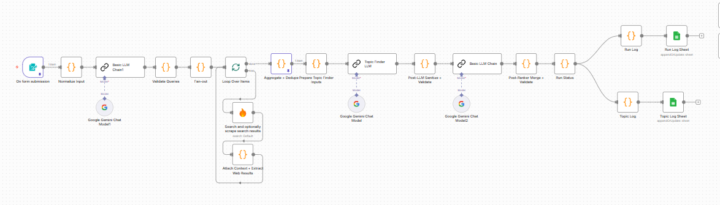
Week 4 Reflection: Topic Finder & Ranker
This week pushed me beyond simply following steps into actually understanding how data flows through an AI automation. Replacing JavaScript nodes with LLM chains sounded straightforward initially. In practice, I learned that LLMs silently break implicit assumptions unless context, schemas, and validation are handled explicitly. I ran into multiple dead ends like rate limits, broken loops, partial logs, and at first it felt like I was doing something wrong. Over time, I realized those failures were exposing gaps in how I was thinking about guardrails and observability. By the end, I was able to replace the JS ranker with an LLM-based ranker, add post-LLM validation, and build a more robust topic-finding workflow. Biggest takeaway: building AI workflows is less about prompts and more about protecting data flow and designing for failure.
0 likes • Dec '25
Hi Sandeep, happy to help where I can 🙂 Could you please clarify what exactly you’re trying to achieve and where you’re getting stuck? I am not sure about your problem statement yet.
Dec '25 •
Week 3 Assignment – Problem Decomposition
This week was about slowing down before building. Decomposing my LinkedIn RAG project into minimal, testable nodes made me realize how much clarity comes from defining “done” first.
0
0

Dec '25 •
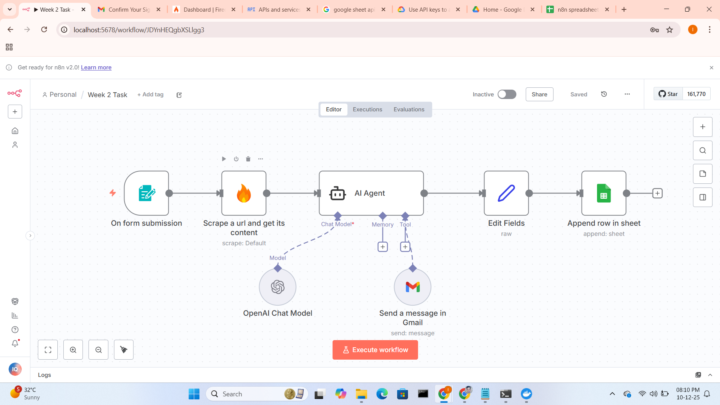
Week 2 Build Assignment
In Week 2 assignment i rebuild AI Automation for Digital Marketing B2B, included my website https://digitalimran.xyz
1 like • Dec '25
Excellent work Imran!
Dec '25 •
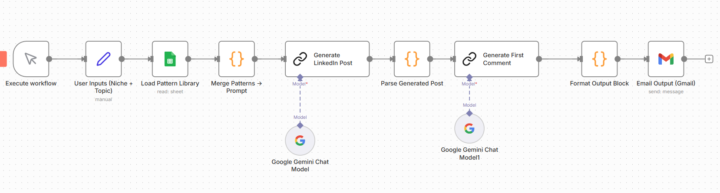
🔥 Week 2 Bonus Build — Mini LinkedIn RAG System (Pattern → Post → Email)
I spent this Sunday building something interesting outside of the official assignment; a Mini RAG system for LinkedIn content using n8n + Google Sheets + Gemini. The goal: 👉 Scrape high-performing posts from top AI creators 👉 Extract structural patterns automatically 👉 Generate fresh LinkedIn posts in my voice, based on proven formats Here’s how it works: 🧩 Workflow A : Pattern Builder 1. Fetches raw posts from a Google Sheet (just post URL + content pasted manually 2. Loops through each post 3. Sends the content to an LLM and returns structured data: ✔️Hook type ✔️Hook example ✔️Post type ✔️Tone style ✔️CTA style ✔️Writing tricks ✔️Key ideas 4. Saves everything into a Pattern Library Sheet This turns long unstructured posts into a database of writing patterns. 🧩 Workflow B : Post Generator 1. I enter simple inputs: ✔️Niche ✔️Target audience ✔️Post type ✔️Topic hint 2. The system: Reads multiple patterns from the library Summarizes them into one master pattern prompt Generates: ✔️ LinkedIn post ✔️ First comment ✔️ One-line summary Then emails the output to me automatically. 🧪 Status & Screenshots ✔️ The system works end-to-end ✔️ I received my own AI-generated LinkedIn post + comment by email ⚠️ Hit a Gemini API quota after processing several posts (classic 🤣) No paid tools. No external scraper APIs. Just n8n, Google Sheets, and manual LinkedIn/X copy/paste. 🧠 What I learned today: - Studying real posts beats “write a LinkedIn post like a human” prompts. - Data beats creativity. I can replicate viral positioning based on structure and data, not luck. - Workflow chaining in n8n finally clicked today. 📅 Next steps: - Add batching + retry logic to avoid API limits - Auto-scrape LinkedIn comments for CTAs and hook variants - Export pattern library to Airtable or Notion
0 likes • Dec '25
@Sujithbeno Sekhar thank you
1-9 of 9

@pankaj-kumar-6457
Exploring AI, digital skills, wealth-building.
Learning actively, applying consistently, growing intentionally.
Active 80d ago
Joined Nov 21, 2025