Activity
Mon
Wed
Fri
Sun
Jul
Aug
Sep
Oct
Nov
Dec
Jan
Feb
Mar
Apr
May
Jun
What is this?
Less
More
Memberships
Agentic Labs
699 members • $29/m
Samin's Free AI Resource Hub
16.9k members • Free
Peak System Builders
913 members • Free
Automate Business AI
6.1k members • Free
Escuela Neuroexpansión
14 members • Free
Master AI Automation
163 members • $1/month
AI Automation Academy
2.2k members • Free
AI Automation Society
413.1k members • Free
AI Automation Agency Hub
326.9k members • Free
79 contributions to Master AI Automation

Mar 23 •
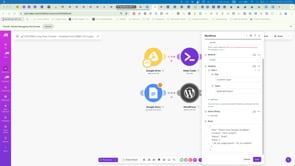
OUCH! A WHOLE DAY WASTED FORMATTING for WordPress (and still no solution!)
Hi team. I can't believe I've wasted a whole day on this. I've worked with Claude Chat, Claude Cowork, Claude Chrome and ChatGPT and they've ALL FAILED to deliver a working solution; i.e a clean Google Doc output format path for a clean WordPress input format path. They had no restrictions on modules to use, or number of modules, but despite showing them the EXACTLY the output they needed from the input provided, I'm still no closer to success than when I started! FYI, here is the Google Doc which I've shared publically for now: https://docs.google.com/document/d/1pziCm9wIIvtKvzt10IRc_jk-5pl1pn0rd8RVrjsBOLM/edit?usp=sharing PS. Here is how Cowork described the clean input that is working inside the scenario: https://us2.make.com/93886/scenarios/4492233/edit?folder=63806 Note I don't know if the following IS the reason it works. All I know is that the single module scenario above with the clean "content" inside it, works. Claude trying to self-diagnose: "When you gave me the blueprint with the content already populated, it worked. Here's why: The "content" value is plain HTML — but with a very specific character encoding approach. Here's what's actually in there: What it IS: - Raw HTML tags: <h1>, </h1>, <p>, </p>, <h2>, <ol>, <li>, <table>, <tr>, <td>, <br>, <hr>, etc. - All on a single continuous line — zero newlines, zero line breaks anywhere - No escaped characters like \" — double quotes simply don't appear inside the content value at all What it uses for special characters: - Named HTML entities for typographic characters: “ ” ’ – £ ® - Numeric entity ' for apostrophes (instead of a literal ') - > for > where needed - " for quote characters where needed The critical difference from what LLMs produce: When an LLM (or a Make module) processes text from a Google Doc, it almost always produces one or more of these problems:

1 like • Mar 23
Hi! Are you using any skills in Claude?

Jan 2 •
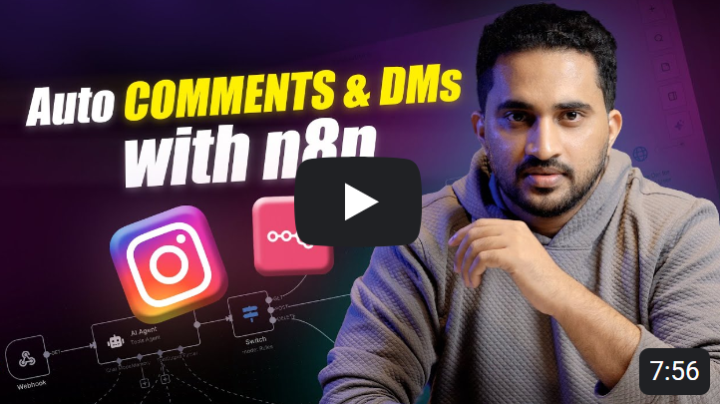
🔥 NEW Video: Automating Instagram Comments & DMs with n8n
Hey everyone. If you’ve ever had a reel take off and suddenly found yourself drowning in comments and DMs, this video is for you.That’s exactly what happened to me. Most people were asking the same things — links, resources, or what to do next — and there was no realistic way to reply to everyone manually. So I built a simple automation using n8n that now handles it in the background. Here’s what the setup does: 1. Reads every new comment on your post 2. Understands what the person is actually asking for 3. Replies in a natural, human tone 4. Sends personalised DMs automatically when needed 5. Lets you control everything through a simple Google Sheet Once it’s live, it just runs on its own. In this video, I walk through the entire workflow — how the logic works, which n8n modules are used, and how you can build the same setup for your own content. If Instagram is an important part of your lead generation or community growth, this can save you hours every week. 🎥 Watch the full walkthrough here 📘 Get the blueprint for this inside the Classroom If you try it or want to customise it further, drop a comment — happy to help.
2 likes • Jan 6
I’ve already used it and it’s amazing. Thanks so much!

Dec '25 •
n8n Version of Instagram Comments + DMs automation
Hey everyone, We’ve have created an n8n blueprint for the Instagram Comments + DMs automation. Along with that, we’ve set up a classroom that walks you through the entire setup. This is the same system that: - Replies like a human - Handles comments + DMs automatically - Saves everything to Google Sheets - Turns engagement into real opportunities If you’re using n8n and want a clean, practical implementation — this is for you. 👉 Access the n8n blueprint from classroom and try it out right away!! Let us know if you’d like more n8n automations like this — happy to build what actually helps you.

1 like • Dec '25
oh this is gold!! thanks @Shirin Saleem

🔥
Dec '25 •
Day 20 – A complete RAG disaster
Today was a mess. Everything I tried to rebuild went completely wrong. I thought I could trigger a subworkflow using the “call n8n workflow” node.Simple idea. But nothing worked.Nothing was passed through, nothing arrived, nothing happened. And I have no clue why. I searched and searched and searched. Still nothing.I even used Gemini to try to debug it, but no luck there either. I wanted to spend one hour.I ended up at one and a half. I even got up early to do this. And let’s not forget Christmas is coming. I still need to buy gifts, breathe a little and not lose my mind. Today the morning is finished. So here is my question for you. Do you have any good examples in the classroom or anywhere else that show how to use the “call n8n workflow” node properly? Did anyone yoused this node in an AI Agent node? I clearly need to understand this better. Not every day is progress. Todaywas pure frustration. It was nothing... But that is part of the journey.

2 likes • Dec '25
hey @Holger Peschke — this is honestly my best tip and the most helpful thing I can share that I know and tried, because it completely changed how fast I build and fix workflows in n8n. On https://docs.n8n.io/ there’s a top button called “Chat with the docs.” I paste entire nodes, parts of a workflow, and error messages (even full workflows if they’re not too big), and it gives me an actual fix. What I do a lot: I paste the failing node + the exact error message and ask it to return the full corrected node JSON (not just advice). It does — I copy/paste back into n8n, test, and move on. If the workflow is big, I feed it in chunks and go step by step. Sometimes it replies with advice only, and I literally write: “Give me the full node/workflow JSON fixed so I can copy and paste in n8n. You always do it , come on" 😂 and it works. Bonus: it can also suggest existing templates similar to what you want, so you can import them and see how they’re built. Today I also noticed you can connect it with tools like Claude, ChatGPT, and VS Code to help build/troubleshoot workflows (I haven’t tested that part yet), but even the docs chat alone saves me a ton of time. Are you using it already? If yes, how are you using it?
🔥
Dec '25 •
Day 22 – Testing Google File Search as a low-cost RAG
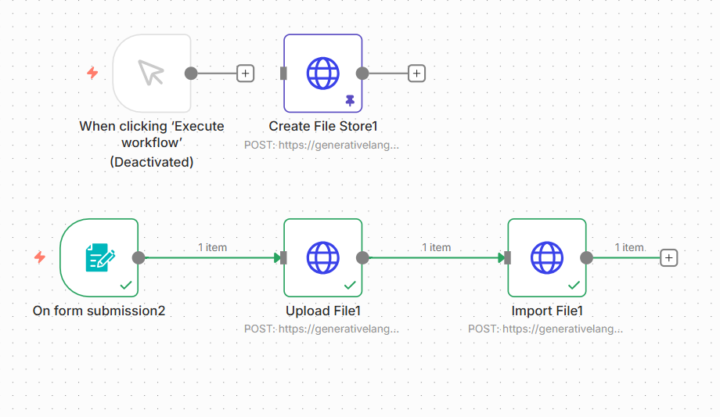
Today I remembered something important. Google Gemini offers a File Search feature that is supposed to be much cheaper than Pinecone or Supabase. So I made it my goal for today to test it and see how it works inside n8n. From what I have read, it is a complete simplification of the whole RAG workflow. Here is what makes it different. With Pinecone or Supabase you have to build the entire RAG pipeline yourself. That includes: • Chunking the documents • Managing embeddings • Calculating and storing vectors • Handling metadata With Google File Search, all of that shall be handled automatically. We will see what will happen. You shall upload a file and that it is. No chunking, no embedding model selection, no vector Google does all of this internally. I am curious to see if it really is that simple. The setup First I had to get an API key, which meant creating a project in Google Cloud and adding a billing account.Once that was done, I had my key and could start. In n8n I created a new credential and added everything into the HTTP Request node. Then I created the store, which is basically the container where the files will be indexed. Next I added a form trigger to upload the document, followed by an HTTP Request for the file upload and another HTTP Request to import the file into the store. And here is the interesting part: My full patent file with all images was accepted by Google without any issues... interesting. Nut i am not sure. I am curious to see the results later, but not today.This setup already took more time than expected. Still, I am happy that everything worked so smoothly. Another good step in the journey.
2 likes • Dec '25
thanks this is really helpful!!
1-10 of 79

Active 4d ago
Joined Nov 24, 2024
Powered by