Activity
Mon
Wed
Fri
Sun
Sep
Oct
Nov
Dec
Jan
Feb
Mar
Apr
May
Jun
Jul
Aug
What is this?
Less
More
Memberships
217 contributions to Master AI Automation

7d •
🥳 July 2026 in Review!
Hey fam, As we close out an amazing month of July, it’s time to look back at some outstanding performances and key achievements. 🚀 Presenting our top leaderboard champions who made this month truly competitive and inspiring! @Fahila K p on top with highest engagement of the month 🏆 @Colin Clapp - $ 25 @Christopher Daniel - $15 ✨ Here’s a recap of the content and updates shared throughout last month: 🎥 Video Releases: 1️⃣ Connect Instagram (and 1000+ apps) to Claude - even without a built-in connector 2️⃣ GPT-5.6 or Fable 5? I Built a Website and Game with Both 3️⃣ New Video: We Built an AI That Qualifies Leads Better Than Our Sales Team | Claude 🚨 Other Updates: 1️⃣ 🎥 Create AI Videos for Free with Gemini Omni! 2️⃣ The Next AI Revolution Isn't at Work - It's at Home 🏠🤖 3️⃣ Google Launches Gemini 3.6 Flash, 3.5 Flash-Lite & 3.5 Flash Cyber 4️⃣ Gemini 3.6 Flash Is Here: Is Google Falling Behind on Intelligence or Playing a Bigger Game? 5️⃣ 🚨 Kimi K3 is here! 6️⃣ Will AI tools like Claude replace n8n and Make? 📢 Classrooms updates: 1️⃣ Make Basics


2 likes • 6d
Thank you! Thank you!

Jun 30 •
What's the most powerful app you've integrated with Make.com?
I've been exploring different workflows lately, and it's amazing how the right combination of tools can completely change a process and save hours of manual work. Curious to know which app integration has had the biggest impact on your workflows and what made it so useful.
4 likes • Jul 3
@Nihal Ct Airtable! My tech stack is pretty simple with the core tools being Make, Airtable and Claude and everything else is peripheral and/or accessed with connectors. I used to do everything in Google Sheets but just got bogged down in time-consuming manual and inefficient processes. Since I dived into Airtable and used Make to automate standard processes our productivity and output has just got better and better.
1 like • Jul 10
@Mohamed Jahar Great question. Claude Projects is my go to resource. For example, I use it Claude Projects to onboard clients and prospects. We have a growing set of Skills and Connectors that mean Claude becomes the strategic advisor (and sometines) executioner depending on what's needed at any given time. The fact it can work with Make and Airtable gives me all I need to service clients.

Jul 9 •
Community Check-In 👋
It's been a while since we had a community check-in, so I'd love to hear how everyone's doing! A few questions for you: - What are you currently working on? - What type of clients or projects are you focusing on these days? - What's been working well for you recently? - What's the biggest challenge you're facing right now? - Have you made any changes to your business, services, or career direction this year? If yes, what inspired that change? - What's one goal you're hoping to achieve before the end of the year? Feel free to answer as many or as few as you'd like. Whether you've had big wins, learned some hard lessons, or you're just figuring things out, we'd love to hear your journey. Looking forward to reading everyone's updates and learning from each other. ❤️

4 likes • Jul 10
Working on: Scaled on-brand, SEO/AEO optimised long-form content for us and our clients. All our hard work in getting the 'machine's kinks ironed out is paying off. Our users are now scheduling and publishing content with all the correct human in the loop steps in place and their content calendars are filling up! Client focus: Our ideal client is an agency or end-user looking for on-brand, long-form SEO/AEO content published consistently (but lacks the experience, skills or resources to make it happen). What's working well: Airtable, Make and Claude is my wheelhouse. Those three working collectively have been a game-changer for us and everything else is peripheral. Biggest challenge: My perennial challenge is finding more clients. I don't do social media and I live an unusual full-time travelling life so my word of mouth networks are very light. I need to find another way to expand my client list and get our work out there to more people. Goal: Less building and more execution with ROI!
Jul 3 •
Ouch! Going around in Make array circles again!
Hi all. I've just spent another 24 hours going around in circles trying to solve a routing/mapping problem. I partly 'fixed' my problem but not the bit that really matters! I've run repeated tests but now I'm just confused and consuming credits!!! Can you help? The screenshots show what the output looks like when more than one URL is found, and what happens when one URL is missing. So the challenge is how to use the upstream information to 'pretend' the missing URL exists. This is the test scenario that can be used for re-runs without affecting live data: - 🧪 [TESTING] GSC-Existing Content Scan (v2.1) - https://us2.make.com/93886/scenarios/5554137/edit
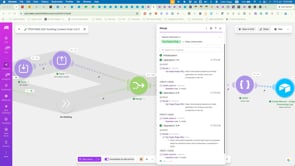
4 likes • Jul 4
@Aashiya Bi @Mohamed Jahar thanks. I did and I now I realize I only shared half the problem! I still have to have a downstream record id which means a new record needs to be created and populated BEFORE the iterator keeps going on 100s of upstream records. I’ve been out hiking and thinking about it all day! I’ll try another experiment and show you where I think I’m stuck.
Jul 1 •
🥳 June 2026 in Review!
Hello community, June was a month of growth, achievements, and inspiring milestones , made possible by the dedication, passion, and hard work of our incredible community. 🏆 Celebrating our top leaderboard champions who stood out this month with their consistency, dedication, and outstanding performance! 🥇 @Colin Clapp - $50 🥈 @Holger Peschke - $25 🥉 @Fahila K p - $15 ✨ Here’s a recap of the content and updates shared throughout last month: 🎥 Videos Released This Month: 1️⃣ New Video: We Automated Entire Shopify Store With Claude (No Code) 2️⃣ 5 Claude Skills You Must Have to Reduce Your Workload 3️⃣ Watch Claude Build Your Marketing Strategy | Claude Skills 4️⃣ I Tested GLM 5.2 vs Claude Opus 4.8 | My Honest Opinion 5️⃣ I tested Claude’s Fable 5 | Honest Review 6️⃣ New Video: I Built a Mobile App From 1-Star Reviews Using Claude (Full Tutorial) 7️⃣ AI-Drafted Email Replies in Your Own Voice (Claude + Gmail) 8️⃣ New Video: I Replaced Higgsfield with This FREE Claude Skill! 🚨 Other Updates: 1️⃣ Major Update for Anyone Doing B2B Prospecting with AI
2 likes • Jul 2
@Aashiya Bi @Mohamed Jahar @Nihal Ct @Nafih T @Adithya Cp @Shahna Tt @Gnaneshwari P Oh wow!!! Thank you everyone. Most unexpected once again! And congratulation @Holger Peschke and @Fahila K p Everyone here rocks. Watch out for my latest 'Ouch!'' Not as big as the last one but just as frustrating!!!
1-10 of 217
@colin-clapp-1624
Growth enabler behind the 'one-click' SEO/AEO/GEO philosophy: Systemised content optimization that compounds content ROI 🚀
Active 13h ago
Joined Apr 28, 2025
Powered by