Activity
Mon
Wed
Fri
Sun
Jul
Aug
Sep
Oct
Nov
Dec
Jan
Feb
Mar
Apr
May
What is this?
Less
More
Owned by Pakawat
Community สำหรับนักสร้าง นักแก้ปัญหา 🤖 เปลี่ยน AI ให้เป็นพนักงานของคุณ | ไม่ใช่แค่เรียนรู้ แต่ลงมือสร้าง Product · Workflow · Agent สำหรับใช้จริง
Memberships
Business Builders Club
8k members • $7/month
Free Skool Course
69k members • Free
Synthesizer: Free Skool Growth
42.3k members • Free
AI Automation Society
381.9k members • Free
Skoolers
184.6k members • Free
10 contributions to AI Automation Society

30d •
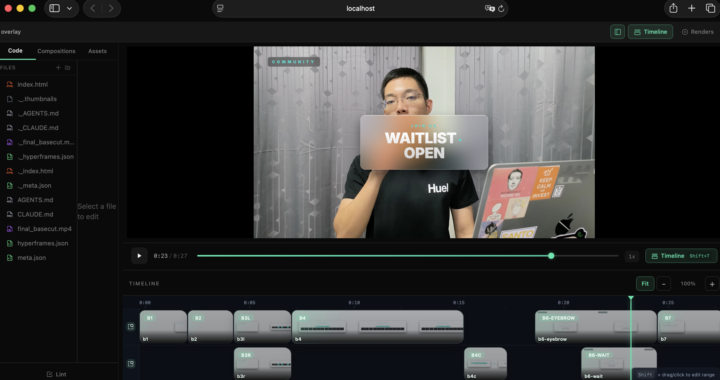
I implemented Claude Code + Hyperframes + Video Use on Claude Pro — here's what I actually learned (including what doesn't work yet)
Inspired by Nate's video, I tested the full workflow on a Thai-language video. Here's my honest breakdown: ⚠️ The session limit is the real constraint - Editing a ~3 minute raw file end-to-end (trimming dead air + mistakes + adding motion graphics down to a 20–30 sec final cut) used my entire Claude Pro session (5-hour reset) - So fully automating your editing pipeline on Pro isn't realistic right now — but you can still use it in parts, and the key benefit is: you let Claude Code handle the rendering while you go work on something else in parallel 🔧 Workarounds that actually help - Instead of having Claude combine the base video + motion graphics layer and render everything, tell it to export just the overlay. Then combine and render yourself. Saves significant time and tokens. I baked this into my own philosophy file so Claude asks me every time which mode I want. - If you're going back and forth on edits, specify the exact timestamp in seconds instead of describing the scene. This alone saves a lot of token usage. - The Hyperframes preview dashboard (npx hyperframes preview) crashed on me after a while on Safari — so my workaround was to do the final combine + export in CapCut instead. 📁 Beyond Nate's motion philosophy In addition to the motion philosophy from the student kit, you can create your own philosophy files for other parts of the workflow. I built: - TRIMMING_PHILOSOPHY.md — rules for how Claude should handle cuts, mistakes, dead air - RENDER_AND_EXPORT_PHILOSOPHY.md — rendering preferences and the "overlay only vs full render" decision Full template here if you want to start from it: https://github.com/captainp369/Claude-Video-Editing-Studio 🌏 Non-English editing is harder For anyone editing in a non-English language — even when ElevenLabs transcribes the script correctly, Claude needs more context to make the right cuts. Example: if you misspeak, adjust slightly, then say the line again — Claude might keep both versions. You'll need to tell it explicitly which is the mistake and which is the keeper. Factor in extra back-and-forth if you're not editing in English.

Jun '25 •
Automatic PDF creator
Hello all, I am looking for some initial thoughts on a situation I want to solve. I constantly need to put curated employment guides in PDFs. This is a very manual process. I want to find a way with N8N to generate these PDFs from within a template document I have. In essence the flow would be: 1. The user provides the data 2. Agent fills in the template 3. PDF is extracted A nice to have: A return message from the agent saying that a section is empty, to provide data to fill it in... Not sure how to achieve this. I thank you all for your guidance!
0 likes • 30d
a few approaches depending on how complex your template is: Easiest to set up in n8n:Google Docs template → PDF export. Create your template in Google Docs with {{placeholder}} syntax, use n8n's Google Docs node to fill the placeholders, then export via Google Drive API as PDF. Visual template editing, easy to maintain, no extra services needed. If output quality is critical (reports, formal documents):LaTeX is genuinely the best for this — consistent, precise, scales well with code. Write a .tex template with placeholders, fill via n8n Code node, compile with pdflatex. Steeper setup but the output is hard to beat. Worth it if you're generating a lot of these repeatedly. For the empty section check: Before the PDF generation step, add an n8n IF node that checks each required field — if any are empty, branch to a message response instead of generating. Something like: "Section X is missing — please provide [field name] to complete the guide." Easy to add and makes the flow feel much more polished. What does your current template look like — is it heavily formatted or mostly text/tables? That would help narrow down which approach fits best.

30d •
Anyone here struggling to get clients via cold email?
When getting AI automation clients via cold email, I feel like a lot of people blame their copy when things aren’t working. But a lot of the time… it’s the personalisation. I used to send emails that looked “personalised” on the surface, but it was all pretty generic. Everything sounded decent, but nothing actually stood out — so replies stayed low. Once I started putting a bit more thought into the research and making it actually specific to the person, everything improved. More replies, better conversations, and it didn’t feel forced. I put together a quick breakdown of how I approach personalisation now, mostly from the mistakes I made early on so you don’t end up sending emails that feel personalised but get ignored anyway. You can access the breakdown here, hope it helps!
1 like • 30d
Thanks for sharing this! I haven't done much cold email for the AI automation side yet, so this breakdown on doing personalization the right way is the perfect starting point for me.

30d •
🚨 URGENT: Claude Code is silently burning my session usage. Has anyone found a fix?
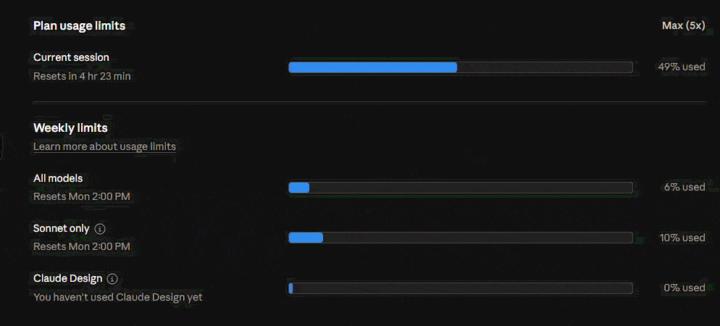
I’ve got a client call today and I’m effectively blocked because Claude Code is unusable right now. I’m on Max 5x. As you can see in the attached GIF, my current session usage was at 49% and a slow silent consumption keeps going on. So the issue doesn’t look like normal weekly exhaustion. It looks like something inside the current Claude Code session is burning context extremely fast. I’ve disconnected MCP servers, tried reducing background activity and waited for my weekly limits to reset, but the same issue keeps coming back. Even when I’m barely doing anything, the session usage climbs very quickly. I’m trying to work out whether this is caused by bloated claude.md files, duplicated project context, hidden MCP activity, background indexing, prompt injection or something else repeatedly loading into context. Has anyone built a practical way to audit what Claude Code is actually consuming? I’m not looking for generic advice like “wait for your limits to reset” or “upgrade the plan”. I need to understand what is consuming the tokens so I can fix the setup and get back to client work. Any transparent breakdown, diagnostic approach or tool/plugin idea would be really appreciated.
1 like • 30d
have you tried these? Quick audit first: - Run /context in your Claude Code session — shows token breakdown for the current conversation - Run /compact to compress conversation history before starting heavy work. Long sessions accumulate all previous tool outputs and file reads in context, and that compounds fast. Possible things to check in your setup: - CLAUDE.md size — every message reloads it. Check all levels (global ~/.claude/CLAUDE.md + any project-level ones). Run wc -l on each. Anything over ~300-400 lines is a significant passive load. - MCP tool descriptions — even with servers "disconnected", their tool schemas may still be loaded into context. Try launching with --no-mcp flag to baseline whether MCP is the source. - Tool call results staying in context — every bash output, file read, and search result accumulates. If you've had a long session with lots of file operations, that alone can explain the fast burn. not sure if these will fix it but hope it helps, good luck 🙏
0 likes • 30d
@David Barroso glad you found it! that background observer pattern is the problem — anything that watches sessions and auto-summarises is going to consume usage continuously whether you're prompting or not. the approach i use instead: plain markdown files that Claude only reads when you explicitly ask it to. no background process, no hooks, zero passive consumption. the tradeoff is it's manual — you tell Claude what to remember and when to recall it — but you have full control over when tokens get spent. the pattern is basically what Andrej Karpathy calls LLM Wiki — persistent markdown knowledge base that the agent reads on demand rather than observing in the background. if you want to go deep on it, nate made video about this. for lightweight memory without a full wiki, even just a well-structured CLAUDE.md with key context is enough for most projects — loads once per session, no continuous drain.

💎
⭐
Apr 27 •
🚀New Video: 32 Claude Code Hacks in 16 Mins
I went from complete beginner to mass-producing workflows, websites, and AI agents in real time. This video covers 32 Claude Code hacks I actually use, sorted from beginner to pro. The best ones are saved for the end
1 like • 30d
Thanks Nate, this is exactly what I needed. Skipping the trial-and-error phase and having these mapped out saves me hours of exploring.
1-10 of 10

@pakawat-piampatiparn-7148
AI Engineer | YouTube: Everyday with Captain | GoWANDR.today | Use AI to grow your business, save costs and free your time
Active 4d ago
Joined Mar 4, 2026
Powered by