Activity
Mon
Wed
Fri
Sun
Sep
Oct
Nov
Dec
Jan
Feb
Mar
Apr
May
Jun
Jul
What is this?
Less
More
Owned by Nisha
Women ages 40+ who are ready to have financial freedom, build wealth, financial confidence in your second act, without hustle culture or overwhelm.
Memberships
Skoolers
162.1k members • Free
2 contributions to Skool Extensions 🧩

🔥
May 21 •
Community Pins
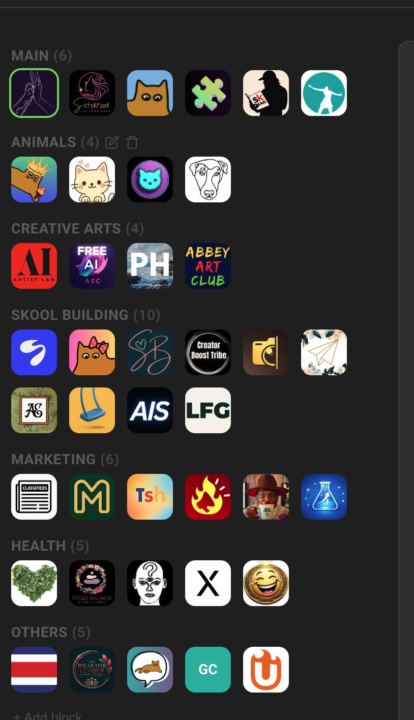
Replace Skool's left community switcher with a strip that holds every community you belong to, grouped into named blocks Skool's left sidebar only surfaces a handful of communities at a time — the rest sit behind a switcher dropdown you have to open every time. If you're active in a dozen or more, the ones you visit daily end up buried in a list you keep scrolling through. Community Pins replaces that switcher with a redesigned strip down the left edge that shows every community you belong to at once — your logos flow in rows across the space beside the page instead of one cramped column. Hover any community to see its name in a tooltip, and the one you're currently in is marked. Group your communities into named blocks. Add a block, head it "AI", "Clients", or whatever fits — each heading carries a live count of how many sit inside. A permanent "Pinned" block catches every community on its own: join a new one and it lands there, leave one and it drops out. Manage it all inline in the strip — "+ Block" adds one, the pencil renames a heading, and the trash icon removes a block (after a quick confirm) and drops its communities back into "Pinned". The "Pinned" block itself can be renamed but never deleted. Drag to organize. Reorder communities inside a block, pull one across to another block, or grab a block's heading to move whole blocks up and down. A custom mouse-driven drag tracks your cursor one-to-one, with no HTML5 ghost image or forbidden-drop flicker to get in the way. The strip scrolls quietly once the list grows long — a slim green scrollbar appears on hover and stays hidden otherwise, so the sidebar stays calm at rest. The whole arrangement is cloud-synced: lay your blocks out on one device and they show up the same on the next. Community Pins can be toggled in the Extension Settings under Appearance. --- Skools linken Community-Switcher durch einen Streifen ersetzen, der jede Community enthält, in der du bist, in benannten Blöcken organisiert Skools linke Sidebar zeigt immer nur eine Handvoll Communities auf einmal — der Rest steckt hinter einem Switcher-Dropdown, das du jedes Mal aufklappen musst. Wenn du in einem Dutzend oder mehr aktiv bist, sind die täglich besuchten in einer Liste vergraben, durch die du immer wieder scrollst.

🔥
4 likes • May 22
Thank you 😊
🔥
Mar 10 •
🧩 Skool Extensions starting
skool-extensions.com I’m officially releasing my Skool Extensions! 🥳 Install the extension, give me your feedback and ideas, and spread the word! --- Hiermit veröffentliche ich offiziell meine Skool Chrome Extension 🥳 Installier dir die Extension, geb mir Feedback und Ideen und erzählt es weiter.

🔥
4 likes • May 7
Going to check it out. Thanks
1-2 of 2

🔥
@nisha-jackson-4912
I Help women ages 40+ create financial freedom through multiple streams of income & keep more of the money they make by mastering personal finance.
Active 1h ago
Joined May 7, 2026
California
Powered by