Activity
Mon
Wed
Fri
Sun
Jul
Aug
Sep
Oct
Nov
Dec
Jan
Feb
Mar
Apr
May
Jun
What is this?
Less
More
Memberships
ChatGPT Users
12.7k members • Free
11 contributions to ChatGPT Users

Apr 30 •
Custom Instructions: the 5-minute setup that makes every ChatGPT chat better
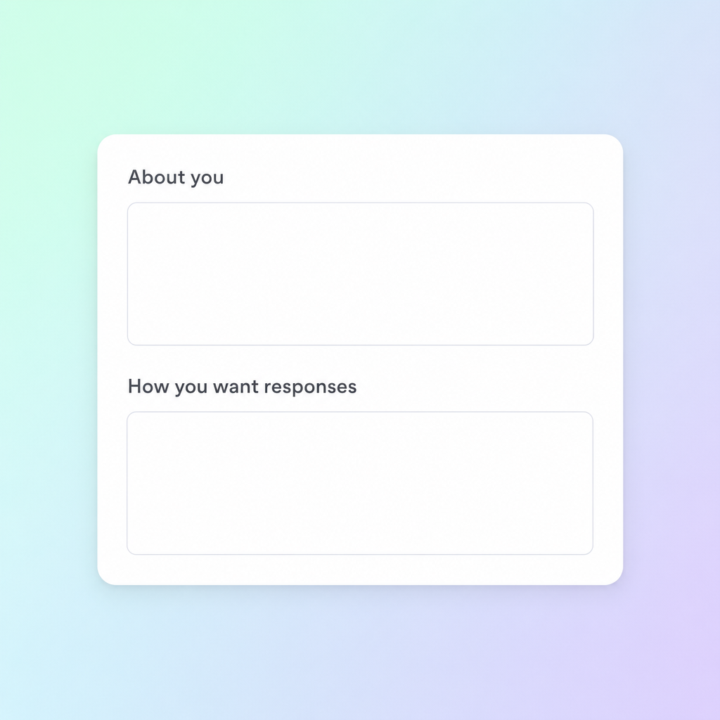
Most people open ChatGPT, fire off a prompt, get an OK answer, and move on. The thing that quietly separates the people getting incredible results from everyone else isn't a secret prompt — it's that they spent 5 minutes on Custom Instructions and never had to repeat themselves again. Custom Instructions sits in your settings. It's two text boxes ChatGPT reads silently before every reply, in every chat. Set it up once and the model already knows who you are and how you want to be answered. Here's the 5-minute setup that actually moves the needle: Box 1 — "What would you like ChatGPT to know about you?" Drop in three things: what you do, who you serve, and what you're working on right now. Example: "I run a SaaS business in customer support automation. My audience is small-business owners and marketing teams. I'm focused on growth and content right now." Skip hobbies and personal trivia — keep it work-focused. Box 2 — "How would you like ChatGPT to respond?" This is where most people leave money on the table. Tell it the tone, the format, and the things you don't want. Example: "Be direct and concise. Skip disclaimers and preambles. When I ask for copy, give me three variations. When I ask strategy questions, push back if my thinking is weak. Use plain English, not corporate-speak." Save it, open a new chat, ask the same question you've been asking for weeks. The difference is immediate. Two things to watch out for: don't stuff it with everything you can think of (the model weighs it heavier than you'd expect, and bloated instructions make answers worse not better), and revisit it every couple of months as your work shifts. What's in your Custom Instructions right now? Drop a line or two below — happy to suggest tweaks. Jason 🙌

4 likes • May 1
then there is also the format that should be used when running a complex task in 5.5. This is what works well. Finally, don't forget when using a ChatGPT Project, to setup your Project Instructions as they override all other custom instructions. Here is the format, which comes directly from OpenAI: Role: [what the model is and the job to be done] # Goal [user-visible outcome] # Success criteria [what must be true before the final answer] # Constraints [policy, safety, business, and evidence limits] # Output [length, sections, tone] # Stop rules [when to retry, fall back, abstain, ask, or stop] Here is an example of a well-formed prompt using this format: Role: You are an experienced writing coach, editor, and clarity reviewer. Your job is to help the user turn rough ideas into clear, polished, reader-friendly writing. You should improve structure, tighten wording, remove unnecessary complexity, and preserve the user’s intended meaning. # Goal Create a polished final version of the user’s draft that is clear, well organized, and appropriate for the intended audience. # Success criteria Before providing the final answer, make sure the response: 1. Preserves the user’s original meaning. 2. Improves clarity, flow, grammar, and structure. 3. Uses plain, direct language. 4. Matches the requested audience, purpose, and tone. 5. Removes filler, repetition, and vague wording. 6. Does not add unsupported claims or invented facts. 7. Flags any unclear points that need user confirmation. # Constraints Follow these limits: 1. Do not change the substance of the message unless the user asks for rewriting or improvement. 2. Do not invent names, dates, facts, numbers, sources, or commitments. 3. Do not make the writing sound overly formal, dramatic, or promotional. 4. Do not use jargon unless the audience clearly expects it. 5. If the draft contains sensitive, legal, financial, medical, or policy-related content, avoid giving authoritative advice unless supported by the user’s source material.
Apr 23 •
ChatGPT 5.5 is now live 👀
I’ve been digging into it today, and it’s definitely a noticeable step forward from 5.4 in a few key areas. GPT-5.5 is the strongest agentic coding model to date. On Terminal-Bench 2.0, which tests complex command-line workflows requiring planning, iteration, and tool coordination, it achieves a state-of-the-art accuracy of 82.7%. Here’s what stood out straight away: • Stronger reasoning and accuracy It feels more reliable when working through complex tasks, especially anything that involves multiple steps or deeper thinking. • Better at real-world work Writing, research, analysing data, structuring ideas… it just handles these more smoothly without needing as much back-and-forth. • Improved coding + technical help If you’re building apps, automations, or workflows, the responses feel cleaner and more usable first time. • More consistent outputs Less randomness, fewer weird replies, and generally more predictable results when you give it a clear prompt. • Handles larger context even better Great if you’re working with long documents, big prompts, or ongoing projects. What this actually means for us For most people here, it’s not about “new features”… it’s about getting better results faster. • Fewer prompt tweaks • More usable first drafts • Better outputs for clients • More reliable automations If you’re using ChatGPT daily for business, content, or building tools… this should make things noticeably smoother.

6 likes • Apr 23
must be rolling out in waves as I don't see it yet.
1 like • Apr 25
@Jason West this is also where I’ve found using projects really help. I first started using projects in Claude because originally ChatGPT projects where just a bunch of related conversations. But now that I see they added the ability to have sources in a project as well, it is fantastic
Apr 22 •
ChatGPT Image 2 is Here....Wow!
We’ve just had a pretty big update drop with ChatGPT Image 2… and it’s seriously impressive. I’ve been testing it over the last day, and the quality of the images it’s producing is on another level compared to what we’ve seen before. The detail, lighting, realism, and consistency are all noticeably better - no more gibberish text too! What stood out most for me: - Much more realistic faces and expressions - Better text handling inside images (still not perfect, but a big step forward) - More consistent styles across multiple images - Stronger understanding of prompts without needing loads of tweaking I’ve attached a bunch of examples to this post so you can see exactly what it’s capable of 👇 If you’re creating content, ads, thumbnails, product visuals, or even just experimenting… this is definitely worth spending some time with. 🤩 Curious to hear what you all think once you’ve tried it. Have you managed to get anything particularly good out of it yet that's going to be useful to your business? Cheers Jason 🙌
0 likes • Apr 25
@Jason West In the end, I decided to decline the role. But I had some fun back and forth with the recruiter before finally making the decision to decline.
1 like • Apr 25
@Breyden Taylor I’m working on a, I don’t know what I’d call it. I guess a thought exercise where I’m trying to get consistent images for chapters in an educational piece. I think the model did a great job with the cover and chapter one This was after it wrote the entire first book in the series with 19 chapters. Then when I pondered the idea of images it suggested images for each chapter, plus hero images. Then it really blew my mind when it created a 12 step image generation package. Nick, I created the production-ready package in the canvas as City Of Provision Image Generation Package. It includes: - Cover-first workflow - Visual style bible - Character continuity guide - Reusable master style block - Reusable negative prompt block - No-text cover prompt - Optional cover-with-text prompt - 19 chapter hero image prompts - Optional secondary image prompts - File naming convention - QC checklist
Dec '25 •
Your Year With ChatGPT
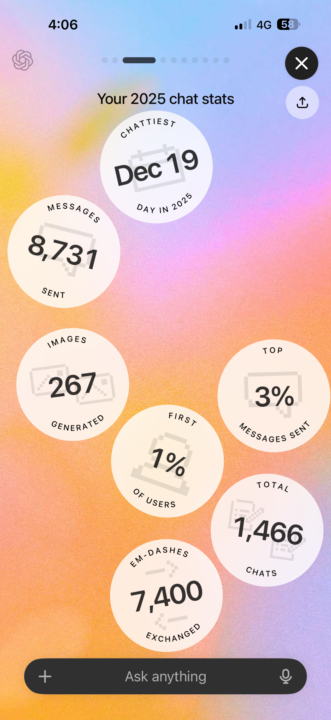
How did everyone get on with ChatGPT over the last year? I’ve attached my stats, looks like use it a lot 😄
5 likes • Dec '25
[attachment]
5 likes • Dec '25
@Kelly Stephens I'll see your 26.3K and raise you to 32.8K 🤣

Mar '23 •
Copy function in Chat GPT. Is there an easier way to copy responses?
I found a link that explains what the ChatGPT Prompt Strongbox is: https://chatgptpromptstrongbox.quora.com I haven't bought it, but it looks interesting, what I do is copy and paste the responses from ChatGPT to Word, but it seems to me that it is not very efficient if you make a lot of queries. In that case Prompt Strongbox can be useful.
4 likes • Apr '23
There is an easier way. Create a new bookmark in your browser. In the URL box, paste the text below and save it. Now whenever you want to export the contents of your entire session (just one conversation) click on the bookmark and it will put an HTML file in your downloads folder. From there you can print it out to PDF if you want, or just save it in a folder. javascript:(function() { try { const a = document.createElement('a'); const dom = document.querySelector('main > .flex-1 > .h-full .flex'); const template = document.createElement('template'); const title = document.title; template.innerHTML = dom.innerHTML; ['.items-end', 'img', 'svg', 'button', ':empty'].forEach(selector => { template.content.querySelectorAll(selector).forEach(node => { node.remove(); }); }); a.href = URL.createObjectURL(new Blob([`<!DOCTYPE html><html><head> <title>Chat GPT: ${title}</title> <meta name="generator" content="chatGPT Saving Bookmark"/><style>body { background-color: rgb(32,33,35); color: rgb(236,236,241); font-size: 16px; font-family: sans-serif; line-height: 28px; margin: -10px;}body > .w-full { padding: 30px;}/* prompt */body > .w-full:nth-child(2n+1) { background: rgb(52,53,65);}/* response */body > .w-full:nth-child(2n+2) { background: rgb(68,70,84);}a, a:visited { color: #7792cd;}pre { margin: 0 0 1em 0; display: inline-block; width: 100%;}pre code.hljs { margin-bottom: 1em; border-radius: 5px;}.whitespace-pre-wrap { white-space: pre-wrap;}.flex-col { max-width: 850px; margin: 0px auto;}</style><link rel="stylesheet" href="https://cdn.jsdelivr.net/gh/highlightjs/cdn-release@11.7.0/build/styles/default.min.css"/></head><body>${template.innerHTML}</body></html>%60], {type: 'text/html'})); const non_letters_re = /[^\p{L}\p{N}]+/gu; const trailing_dash_re = /(^-)|(-$)/g; a.download = title.toLowerCase() .replace(non_letters_re, "-") .replace(trailing_dash_re, '') + '.html'; document.body.appendChild(a); a.click(); document.body.removeChild(a); URL.revokeObjectURL(a.href); } catch(e) { alert(e.message); }})();
1-10 of 11

@nick-debarmore-4087
Just an average guy, working hard, playing harder. Here to learn more about ChatGPT and how it can make my life easier. would like to monetize it too
Active 54d ago
Joined Mar 21, 2023
Powered by