Activity
Mon
Wed
Fri
Sun
Sep
Oct
Nov
Dec
Jan
Feb
Mar
Apr
May
Jun
Jul
Aug
What is this?
Less
More
Owned by Monica
Free community for creators using AI to build digital products, simplify their systems, & stay ahead of how AI is changing. Next Event: Aug 17-21
Access your Redefining Mom® courses + connect with moms using AI to simplify routines, meal planning, and everyday life.
SkoolKit | Skool CRM Toolkit
455 members • $2/month
EverAds | Growth Boost Style
1.1k members • Free
AI Creative Studio
125 members • Free
📸 Photography by Cristal
204 members • Free
AI Lab
1.5k members • Free
The Heart-Centered Hive
67 members • Free
The Self-Taught AI Lab
558 members • Free
AI-Driven Business Community
8.5k members • Free
Aligned AF Community
205 members • $100,000/month
1 contribution to Skool Extensions 🧩

🔥
Mar 13 •
Bold Text Button
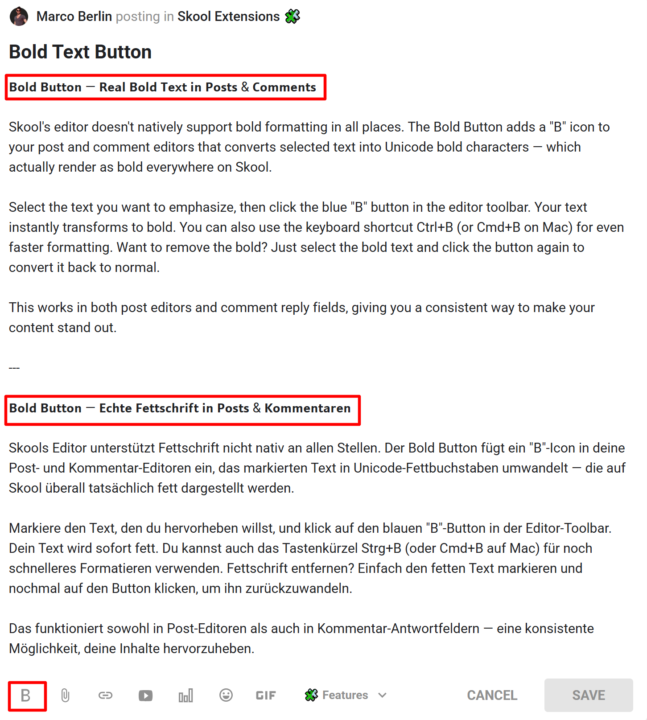
𝗕𝗼𝗹𝗱 𝗕𝘂𝘁𝘁𝗼𝗻 — 𝗥𝗲𝗮𝗹 𝗕𝗼𝗹𝗱 𝗧𝗲𝘅𝘁 𝗶𝗻 𝗣𝗼𝘀𝘁𝘀 & 𝗖𝗼𝗺𝗺𝗲𝗻𝘁𝘀 Skool's editor doesn't natively support bold formatting in all places. The Bold Button adds a "B" icon to your post and comment editors that converts selected text into Unicode bold characters — which actually render as bold everywhere on Skool. Select the text you want to emphasize, then click the blue "B" button in the editor toolbar. Your text instantly transforms to bold. You can also use the keyboard shortcut Ctrl+B (or Cmd+B on Mac) for even faster formatting. Want to remove the bold? Just select the bold text and click the button again to convert it back to normal. This works in both post editors and comment reply fields, giving you a consistent way to make your content stand out. --- 𝗕𝗼𝗹𝗱 𝗕𝘂𝘁𝘁𝗼𝗻 — 𝗘𝗰𝗵𝘁𝗲 𝗙𝗲𝘁𝘁𝘀𝗰𝗵𝗿𝗶𝗳𝘁 𝗶𝗻 𝗣𝗼𝘀𝘁𝘀 & 𝗞𝗼𝗺𝗺𝗲𝗻𝘁𝗮𝗿𝗲𝗻 Skools Editor unterstützt Fettschrift nicht nativ an allen Stellen. Der Bold Button fügt ein "B"-Icon in deine Post- und Kommentar-Editoren ein, das markierten Text in Unicode-Fettbuchstaben umwandelt — die auf Skool überall tatsächlich fett dargestellt werden. Markiere den Text, den du hervorheben willst, und klick auf den blauen "B"-Button in der Editor-Toolbar. Dein Text wird sofort fett. Du kannst auch das Tastenkürzel Strg+B (oder Cmd+B auf Mac) für noch schnelleres Formatieren verwenden. Fettschrift entfernen? Einfach den fetten Text markieren und nochmal auf den Button klicken, um ihn zurückzuwandeln. Das funktioniert sowohl in Post-Editoren als auch in Kommentar-Antwortfeldern — eine konsistente Möglichkeit, deine Inhalte hervorzuheben.

🍀
1 like • Jun 1
My bold function stopped appearing and I don't know how to get it back. Help?
🍀
1 like • Jun 1
@Marco Berlin thank you! Do I need to do something to get it to reappear after the update?
1-1 of 1

🍀
@monica-froese
I help content creators create high-converting digital products & build successful e-commerce shops with the help of AI. I also help moms with AI.
Online now
Joined Jun 1, 2026
Buffalo, NY
Powered by