Activity
Mon
Wed
Fri
Sun
Sep
Oct
Nov
Dec
Jan
Feb
Mar
Apr
May
Jun
Jul
What is this?
Less
More
Owned by Mona
A free community for coaches and consultants ready to grow their business, attract clients, master lead generation, and use AI systems.
A workshop and challenge community helping coaches and consultants attract high-ticket clients and work smarter using AI tools like Claude.
Memberships
3 contributions to Skool Extensions 🧩

Mar 30 •
Community Stream. Love it. Small request
This might not be a small request but I'd love to be able scan the posts and check or uncheck the ones I've read. I'd love to be able to got through posts I've read or posts I'd like to skip. Is that possible @Marco Berlin ? Also, another thing I noticed is that it shows me posts from months ago too. Is it supposed to be doing that?
1 like • Mar 31
@Marco Berlin Oooh! I didn't notice that before. A filter would be amazing. Regarding the 3 posts per community. Is it possible make it the 3 most recent posts. Some of them are really old and out of date. I'd love to be able to see them in chronological order. No big deal if not. It's very useful as is.
1 like • Apr 1
@Marco Berlin ooohh ok that makes sense now. So it bumping up old posts when someone makes a comment. Got it.

🔥
Mar 27 •
Community Stream
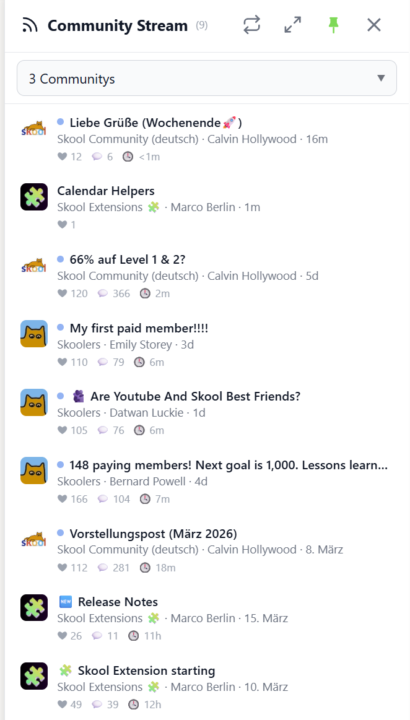
𝗖𝗼𝗺𝗺𝘂𝗻𝗶𝘁𝘆 𝗦𝘁𝗿𝗲𝗮𝗺 — 𝗔 𝗟𝗶𝘃𝗲 𝗙𝗲𝗲𝗱 𝗔𝗰𝗿𝗼𝘀𝘀 𝗔𝗹𝗹 𝗬𝗼𝘂𝗿 𝗖𝗼𝗺𝗺𝘂𝗻𝗶𝘁𝗶𝗲𝘀 Keeping up with multiple Skool communities means jumping between groups and scrolling through separate feeds. Community Stream brings it all together in one sidebar — a live feed of recent posts from your selected communities, right inside Skool. Click the stream icon in your toolbar to open the sidebar. Choose which communities to follow using the selector at the top — pick individual groups or select all at once. The stream shows the three most recent posts from each community, sorted by newest first. Every post displays the community icon, title, author, and a relative timestamp so you can see at a glance what's new and where. Unread posts are marked with a blue dot. Click any post to jump directly to it on Skool, and the dot disappears. The stream auto-refreshes every three minutes, but you can hit the sync button anytime for an instant update. A progress bar shows the refresh status as data loads from each community. Pin the sidebar to keep it open while you browse, or let it close automatically when you click elsewhere. For a bigger view, expand the stream into a full-screen popup. Your community selection and read status are saved across sessions, and cached posts load instantly when you reopen the sidebar. Community Stream can be toggled on or off in the Tools section of the Toolkit Settings. --- 𝗖𝗼𝗺𝗺𝘂𝗻𝗶𝘁𝘆 𝗦𝘁𝗿𝗲𝗮𝗺 — 𝗘𝗶𝗻 𝗟𝗶𝘃𝗲-𝗙𝗲𝗲𝗱 ü𝗯𝗲𝗿 𝗮𝗹𝗹𝗲 𝗱𝗲𝗶𝗻𝗲 𝗖𝗼𝗺𝗺𝘂𝗻𝗶𝘁𝗶𝗲𝘀 Mit mehreren Skool-Communities Schritt zu halten bedeutet, ständig zwischen Gruppen zu wechseln und separate Feeds durchzuscrollen. Der Community Stream bringt alles in einer Sidebar zusammen — ein Live-Feed der neuesten Posts aus deinen ausgewählten Communities, direkt in Skool. Klicke auf das Stream-Icon in deiner Toolbar, um die Sidebar zu öffnen. Wähle über den Selektor oben aus, welchen Communities du folgen möchtest — einzelne Gruppen auswählen oder alle auf einmal. Der Stream zeigt die drei neuesten Posts jeder Community, sortiert nach Aktualität. Jeder Post zeigt das Community-Icon, den Titel, den Autor und einen relativen Zeitstempel — so siehst du auf einen Blick, was neu ist und wo.
7 likes • Mar 27
Total game changer! This will help us stay up to day with communities without having to have notifications on!!! Love it! Might be the best feature yet!
Mar 24 •
Skool cat bug
I have Skool cat turned off but it keeps prompting search to do the "Let there be cat" or "shoo cat" without me prompting. I tested to make sure it's this extension by turning it off. I just turned it back on and it did it again.
1 like • Mar 24
@Shannon Boyer oh strange.
2 likes • Mar 25
@Marco Berlin sure thing! Thank you!
1-3 of 3

@mona
I help established coaches replace chaos and self-doubt with clear strategy, smart systems, and sustainable growth. Business Coach & Strategist
Online now
Joined Mar 21, 2026
Powered by