Activity
Mon
Wed
Fri
Sun
Jan
Feb
Mar
Apr
May
Jun
Jul
Aug
Sep
Oct
Nov
Dec
What is this?
Less
More
Memberships
University of Code
5.3k members • Free
9 contributions to University of Code

Mar 13 •
Little help with a simple streamText div in a client component
Hi, To leverage the power of the community I was wondering if anyone could help me out with setting up a simple streamText component to show some generated text on a page with the Vercel AI SDK. Right now I have created a NextJS app and installed the Google AI SDK and AI package. And I'm trying to show some streamed text on the homepage. Diving in the docs I see an example that uses a separate API Route file to make this happen but I wonder if you can just stream text without it as well? I created a simple generated text div that works and shows some result of the prompt without the need for this API route file. I wonder now, just for the sake of learning, if I can show a streaming text as well. Here's the generatedText component code. How would one replace the generateText function with the streamFunction? import { generateText } from "ai"; import { google } from "@ai-sdk/google"; async function Home() { const result = await generateText({ model: google("models/gemini-2.0-flash-exp"), system: "you like to keep answers short", prompt: "What is love?", }); return ( <main className="h-screen flex flex-col justify-center px-16"> <div className="text-center">{result.text}</div> </main> ); } export default Home;
0 likes • Mar 13
Hey Mark, thanks for your reply! I think I understand what you did here. I don't see the streamed text though unfortunately. I know the ai sdk docs say you can use a useCompletion hook for this but I was wondering if there was a simpler way just to get the result since the generateText function worked very simple. Still figuring this out.

Mar 1 •
Thats a WRAP!!!
The 5 DAY AI AGENT SAAS CHALLENGE is finished! 🚀A huge congratulations to all the winners! What an awesome incredible experience it was!!! P.S. We have a post CHALLENGE-SALE running at www.papareact.com/course right now! (Go save up to 50% off!)

2 likes • Mar 2
Congrats to the winners and thanks Sonny for taking the time!

Feb 27 •
HELP: Schematic: Unable to load portal component.
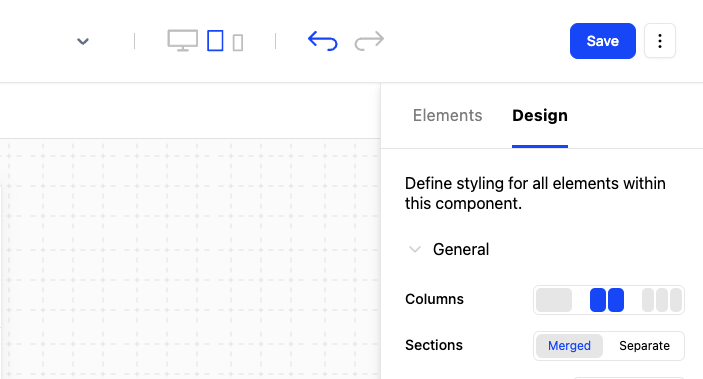
Background: 1. client Unable to load schematic component. Component_id: cmpn_VXtBKVZ7ndm Network Tab : Show 404 Link: https://api.schematichq.com/components/cmpn_VXtBKVZ7ndm/hydrate 1. schematic portal Component Save Button.(does not have publish) [Screenshot attached] any suggestion on this ? @Ryan Echternacht
0 likes • Mar 1
I'm only seeing the change plan button, not the actual indication of which plan the user is on or the billing part.. using the sample data. Not sure what's going wrong.
Feb 28 •
Blank screen after deployment to Vercel and using legacy peer dependencies
Hi, I'm trying to deploy my app to Vercel and while it successfully deployed Im getting a blank screen. The first time deploying I got an error for the latest version of Clerk not being compatible with NextJS Canary, so I installed NextJS 15. Then I got an error that NextJS itself wasn't compatible with React 19 so also used legacy dependencies on that. Then it successfully deployed without errors. However it doesn't show the app yet for some reason.. Anyone an idea?
0 likes • Feb 28
@Brendan Sick hmm ok, but that wouldnt explain my local blank screen.. bit brainfried for today so I think I'll try again tomorrow.
2 likes • Mar 1
Found it! There was a syntax error in the SchematicWrapped component. Found it with GitHub Copilot going down each file one by one, for anyone who's encountering an issue and you got no clue where it is. I couldn't keep up with the videos unfortunately as Im not that experienced yet (it's going too fast for me) but Im determined to finish this build! Hope to show it soon!
Feb 27 •
Tailwind issue because of Nextjs Canary compatibility with Clerk..
Im having issues where I dont see any tailwind config file and having trouble reinstalling it because of an incompatibility of NextJS Canary with Clerk. This is the error Im getting.. Is no configfile a problem or what should I do? npm warn using --force Recommended protections disabled. npm warn ERESOLVE overriding peer dependency npm warn While resolving: @clerk/nextjs@6.12.0 npm warn Found: next@15.2.0-canary.76 npm warn node_modules/next npm warn next@"15.2.0-canary.76" from the root project npm warn npm warn Could not resolve dependency: npm warn peer next@"^13.5.4 || ^14.0.3 || ^15.0.0" from @clerk/nextjs@6.12.0 npm warn node_modules/@clerk/nextjs npm warn @clerk/nextjs@"^6.12.0" from the root project npm warn npm warn Conflicting peer dependency: next@15.2.0 npm warn node_modules/next npm warn peer next@"^13.5.4 || ^14.0.3 || ^15.0.0" from @clerk/nextjs@6.12.0 npm warn node_modules/@clerk/nextjs npm warn @clerk/nextjs@"^6.12.0" from the root project
0 likes • Feb 27
Thanks for the help guys! I see I have tailwind v4 installed and I'm able to use it. I was used to seeing a tailwind config file in other projects but I guess that's not necessary. At least I can proceed.
1-9 of 9