Activity
Mon
Wed
Fri
Sun
Jul
Aug
Sep
Oct
Nov
Dec
Jan
Feb
Mar
Apr
May
Jun
What is this?
Less
More
Memberships
Cold Email Accelerator
946 members • Free
DM Sales For Service Providers
1.8k members • Free
Cold Outreach Academy™
662 members • Free
ScaledMail - B2B Cold Email
536 members • Free
Lead Gen Secrets
23.7k members • Free
Unlimited Cold Email Data
8 members • Free
Frostmailer Accelerator
700 members • Free
4 contributions to ScaledMail - B2B Cold Email

25d •
How I Sent 60,000 Cold Emails in April as a Complete Newbie (and Scaled It Profitably)
Hey ScaledMail community! 👋 I run a B2B SaaS that helps companies appear in ChatGPT and other AI answers. With CPMs rising on paid channels, we turned to cold email starting in November. Cold email has quickly become one of our most important acquisition channels. I knew nothing about cold outreach when I started. I learned a lot along the way (including plenty of mistakes), so here’s everything I wish I had known from day one. Part 1: Technical Setup Domain Strategy - Buy dedicated domains just for email campaigns — never ever use your main company domain. - Set up DNS records immediately: SPF, DKIM, and DMARC. - Use Google Workspace or Microsoft 365 for better deliverability (roughly $4–6 per account per month). Email Account Setup - Create 1–4 email accounts per domain. - Start slow: 10 emails per account per day, then increase volume by ~10% each day. - Max once warmed up: ~25 emails per account per day. - Example: 4 domains × 3 accounts × 25 emails = 300 emails/day to begin with. IMPORTANT: Always warm up accounts for at least 14 days before ramping up. Extra tips that help a lot: - Add real profile photos and complete the accounts. - Older domains tend to perform better when you can get them. - Set up a custom tracking domain for accurate open/click data. Choosing Your Sending Platform The ScaledMail platform is pretty good thanks to its campaign sequencing, deliverability focus, analytics, and the real-world insights shared by other operators who are actively scaling. It’s genuinely one of the strongest environments for cold email right now. I’ve also run high-volume campaigns successfully with Instantly.ai, which complements tools like ScaledMail nicely depending on your workflow and volume. A lot of top performers use a combination of platforms and simply play to each tool’s strengths. Test what fits your process best (I know people using 3 different outreach platforms each for a specific purpose).

1 like • 3d
@Jason Bean Fair question. It's sourced and verified through our own process — we're not reselling scraped lists or static databases. When someone requests a list, we pull current data matching their criteria (job titles, industry, location, etc.) and run it through verification before it goes out, so it's fresh rather than sitting in a database for months. That's also why turnaround is roughly an hour rather than instant — there's an actual verification step happening.
0 likes • 3d
@Jason Bean We license a mix of databases, similar to what Apollo pulls from — the difference is we verify and refresh before anything goes out, rather than handing over whatever's sitting in the database. We're actually still early with this as a standalone offer, so the group's a bit of a founding cohort right now. Since you've clearly got a good eye for this stuff, want me to run you a free sample list so you can see the quality for yourself?

Mar 11 •
Cut your List Building Costs by Thousands of $ Per Month with RevyOps + Clay (Our Exact List Building Template)
Just posted a new video resource on how you can cut your list building costs by thousands of $$ per month by implementing RevyOps and Clay. When you're sending hundreds of thousands of emails a month, you're paying to enrich the same leads over and over. In this video I walk you through the exact Clay workbook template and RevyOps setup we use to eliminate that waste. What's covered in the video: - Central database logic - Every lead you enrich gets stored in RevyOps so you never pay twice to enrich the same contact or company across campaigns. - 8-table Clay workbook - Covers company enrichment, qualification, contact sourcing (AI Ark + Clay), email waterfall enrichment, company-level personalization, and final push to your sequencer. - Duplicate suppression - Automatically checks whether a contact or company has been reached out to in the last 60-90 days before spending any credits, at both the company and contact level. - Smart email enrichment - Compares RevyOps data against live source data to detect job changes, then decides whether to reuse, verify, or re-enrich the email address from scratch. - GTM Engineer efficiency - 95% of list building tasks are pre-built into the template. Our team members duplicate it, customize for the campaign, and go. Affiliate links for the tools used: Get RevyOps Here Get AI Ark Here Let me know if you have any feedback! Happy to answers any questions you might have And if you're a Premium Member, remember to hop on the Cold Email Q&A call today, March 11th at 11:30am Eastern. See you there!

0 likes • 5d
The dedup-before-enrich point is underrated. Most people don't realize how often they're paying to re-verify or re-enrich the same contact across different campaigns. A rolling check on whether someone's actually changed roles recently would save a lot of wasted spend versus refreshing the whole list on a schedule.

Mar 24 •
Is this an ESP matching issue or a deliverability issue?
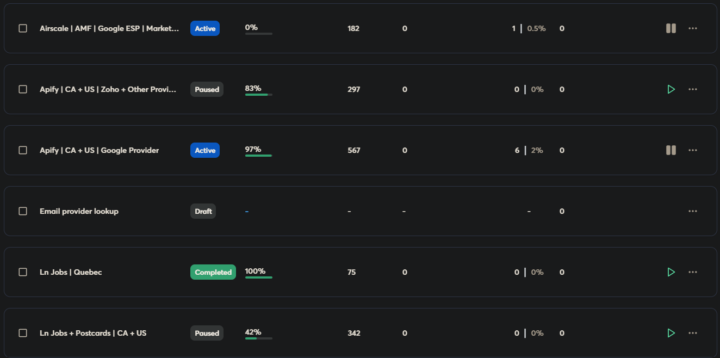
I purchased Google inboxes from Zapmail — they handled all the setup and connections. I let them warm up for a full month to be safe. When I started using them in campaigns last week, I got zero replies. I dug into my lead list and realized most of my prospects are on Microsoft providers, which makes sense since I'm targeting enterprise. I came back to the ScaledMail course and figured I should run a deliverability check. Here are the results: https://spamchecker.mailreach.co/tests/7b8a1b8a3e1ecf18778e02 What I can't wrap my head around is how inboxes set up by specialists, warmed for a month, can perform this badly on a spam test. I've only been sending for four days and under 20 emails per inbox — I couldn't have tanked the reputation that quickly. Could I? Since we paid a significant amount for these inboxes, I wanted to isolate the variable and test by ESP. So I ran the same copy through Google ESPs instead — and that campaign pulled a 2% reply rate (All negative). I've attached a copy example if you're curious. And on the targeting front: the first campaign (zero replies) was hyper-targeted. We scraped LinkedIn job postings and even sent physical postcards to those leads beforehand, so targeting isn't the issue. Where I'm stuck: I can't pinpoint whether this is a Zapmail setup problem, something I did, or purely an ESP matching issue — but I need to find a way forward. Has anyone run into something similar? Happy to answer any questions about the setup.
0 likes • 5d
Good instinct separating this into pieces instead of blaming the list outright. From what I've seen, when reply rates hold up on one ESP and drop on another, it's rarely the data — it's usually how that provider's infrastructure is being read on the receiving end. Worth testing the same exact list segment through a different sending setup before changing anything on the data side.

7d •
Built a Python pipeline that enriches local leads with live IG/FB pages and verified emails. Free 100 Detroit Sample inside.
Hey everyone, I got tired of buying generic B2B databases that are full of dead websites, missing social links, and 40% email bounce rates. To solve this, I spent the last few weeks building a custom Python script that takes raw location inputs, cross-references active digital footprints, and extracts clean data. To prove the pipeline works, I just ran a clean script for Detroit, MI and filtered out all the rows missing core contact info. Here is a completely free, unrestricted sample of ~100 deeply enriched local companies split across: 🛡️ Security & IT Services 🎨 Design & Creative Studios 👕 Retail & Apparel Brands 🚗 Automotive Services & Hospitality Every single row includes: Business Name, Website, Phone, Verified Email, and direct links to their active Facebook or Instagram pages so you can run multi-touch cold email + social DM sequences. 👉 https://docs.google.com/spreadsheets/d/1L5ygv7O5A_qNhD00fZjiXGap8OlF_54d_BXEXLcycRI/edit?usp=sharing Looking for feedback: If you are an agency owner or lead-gen rep, take a look at the data quality and let me know what you think. P.S. If you want a custom list engineered specifically for your agency's target niche and city, drop a comment below
0 likes • 5d
This tracks with what I see a lot — most "verified" lists aren't actually wrong, they're just stale by the time they reach you. The website-status check is a smart filter. We run something similar on our end before anything goes out the door, and it's usually the difference between a list that performs and one that just looks complete on paper.
1-4 of 4

@michael-palma-5028
Get Unlimited B2B Email Data For $99/Month → skool.com/unlimiteddata
Active 2d ago
Joined Jun 5, 2026
Powered by