Activity
Mon
Wed
Fri
Sun
Aug
Sep
Oct
Nov
Dec
Jan
Feb
Mar
Apr
May
Jun
Jul
What is this?
Less
More
Memberships
Pinterest Skool
5.5k members • $7/month
AI Workshop Lite
36.6k members • Free
Business Builders Club
8k members • $33/month
Cold Email Accelerator
971 members • Free
AI Bits and Pieces
807 members • Free
AI Automation Society Plus
3.8k members • $99/month
AI Automation Society
422.6k members • Free
22 contributions to AI Bits and Pieces

🔥
May 31 •
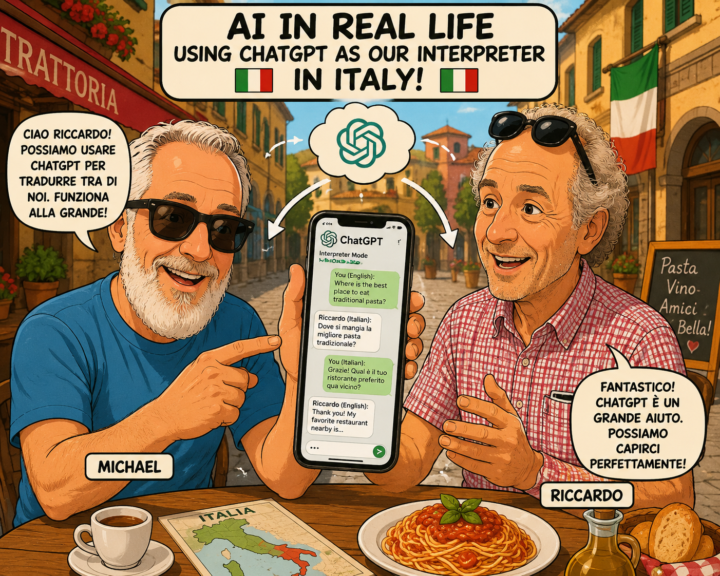
AI in Real Life: ChatGPT Became Our Family Interpreter 🇮🇹
One of the most unexpected uses of AI during our trip to Italy wasn’t coding, content creation, or business strategy. It was family. My wife’s cousin, Riccardo, speaks Italian. I speak English. Other family members fall somewhere in between. Some speak only Italian. Some speak a little English. Some know just enough of the other language to get by. After arriving in Italy, I realized ChatGPT could help. So I created a simple custom instruction: “We are visiting Italy and do not speak Italian fluently and need a translator. If you hear someone speaking English, translate to Italian. If you hear someone speaking Italian, translate to English.” That was it. Then I opened Voice Mode. I would speak English. ChatGPT would translate it into Italian. Riccardo would respond in Italian. ChatGPT would translate it back into English. Suddenly, more people could participate. Stories were shared. Family history was discussed. Jokes landed. Questions about ancestors and life in Italy were answered more clearly. It was not perfect. In poor cell areas, it struggled. When we hit Voice Mode limits, the translation stopped. Sometimes the flow broke. But even with those limitations, the overall experience was a huge net plus. The other unexpected benefit was context. Every conversation started in a different chat. But after a few days, ChatGPT had helped capture enough context around our family ancestry, our kids’ life journeys, family relationships, and stories from Italy that each conversation became more meaningful. After one conversation, I was even able to create a family tree. That was amazing. It was not just translating words. It was helping preserve the story. The result was not seamless technology. It was practical connection. In a small mountain town in Italy, surrounded by family, history, great food, and generations of stories, ChatGPT helped bridge a language gap that had existed for years. When people talk about AI, they often focus on productivity, automation, coding, or business transformation.

1 like • Jun 6
simple but powerful use @Michael Wacht
🔥
May 17 •
🇮🇹 Off to Milan, Italy for Europe’s Largest AI Conference
Over the next several days, I’ll be attending an AI conference in Milan, Italy — spending time listening, learning, testing ideas, and having conversations with people building at the edge of where this technology is heading. ✈️ I’ll still work to maintain content and keep things moving inside AI Bits & Pieces, but this trip is also an important reminder of something: Sometimes the highest-value thing you can do is to stop, observe, listen carefully, and consider other perspectives. The AI space is moving fast. ⚡ New tools. ⚡ New workflows. ⚡ New business models. ⚡ New assumptions being challenged almost weekly. And while online content is useful, there’s still tremendous value in getting into rooms with operators, builders, founders, developers, and enterprise leaders to hear what is actually working in the real world. 🎯 My goal is simple: ✅ Come back with insights worth sharing. ❌ Not hype. ❌ Not recycled headlines. ❌ Not “AI influencer” noise. Real observations. Real workflows. Real opportunities. Real AI lessons. 🙏 Appreciate everyone here who continues to contribute, ask questions, experiment, and help make this community valuable. Now it’s time for me to go learn a few new things. 🇮🇹
2 likes • May 17
Awesome @Michael Wacht Cant wait to hear from you when you are back!
🔥
Apr 26 •
📦 Out of The Box in 90: Suno Turns My Poem Into AI Song for Daughter
Welcome to the Out of The Box Series — where I test how far curiosity and AI can take you in 30, 60, or 90 minutes using today’s best no-code and low-code tools. No studio. No production team. No advance training. Just exploration to see what we can do — right out of the box. 🎧 Finished Song*: I Got Your Six Little Girl 🎬 This Episode: Suno.com – AI Song Creation 🕒 Time Limit: 90 Minutes 📂 Category: AI Music & Personal Creativity 🎶 What Is Suno? Suno is an AI music generation tool that can create songs from prompts, lyrics, and style direction. In this case, Suno did the musical composition. I uploaded my original lyrics. 🎧 Finished Song*: I Got Your Six Little Girl Because rights and ownership matter, I started with lyrics I had written myself and kept the words original. With Suno Pro, you can publish what you create, so I wanted to be thoughtful about what I uploaded and refined. 📝 Backstory In February 2020, I wrote a poem for my daughter called I Got Your Six Little Girl. It was written from the perspective of a father looking back on all the firsts: - first heartbeat - first breath - first steps - first bike ride and moments in between The poem was already written. But I cannot sing. I cannot play instruments very well. I was never in the band. So I wanted to see if I could use AI to help turn the poem into a song to give her as a graduation present. ⏳ What I Built in 90 Minutes: Within one focused session, I: 🎼 Uploaded my original lyrics into Suno 📝 Converted the poem format into a song lyric format 🎚️ Used Suno’s interface presets to guide the style 🔁 Generated multiple versions 🎧 Listened for tempo, transitions, hooks, and continuity 🎵 Created a strong working version of the song 🎧 Finished Song*: I Got Your Six Little Girl The prompt was less of a traditional instruction and more of a music style descriptor.

2 likes • Apr 27
@Michael Wacht That was extra ordinary!! I really liked the song!!
🔥
Apr 18 •
AI in Real Life: So Many AI Tools, So Little Time — Here Is What They All Have in Common
I was commenting on a great question posed by @Girish Mohan, and I found myself thinking about it long after I responded.🤔 That reflection led to this post about the future of AI in a practical, real-world sense. The essence of the question: Is there a risk in becoming too dependent on one AI company, product, or tool set? I thought that was a smart question, because there is some real tension there. At this early stage of AI adoption, there is always a risk in overcommitting too soon. We have seen this before. During the eCommerce boom, a lot of companies looked like they were going to dominate, and many of them did not last. Early markets move fast. Leaders change. Sometimes you pick the wrong horse. 🐎 At the same time, over-diversifying creates its own problem. If you keep jumping from one tool to the next, you can lose the benefit of synergy. Some tools work better together. 🔗 Gemini and NotebookLM are a good example. When tools are designed to complement each other, the combined value can be better than chasing ten separate platforms that do similar things. There is also a practical reality that matters. One person cannot learn every AI tool coming to market. There are too many. At some point, each of us has to decide where we want depth, where we want breadth, and what kind of workflows actually fit the way we work. 🎯 That means some specialization is going to matter. People will need to find their niche instead of trying to master everything. But for me, the bigger point sits above all of that. We are moving into a very different communication model. 1) AI is shifting toward natural language. 2) More of the work will be handled through machine-to-machine interaction at machine speed, 3) All this be done without the user interface we think of today. 🛍️ My shopping AI may eventually interact with a retailer’s concierge AI. 🤖 Your scheduling assistant may work directly with mine. 🔄 Business systems will increasingly pass tasks, context, and decisions across platforms without the same kind of manual navigation we deal with today.

2 likes • Apr 18
quite true @Michael Wacht! Thanks for sharing
🔥
Apr 10 •
🎉Celebrating 600 Members and Growing!
We just crossed 600 members in AI Bits & Pieces. Consistent growth from day one, fueled by people trying to understand what AI actually means for their work and day-to-day life—and how it can help them stand out in the workforce, business environment, or executive ranks. That’s been the goal from the start. A place for: 🔵 AI Curious — figuring out what this all is 🟢 AI Enthusiasts — using it regularly 🟠 AI Practitioners — applying it to real work 🟣 Enterprise — thinking about scale across teams What’s been interesting isn’t just the number—it’s the mix of people and the conversations starting to take shape. Members are building small things. Members are asking in-depth questions. And members are starting to connect the dots between tools and outcomes. A special shoutout to each and every member, and the people who have supported me from the beginning: @Michele Wacht @Dena Dion @Debra Schmitt @Patti Hoekstra @Mark Zayec @Matthew Sutherland @Jason Hagen @Usman Mohammed @Nick Mohler @Eduard Friesen We have some exciting updates and new offerings for the community designed to help you win the AI game in life, at work, as a business owner, or as an agency. A heartfelt thank you. Michael

2 likes • Apr 10
Congratulations @Michael Wacht !!
1-10 of 22

Active 2h ago
Joined Nov 21, 2025
saskatoon
Powered by