Activity
Mon
Wed
Fri
Sun
Oct
Nov
Dec
Jan
Feb
Mar
Apr
May
Jun
Jul
Aug
Sep
What is this?
Less
More
Organic Supremacy Lite
60 members • Free
Trade Launch
3.3k members • Free
The Paid Ads Boardroom
20.4k members • Free
GoHighLevel w/ Robb Bailey
13.6k members • Free
The HighLevel™ Launchpad
959 members • Free
AI SEO | Rank & Rent Lead Gen
5.7k members • Free
Local AI Agency Accelerator
4.4k members • $27/month
CEO Lab (Marketer School)
1.3k members • $197/month
Pay Per Call Academy
1.9k members • Free
5 contributions to Local Lead Labs

Feb '25 •
Help w/Evident for Business verification
I’m a little confused and would appreciate some help. I’m a bit confused about the Business Verification and Background Check process. When I click the ‘Go to Evident’ button in my MCC account, it asks me to sign in with Google. Is it okay to use my Google account for this step? Even though I’m doing the Business verification process on behalf of my client Also, on the next page, where it asks for the Employee and Business Owner email addresses, my Google account appears at the top (see picture). Will both my email and the ones I enter in those fields receive a background check request? Or will it only be sent to the emails entered in the Employee and Business Owner fields? When I called into LSA help desk he didn’t sound too sure of himself and said when I click on the “Go to Evident” button, that I need to be signed in with my clients email address (which makes no sense.) They’re not going to just give me their email password. Then he said you might have to just do it with him on a zoom call. Surely there’s got to be a better way. I consulted with chat GPT and it said I was ok to sign in with my gmail and as long as I put my clients email under the business owner email address, that I should be fine
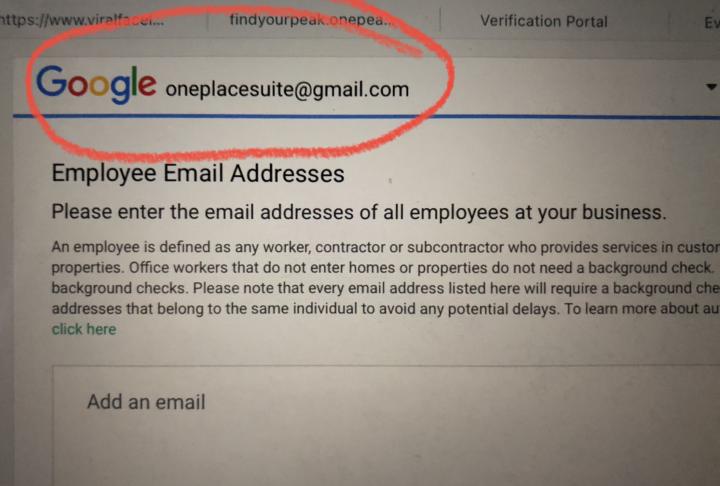
0 likes • Feb '25
Here’s what chat GPT said: 1. Signing in with Your Google Account on Evident • Yes, it is okay to use your Google account to sign in when clicking the ‘Go to Evident’ button. This is simply to authenticate your access and does not mean you are the one undergoing the background check. • Your role here is as an agency managing the account, so signing in allows you to proceed with verification on behalf of your client. 2. Who Receives the Background Check Request? • When you reach the step asking for the Employee and Business Owner email addresses, these are the emails of the individuals who will actually undergo the background check (e.g., the business owner and potentially employees providing services). • Your Google account appearing at the top does not mean you will be background checked. It’s just showing the account currently signed in to Evident. • Only the email addresses entered in the Employee and Business Owner fields will receive the background check request. Your agency’s email will not be included unless you enter it in those fields. Additional Notes: • Business Owner Check: The owner (or authorized representative) must complete a criminal background check as part of Google’s requirements. • Employee Check (if applicable): In certain industries (like locksmiths, electricians, etc.), employees may also need a background check. • Business Verification: You’ll need to submit the business registration details, insurance, and licensing (if applicable) to pass verification. If your agency is managing multiple clients’ LSAs, make sure you’re logged into the correct MCC sub-account before proceeding with verification.
0 likes • Feb '25
@Roxanne Escolano electrician. I just followed what chat GPT said and used my own gmail when clicking on the blue Evident button, and then put in my clients email address and it seemed to work ok. I just wanted to confirm I was doing it correctly though.
Feb '25 •
LSA Messaging
Does anyone know, when you message someone on a LSA ad, (where it says Message next to Call) does that call as a ‘Call’ or lead? Like if someone were to call you and you’d be charged. Or is messaging a different charge? (If so, what does that cost typically? Is it half of a typical lead charge)
1 like • Feb '25
@Roxanne Escolano by text, do you mean the message they text on the LSA ad will go directly to the business owners cell phone and can respond there? Or does that go somewhere else?
0 likes • Feb '25
@Bryan Gordon got it, thank you

Feb '25 •
LSA and GHL integration?
Is anyone integrating their LSA into Go High level? What exactly can it do inside of GHL or what are the benefits? Thank you
2 likes • Feb '25
@Ryan Steinolfson aside from the ai voice, what exactly does your app do with LSA? Does it respond to the messages or emails that come from the LSA ad in the SERPS? And is there pricing available or does one have to book a call for that info?
1 like • Feb '25
@Ryan Steinolfson that sounds awesome. And yes please have her send it over. And what time Monday and Wednesday? If I’m available I’ll definitely try to join

Jan '25 •
🚨 Advertiser Verification for LSA: Have You Completed Yours? 🚨
Hey everyone! 👋 Google's Advertiser Verification for Local Services Ads (LSA) is a game-changer for certain industries. It adds credibility, builds trust, and helps reduce fraudulent activity. 🔍 What is it? It’s an extra layer of verification required for some industries. 📢 Why does it matter? ✅ Boosts trust with potential clients ✅ Ensures compliance with Google's policies ✅ Reduces spam and fraudulent listings 🚀 Question for you: 👉 Have you completed your Advanced Verification yet? 👉 If so, how was your experience? Any tips for those who haven’t? 👉 If not, what’s stopping you from getting it done? Drop your thoughts below! Let’s help each other out! 👇💬
0 likes • Feb '25
Where do you go to get this?
0 likes • Feb '25
@Roxanne Escolano thank you
Feb '25 •
MCC for LSA question
Maybe someone can assist me with this question. To get a MCC for LSA, do you just make a MCC account with a traditional Google PPC ads MCC account and then use the same email from that to log into the LSA log in page? (And your Google ads (PPC) MCC account transfers over to LSA MCC) Or is there a different MCC account process for LSA? Thank you in advance
1-5 of 5