Activity
Mon
Wed
Fri
Sun
Jun
Jul
Aug
Sep
Oct
Nov
Dec
Jan
Feb
Mar
Apr
What is this?
Less
More
Memberships
AI x 自動化 x 創業 Skool
1.3k members • Free
現代價值投資(真倉陪練社群)
1.7k members • Free
AI 效率革命聯盟|解放雙手,10倍生產力
110 members • $99/month
13 contributions to AI x 自動化 x 創業 Skool

🔥
8d •
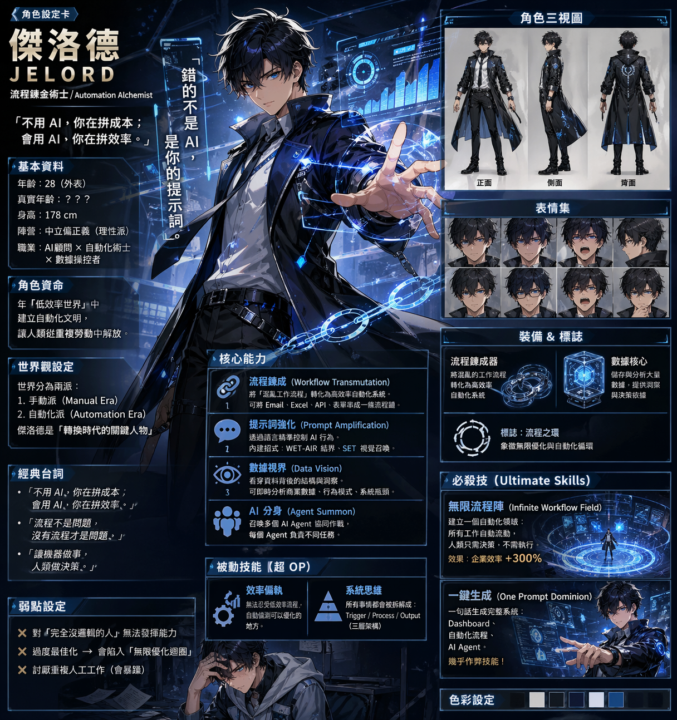
換你試試!
1 使用工具: ChatGPT Image-2 模型 2 提示詞: Based on everything you know about me, make a character sheet of shonen-style anime character of me, name is Jelord (繁體中文版本) 記得改名: 最後一句:name is [你的英文/中文名]

2 likes • 3d
@章民 陳 整體看起來很棒

3 likes • Feb 18
祝各位新年快樂!!!

Jan 31 •
OpenClawd 安全地在VPS上部署,資安重要
安全地在 VPS 上部署:從全新的 Linux 例如:Ubuntu VPS 升級到加固型私有 AI 伺服器 1) 鎖定 SSH → 僅限金鑰,不使用密碼,不允許 root 登入。 sudo nano /etc/ssh/sshd_config # Set explicitly: PasswordAuthentication no PermitRootLogin no sudo sshd -t && sudo systemctl reload ssh 2) 預設拒絕防火牆 → 預設情況下阻止所有傳入連線。 sudo apt install ufw -y sudo ufw default deny incoming sudo ufw default allow outgoing sudo ufw enable 3) 暴力破解防護 → 登入失敗後自動封鎖 IP 位址。 sudo apt install fail2ban -y sudo systemctl enable --now fail2ban 4) 安裝 Tailscale → 您的私有 VPN 網狀網路。 curl -fsSL https://tailscale.com/install.sh | sh sudo tailscale up 5) 僅透過 Tailscale 進行 SSH 連線 → 不再公開暴露 SSH 服務。 # Verify Tailscale is working first! tailscale status sudo ufw allow from 100.64.0.0/10 to any port 22 proto tcp sudo ufw delete allow OpenSSH 6) Web 埠也設為私有 → 僅限透過您的裝置存取此應用程式。 sudo ufw allow from 100.64.0.0/10 to any port 443 proto tcp sudo ufw allow from 100.64.0.0/10 to any port 80 proto tcp 7) 停用 IPv6(可選) → 若不使用,可減少攻擊面。 sudo sed -i 's/IPV6=yes/IPV6=no/' /etc/default/ufw echo "net.ipv6.conf.all.disable_ipv6 = 1" | sudo tee -a /etc/sysctl.conf sudo sysctl -p && sudo ufw reload 8) 安裝 Clawdbot → 在您的私人伺服器上部署 AI 助理。 npm install -g clawdbot && clawdbot doctor 9) 將 Clawdbot 鎖定給所有者 → 只有你可以傳訊息給機器人。 { "dmPolicy": "allowlist", "allowFrom": ["YOUR_TELEGRAM_ID"], "groupPolicy": "allowlist" } 10) 修復憑證權限 → 不要讓秘密人盡皆知。 chmod 700 ~/.clawdbot/credentials chmod 600 .env 11) 執行安全審計 → 捕捉您遺漏的問題 —— 千萬別跳過! clawdbot security audit --deep 核實所有資訊: sudo ufw status ss -tulnp tailscale status clawdbot doctor 結果: ✅ 無公共 SSH ✅ 無公共 Web 端口 ✅ 伺服器只能透過 Tailscale 存取 ✅ 機器人只回覆你 ✅ 30 分鐘內即可擁有私人 AI 伺服器 現在你可以開始玩了,之前不行。 繫好安全帶再踩油門,懂嗎?
2 likes • Feb 1
謝謝分享提供資訊
🔥
Jan 30 •
GenSpark AI Workspace 2.0
新加入送1000點: 請由此進 GenSpark AI Workspace 2.0 是一套整合型的 AI 工作平台,已於 2026 年 1 月 28 日 正式發布。它主打「把瑣事交給 AI,人只專注在結果」,以下為重點特色整理。 核心創新亮點 GenSpark AI Workspace 2.0 的核心設計理念,是讓使用者只需描述「想完成什麼」,AI 代理就能自動規劃並端到端執行整個流程,大幅降低操作與切換工具的成本。 - Speakly|AI 語音輸入 全新推出的 macOS 與 Windows 語音轉文字應用,能即時產出結構清楚、格式良好的文字內容。使用者可透過語音直接觸發 AI 代理執行任務,支援企業級應用與「零資料保留」設計,輸入效率比傳統打字快上 4 倍。 - AI Inbox 2.0|電子郵件自動化 透過可自訂的工作流程,自動處理重複性的 Email 任務,例如郵件分類、批次清理與整理,大幅減少信箱管理的時間負擔。 - AI Slides|創意簡報模式 只需輸入簡單的文字描述,系統就能自動生成具備視覺設計感、可直接簡報使用的完整投影片,省去手動排版與設計的繁瑣流程。 - AI Media 代理 協助團隊快速產出高完成度的影像、影片、音訊與音樂素材,並整合多種頂級 AI 模型,讓內容製作流程更集中、更高效。 整體工作流程的關鍵轉變 GenSpark 的突破不只在功能,而是在「工作方式」本身。過去的工作流程往往分散在多個工具、草稿版本與人工作業交接中,而 AI Workspace 2.0 透過協調型 AI 代理,整合簡報、媒體、Email 與語音等模組,實現真正的端到端自動執行。 使用者不再需要反覆下提示、手動拼接不同工具的輸出,或花時間整理格式,而是由 AI 主動規劃流程並完成任務,從「工具輔助」正式跨入「操作自主」的階段。 市場表現與成長動能 GenSpark 在 AI 產業中的成長速度相當亮眼,僅用 9 個月就突破 1 億美元 ARR(年度經常性收入),並成功完成 3 億美元的 B 輪融資。這顯示該平台已在顧問服務、廣告產業與其他知識密集型領域中,獲得大量企業級客戶採用。 此外,GenSpark 宣布 2026 年全年提供 AI 聊天與 AI 圖像生成功能的「不限次數使用」,進一步強化其市場吸引力與競爭優勢。
2 likes • Jan 30
謝謝分享資訊
Jan 16 •
Skills 路徑對照表
## Skills 路徑對照表 ### Claude Code - 專案級:`claude/skills/<name>/` - 全域級:`~/.claude/skills/<name>/` ### GitHub Copilot - 專案級:`github/skills/<name>/` - 全域級:`~/.copilot/skills/<name>/` ### Google Antigravity - 專案級:`agents/skills/<name>/` - 全域級:`~/.gemini/antigravity/skills/<name>/` ### Cursor - 專案級:`cursor/skills/<name>/` - 全域級:`~/.cursor/skills/<name>/` ### OpenCode - 專案級:`opencode/skill/<name>/SKILL.md` - 全域級:`~/.config/opencode/skill/<name>/SKILL.md` ### OpenAI Codex - 專案級:`codex/skills/<name>/` - 全域級:`~/.codex/skills/<name>/` ### Gemini CLI - 專案級:`gemini/skills/<name>/` - 全域級:`~/.gemini/skills/<name>/` ### Windsurf - 專案級:`windsurf/skills/<name>/` - 全域級:`~/.codeium/windsurf/skills/<name>/` ### Amp - 專案級:`agents/skills/<name>/` - 全域級:`~/.config/agents/skills/<name>/`
2 likes • Jan 20
Thanks for share it.
1-10 of 13

Active 3d ago
Joined Dec 22, 2025
Powered by