Activity
Mon
Wed
Fri
Sun
Mar
Apr
May
Jun
Jul
Aug
Sep
Oct
Nov
Dec
Jan
Feb
What is this?
Less
More
Memberships
Ep - reMarkable Tablet Support
679 members • Free
3 contributions to Ep - reMarkable Tablet Support

9d •
Success!
Thanks, Jason, for pointing out the instructions for locating the device password without Developer mode. Between that and the new release the app is working and I was able to connect all my work calendars.
2
0
14d •
How do I generate a planner?
I can't get off square one. I'm using a Remarkable 2. I've provided both my wifi IP address and the IP address for direct connect using the Remarkable USB cable. I confirmed the correct IP for direct connect in my system settings, which show the device connected. The upper right hand corner gives a blue dot and says it's connected to the same wifi as my tablet. I don't have a password on my tablet. Is it failing because the password is blank?
0 likes • 10d
@Jason Smith on my tablet. I can create a password if that will solve the problem.
1 like • 10d
@Jason Smith great! I’ll give that a try on Thursday night. It’s midnight in California so playing with tech settings isn’t a great idea. My inner adult says to go to bed.
19d •
Auto Sync
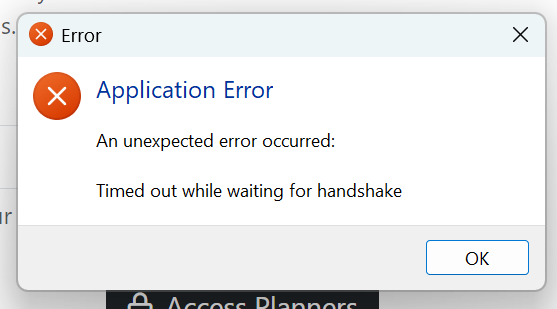
I'm posting in this forum to share my experience. Typically, when I post I'm not sure if it's a bug, user error, or expected behavior. I am running v. 1.0.22 . I have put my remarkable IP address in the box. I have also used chatGPT to make sure that I have an openSSH (though I'm not sure I had to do that but I figured I'd give it a try.) My remarkable is awake and sitting next to my laptop. When I hit "Access Planners" I get this error (screenshot). And when I click "OK" CalSync closes. What should be my next step?
0 likes • 14d
I’m getting a timeout error too.
1-3 of 3

@leslie-cain-8262
Love my Remarkable. It helps keep me sane (ish).
Active 2d ago
Joined Feb 1, 2026
Powered by