Activity
Mon
Wed
Fri
Sun
Sep
Oct
Nov
Dec
Jan
Feb
Mar
Apr
May
Jun
Jul
Aug
What is this?
Less
More
Owned by Lara
For coaches who want to launch or scale their coaching practice on Skool.
Memberships
The LOYALTY PROJECT
30 members • Free
Work Boots to WiFi with Suzie
160 members • Free
Creator's MBA Boardroom
692 members • Free
VIP Soul Circle
1.7k members • Free
Let Yourself In
7 members • Free
Compelling Communicators
153 members • Free
Coaches Life Lab 2.0
798 members • Free
Summiters
271 members • Free
1 contribution to Learn Substack🔥

🔥
May 23 •
🎥⭐SUBSTACK's Got VIDEO Tools⁉️
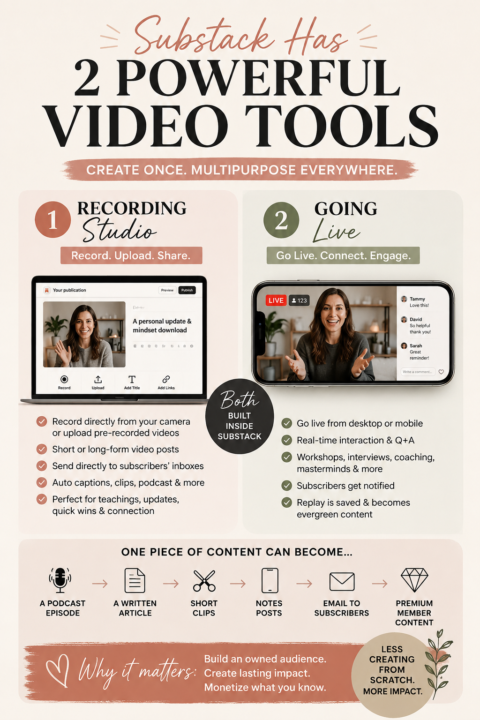
🎥 Substack actually gives creators TWO different ways to create video content directly inside the platform and understanding how they work can completely change how you create content. Most people only know about one of them. Here’s the difference 👇 🎬 1. The Recording Studio This is the built-in video recorder inside your Substack post editor. You can: ✨ record directly from your webcam ✨ upload pre-recorded videos ✨ create short or long-form video posts ✨ add titles, descriptions, links, images, and CTAs ✨ send the video directly to subscribers by email This works beautifully for: 🎙️ solo teachings 🧠 mindset downloads 📚 mini trainings 💡 thought leadership 💬 quick updates ❤️ personal connection content 🎤podcast interviews One of the biggest advantages? It feels VERY personal. Subscribers receive the content directly in their inbox and can consume it without battling social media algorithms. The other huge advantage is simplicity. No fancy editing required. No massive production setup. No needing to “perform.” Just valuable content delivered directly to your audience. AND… Substack can automatically help you: ✨ generate captions ✨ create clips ✨ repurpose into podcast-style content ✨ distribute through Notes 🔴 2. The Going Live Feature This is where things get REALLY interesting for community builders. Substack Live allows you to livestream directly to your subscribers inside the platform. You can: ✨ go live from desktop or mobile ✨ interact with viewers in real time ✨ answer questions live ✨ teach workshops ✨ host interviews ✨ run masterminds or coaching sessions ✨ create subscriber-only livestreams for paid members This is incredibly powerful because it combines: 🎥 video 💬 engagement 💌 email notifications 👥 community interaction all in one place. When you go live: 📲 subscribers get notified 💌 many receive email alerts 🔔 app notifications can trigger 📝 the replay becomes evergreen content afterward Which means… ONE live stream can later become: 🎙️ a podcast

2 likes • May 23
[attachment]
1-1 of 1
@lara-sloan-6698
Helping coaches build a community-based business on Skool without social media or tech overwhelm
Active 7h ago
Joined May 22, 2026
Florida 🌵