Activity
Mon
Wed
Fri
Sun
Jan
Feb
Mar
Apr
May
Jun
Jul
Aug
Sep
Oct
Nov
Dec
What is this?
Less
More
Memberships
AI Automations Guild
1k members • Free
🎙️ Voice AI Bootcamp
7.8k members • Free
AI Workshop Lite
12.9k members • Free
AI Automation Society
209.7k members • Free
AI Automation Agency Hub
275k members • Free
19 contributions to AI Automation Society

25d •
Open to work - AI Automation, Voice Agents & Chatbot Specialist
Hi everyone! I work on AI automation projects and I’m currently open to new opportunities to collaborate. I’ve built real-world systems like voice agents, chatbots, lead-gen flows, and business automations that connect different tools and make work a lot easier for teams. My goal is always to create workflows that are reliable, scalable, and simple enough for anyone to use. How I approach Automation: I like to start by really understanding the problem — what’s slowing things down, what tasks can be automated, and what outcomes the team really needs. From there, I break the workflow into clear blocks: data intake, processing, decisions, and outputs. I build in fail-safes, checks, and error-handling, so things don’t break if something unexpected happens. For AI parts, I make sure the model knows its role, I set boundaries, and I test edge cases to avoid surprises. I also include logging and monitoring and document everything so even non-technical teams can understand and manage the system. I’m looking to collaborate with teams, founders, businesses, agencies, or anyone who needs practical AI automation — whether it’s improving an existing workflow or building something new from scratch. If you know anyone working on projects that could benefit from automation, please I’d really appreciate the connection. If you’d like to see my past work or professional profile, my portfolio, resume, and LinkedIn are available on request. Happy to chat about any serious project or opportunity.
0 likes • 25d
@Hicham Char Thank you for that.

Oct 8 •
connect my phone number to vapi and n8n
hi i need help how do you connect your phone number to vapi i mean to say how you receive and dial call to vapi agent
0 likes • Oct 10
You can use Twilio virtual number

Oct 9 •
AI Agent ignores Google Calendar availability check in n8n
Hey everyone! 👋 I’ve been working on an AI assistant in n8n that helps users book appointments through Google Calendar.The agent is supposed to check calendar availability before suggesting or confirming a time, but it completely ignores that part of the flow. The Google Calendar connection works — events can be created and deleted without any problem, and the API returns the right data when tested separately. The issue is that the AI agent doesn’t actually use the availability data; it just responds as if no check was ever made, even though the “check availability” node and instructions are included in the prompt as a critical rule. Has anyone faced something similar? Maybe I’m missing something in how the data from the Calendar node should be passed to the AI node? Thanks in advance for any help or insights 🙏
2 likes • Oct 10
It’s a prompt issue. If you can post it here, we will understand better. Just like @Titus Blair suggested, tell ChatGPT what you want, it will update your prompt. Tweak it bit by bit until you are satisfied. Make sure you are using a good LLM model. My suggestions: You need to explicitly define your tools (nodes) in the prompt properly, and set rules on when and how each tools should be called. Also some of the biggest common problems are having contradictory sentences/statements redundant lines that may confuse your prompt not to use your tool. You may not notice easily but they may be there. You have to look out for them. For instance, this is just a little example for checking calendar availability and booking appointments. Tools are defined after the overview. The system will have to check availability before booking the appointment. If the slot is taken, it suggests 2 free slots for the day, otherwise it books the appointment immediately. ## Tools Available 1. **Check Calendar Availability** (what you named your Google Calendar Get Events node) – Verify if the requested time slot is free. 2. **Book the Appointment** – Create/book the event if slot is free. Must return "status": "confirmed" or "status": "failed". 3… ## Rules ### Step 1: Requested Slot - Always use "Check Calendar Availability" with the requested date and time. - If the response is [] (empty), the slot is free → immediately call the "Book the Appointment" (proceed to booking). - Expect "status": "confirmed". - … ### Step 2: If Requested Slot is Unavailable - If the requested slot is taken (not free), generate up to 2 alternative times. - Before suggesting them, re-check each one with Check Calendar Availability to make sure it is truly free. - Present them clearly to the client. ### Step 3: … The order is important. The agent will have to use the Check Calendar Availability tool first before booking the appointment. Usually Google Calendar Get Event node (your Check Calendar Availability too) doesn’t return anything (it’s empty) if the requested slot is free.

💎
⭐
Oct 7 •
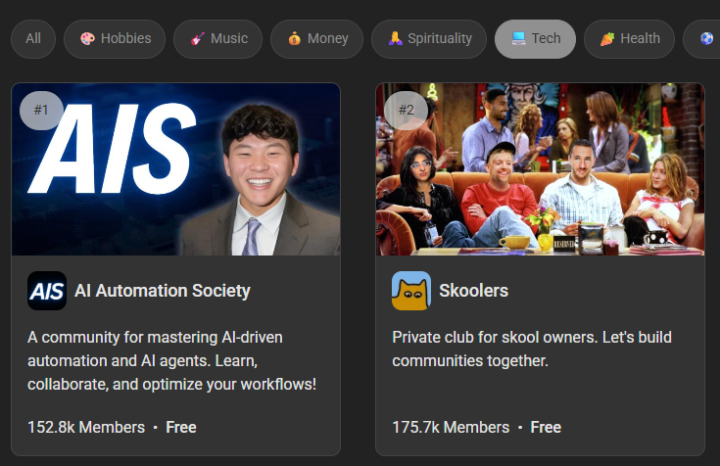
🙌 AIS is the #1 Tech Skool Community... but we need your help
Hey AIS fam, Good news and bad news. The good news, our community just hit #1 in the Tech category and #2 overall on Skool out of more than 175,000 communities! That’s incredible and a huge credit to all of you. The bad news is that with the growth, we’re seeing more spam, self-promotion, and discussions that aren't focused on AI or automation. Please help us keep this space clean and valuable by reporting any spam or self-promotion you see. Our admin team will take care of it quickly. This community is growing because of you, your engagement, questions, and support for one another. Let’s keep building a safe, focused space to learn and grow together. Cheers, Nate
2 likes • Oct 8
That’s great.

Sep 16 •
Parse scanned document
Hi guys! I have documentation full of scanned documents. What is the best way to parse them — should I use OCR or try to convert them into markdown? If OCR is the right approach, which OCR tool would you recommend? I need this in order to search thought data of this documents, these are invoices, contracts, etc. Thank you!
3 likes • Sep 16
Using OCR is the best option. There are popular ones like Mistral OCR, and LlamaParse. I think you should go with Google Gwmini Vision. From my experience, Gemini Vision is the best option among the three as the other two may not extract all the data/info from the scanned documents (depending on your document). For instance, if you are working with blurry documents or embedded text in a logo or something like that, Gemini Vision will always perform better than Mistral OCR or LlamaParse. But if you are working with very well structured documents, you can use any of them.
1-10 of 19

@kingsley-ezema-1132
AI & Automation enthusiast 🤖 | Building smart workflows with n8n | Data analytics on the side 📊
Active 24d ago
Joined Jun 24, 2025
Powered by