Activity
Mon
Wed
Fri
Sun
Aug
Sep
Oct
Nov
Dec
Jan
Feb
Mar
Apr
May
Jun
Jul
What is this?
Less
More
Owned by CPR Instructor
The official CPR hub for free resources, lesson ideas, teaching tips, and live support to run better classes and grow your program.
A community for discovering tools, testing apps, and sharing honest feedback. Get early access and help shape better products with Katapulting tools.
Memberships
Sell & Scale (Free)
7.4k members • Free
The AI Agents Course
2.5k members • Free
Leslie Rob Academy
391 members • Free
Self Publishers Unite!
551 members • Free
Not Today CPR and First Aid
13 members • Free
🪷 Aloha Pumehana Collective
46 members • Free
Growth Hub 365
10.1k members • Free
Marketing & Ai Academy
1.7k members • Free
Grant Mastery Community
13.9k members • Free
14 contributions to Skill & Soul Studio

🔥
May 30 •
The Power of Finishing One Thing
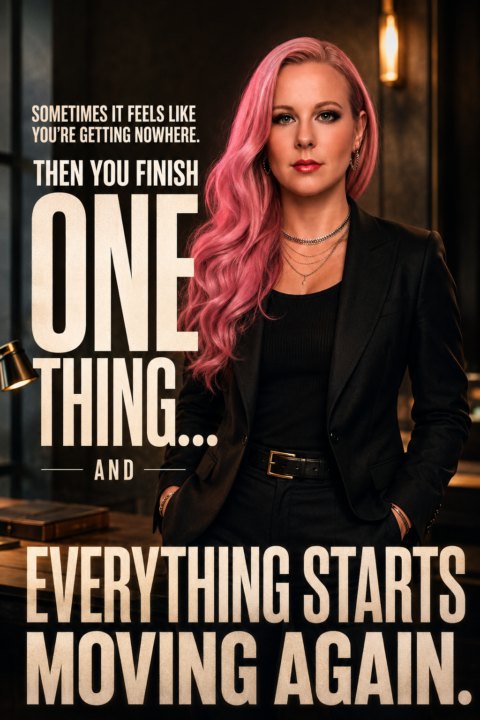
Some days it feels like you're working hard and getting absolutely nowhere. You tick things off. You show up. You keep going. And nothing seems to change. Then you finish one thing. One task. One project. One decision. One thing you've been putting off. And suddenly everything starts moving again. Progress isn't always a giant breakthrough. Sometimes it's just finishing the thing that's been slowing you down. Prompt Transform the uploaded image into a premium cinematic motivational poster while preserving the subject's identity, facial structure, skin tone, and recognizability. Completely replace the existing clothing with a sophisticated, modern, high-end outfit. Dress the subject in a tailored dark jacket layered over a premium fitted shirt or lightweight knit. The styling should feel polished, intentional, successful, and aspirational. No casual clothing, hoodies, graphic tees, or athletic wear. The outfit should communicate momentum, discipline, and personal growth. Position the subject confidently in a clean, modern environment with subtle depth and atmosphere. Use warm cinematic lighting with soft highlights and rich contrast. Create a feeling of clarity, forward movement, and renewed energy. The image should feel like a professional magazine cover or luxury personal brand campaign. Expression: calm confidence, quiet determination, focused optimism. The subject should appear grounded and composed, not overly smiling or celebrating. The emotion is the feeling of finally gaining traction after a period of frustration. Photography style: luxury editorial portrait, professional camera, shallow depth of field, cinematic color grading, highly detailed skin texture, realistic lighting, natural posture, sharp eyes, premium composition. The struggle is NOT shown visually. There are no split scenes, before-and-after effects, dark-versus-light comparisons, or representations of failure. The image exists entirely in the present moment of confidence and momentum. The difficult days are only referenced in the quote.

13 likes • May 30
Absolutely Love this!
🔥
May 9 •
Can we help vote please
One of our Skill & Soul Studio members @CPR Instructor Kay is currently in the finals for Entrepreneur of Impact and could really use some support over the next 5 days ❤️ She’s hoping to win so she can build an app designed to help CPR instructors. Votes are currently open, and every single one genuinely helps right now. If you’ve got 2 minutes spare and want to support someone building something useful, you can vote here: http://entrepreneurofimpact.org/2026/kiata-tolbert-2 Would love to help her push this across the finish line 🙏🏽
3 likes • May 10
@Manda Jackson unfortunately not 😢
3 likes • May 11
@Misty Pastilock thank you so much!
🔥
Apr 27 •
Google AI Studio
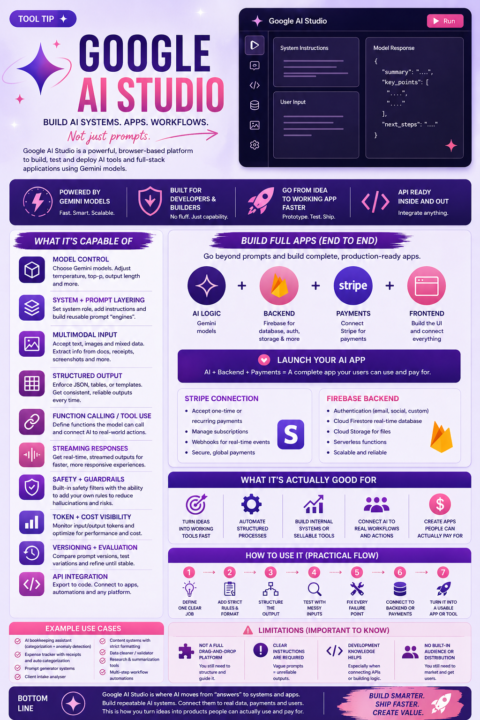
What it is A browser-based platform to build AI systems, workflows, and full apps using Gemini models. What it’s capable of - Model control (speed, reasoning, consistency) - Structured outputs (reports, JSON, workflows) - Multimodal input (text + images) - Function calling (connect to real actions) - Prompt systems (reusable, not one-off) - API integration - Version testing and iteration Full app capability - Build complete AI apps - Connect payments with Stripe - Use Firebase for backend (auth, database, storage) - Combine AI + backend + frontend into one system What it’s good for - Turning ideas into working tools - Automating structured tasks - Building internal systems - Creating sellable AI tools How to use it 1. Define one clear job 2. Add strict rules and format 3. Structure the output 4. Test with messy inputs 5. Fix every failure point 6. Connect backend or payments if needed 7. Turn it into a usable tool or app Limitations - Not fully drag-and-drop - Needs clear instructions - Requires testing - No built-in audience This is where AI moves from answers to systems and apps.
6 likes • Apr 27
This is great info! 😊 Are you aware of Abacus? Have you posted anything about this? I may have missed the posted info.
6 likes • Apr 27
@Manda Jackson thank you! 😊 I used it to connect me to individuals on linked in with an agent. I wanted to know what else it can do...
🔥
Apr 15 •
Add some colour to your life
Sometimes you just need a little colour PROMPT high-quality portrait of the person from the attached image, maintaining their exact facial features, identity, and likeness, reimagined as a vibrant, playful person embodying a Creator archetype, expressive and dynamic, mid-action pose throwing colorful paint and confetti toward the camera, wide joyful smile, slightly low camera angle, wearing a bold sequined jacket with neon accents, graphic t-shirt, and edgy accessories, lively studio environment exploding with color splashes and floating confetti, vibrant energy style, cinematic lighting with high contrast and saturated colors, sharp focus, highly detailed skin, motion and depth, cohesive color grading, professional photoshoot composition. preserve facial structure, skin tone, eye shape, and unique features from the reference image, no face alteration, no generic face generation

4 likes • Apr 15
@Antonio Totino hey where's yours?
4 likes • Apr 17
@Antonio Totino lol...it takes all of two seconds...come on have a little fun!!
🔥
Mar 30 •
24hrs to go
In just over 24 hours, VIP is increasing from $10 to $20/month. What’s been added: - Full CustomGPT library is now live - Claude skills library added (3 so far, more coming) - “Build the Perfect Prompt” course has started, covering all 12 frameworks. Finishing and releasing in the next few days - Next workshop confirmed for late April: vibe coding If you’ve been thinking about upgrading, this is your window.
1 like • Mar 30
Yes!! You are on it! Are you going to be using Lovable, N8N, Replit? What is your vibe coding fav?
1-10 of 14

@kiata-tolbert-2806
Welcome! I’m CPR Instructor Kay. Join for free resources, teaching tips, AI tools, updates & support for EVERYONE including CPR Instructors & Trainers
Active 8m ago
Joined Jan 2, 2026