Activity
Mon
Wed
Fri
Sun
Nov
Dec
Jan
Feb
Mar
Apr
May
Jun
Jul
Aug
Sep
Oct
What is this?
Less
More
Owned by Katrin
Done-for-you website and funnel in 1 week + SEO/AEO/GEO. 10 spots ONLY! Sign up -> https://visibility.aigrimm.com/
AI Grimm helps you monetize your expertise & knowledge. Learning, Community, & Software. For women 40+ who want results. Stop chasing shiny objects.
Women Build AI
6.6k
Free
AI Automation (A-Z)
167.2k
Free
NextGen AI
61.3k
Free
Template Skool
3.6k
5.0
$39/m
Clief Notes
50.9k
5.0
Free
EverAds | Growth Boost Style
1.4k
5.0
Free
AI Ads Mastery
2.2k
Free
Tech Mastery For Entrepreneurs
753
5.0
Free
Community Proof Lab
473
5.0
Free
3 contributions to Skool Extensions 🧩

18d •
Mitgliederwachstum
Hallo Marco, funktioniert diese Funktion? In einigen Gemeinden dauert es 7/30/90 Tage lang dasselbe Zum Beispiel funktioniert es nicht, wenn ich auf deine Mitglieder klicke, aber es funktioniert, wenn ich auf Skoolers Mitglieder klicke (übrigens enorm gesunken)… Lass es mich wissen, wie zuverlässig diese Funktion ist. Tausend Dank!

2 likes • 8d
@Marco Berlin So can I trust the numbers?
2 likes • 8d
@Marco Berlin got it! Thank you!

🔥
Jul 8 •
Screen Recording (Premium Feature 👑)
𝗦𝗰𝗿𝗲𝗲𝗻 𝗥𝗲𝗰𝗼𝗿𝗱𝗶𝗻𝗴 — 𝗖𝗮𝗽𝘁𝘂𝗿𝗲 𝗬𝗼𝘂𝗿 𝗦𝗰𝗿𝗲𝗲𝗻, 𝗪𝗶𝘁𝗵 𝗼𝗿 𝗪𝗶𝘁𝗵𝗼𝘂𝘁 𝗬𝗼𝘂𝗿 𝗪𝗲𝗯𝗰𝗮𝗺 The same recorder that sends voice and video in your DMs, comments and post window can now record your screen instead of your camera. Open the source dropdown in the recording popup and you'll find your cameras alongside two new choices: Screen records just your screen, and Screen + Camera gives you a Loom-style clip where your webcam rides along in a round bubble. Your browser's own picker asks whether to share your whole screen, a single window or a tab — no extra permission is added to the Extension. In Screen + Camera mode the webcam bubble sits in a corner of the recording, and you can drag it anywhere and resize it to frame yourself the way you like. The moment you start sharing, the big popup shrinks to a small control pill near the top of the page — Start before you record, then a red stop dot and a running timer while you record — and you can drag that pill out of the way. It never covers the screen you're capturing, and it never films itself into an infinity-mirror. The recording takes the tab or system audio from whatever you're sharing and mixes your microphone in on top as a voiceover, so you can talk over what's on screen. Pick which microphone (and, for Screen + Camera, which camera) up front, and switch either one mid-recording. If you end the share from your browser's own sharing bar, the recording stops and attaches on its own. When you're done, a Done button plays the clip back for review before anything sends — then Send ships it, or the trash icon discards it for a retake. Clips go out as WebM through Skool's native file attachment, playable right in the thread, with the same 10-minute maximum as camera video. Screen and Screen + Camera are Premium; plain camera and audio recording stay free. For non-Premium accounts the two screen rows show up greyed out with a gold crown — one click starts a free trial right from the recording popup. The whole recorder adapts to your current theme, dark or light.

1 like • Jul 23
@Kimberly Armatys I won't be able to make it today. I'm out today and tomorrow. Hopefully next time!
1 like • Jul 23
@Kimberly Armatys thank you!
🔥
Mar 30 •
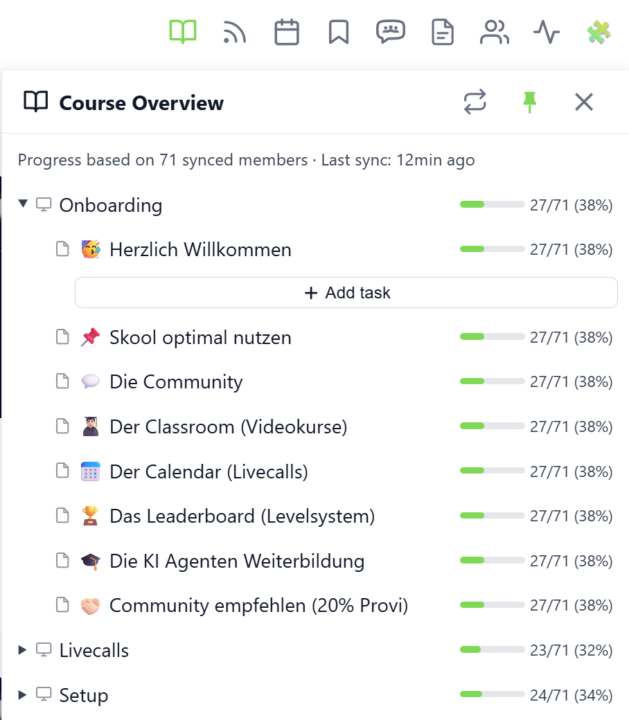
Course Overview (VIP Feature 💎)
𝗖𝗼𝘂𝗿𝘀𝗲 𝗢𝘃𝗲𝗿𝘃𝗶𝗲𝘄 — 𝗬𝗼𝘂𝗿 𝗘𝗻𝘁𝗶𝗿𝗲 𝗖𝗹𝗮𝘀𝘀𝗿𝗼𝗼𝗺 𝗦𝘁𝗿𝘂𝗰𝘁𝘂𝗿𝗲 𝗮𝘁 𝗮 𝗚𝗹𝗮𝗻𝗰𝗲 Managing a Skool classroom with multiple modules, folders, and pages means a lot of clicking and scrolling to understand the full picture. Course Overview adds a dedicated sidebar panel that shows your complete course structure as an expandable tree — every module, every folder, every page — without leaving the page you're on. Click the book icon in your toolbar to open the panel. Each module shows as a collapsible row with a folder icon for subfolders and page icons for individual lessons. Click any module to expand it and reveal its nested content, loaded directly from Skool's data. The tree remembers which modules you've expanded, so your view stays consistent as you navigate. The real power comes from the completion stats. If you've synced your members' course progress, each module displays a green progress bar showing what percentage of your members have started it. Hover over the bar to see member names, or click it to open a popup with the full list — complete with avatars, tags, and pipeline status. A note at the bottom shows how many synced members the percentages are based on. Hit the refresh button to reload the course structure or update completion stats. The panel respects the 24-hour sync cooldown and shows when the next sync is available. You can pin the panel to keep it open while you browse, resize it by dragging the left edge, or close it when you're done. Course Overview is available for admins and owners only, and works on any page within your community. The feature can be toggled in the Toolkit Settings under the Admin section. --- 𝗞𝘂𝗿𝘀ü𝗯𝗲𝗿𝘀𝗶𝗰𝗵𝘁 — 𝗗𝗲𝗶𝗻𝗲 𝗴𝗲𝘀𝗮𝗺𝘁𝗲 𝗖𝗹𝗮𝘀𝘀𝗿𝗼𝗼𝗺-𝗦𝘁𝗿𝘂𝗸𝘁𝘂𝗿 𝗮𝘂𝗳 𝗲𝗶𝗻𝗲𝗻 𝗕𝗹𝗶𝗰𝗸 Eine Skool-Classroom mit mehreren Modulen, Ordnern und Seiten zu verwalten bedeutet viel Klicken und Scrollen, um das Gesamtbild zu verstehen. Die Kursübersicht fügt ein eigenes Sidebar-Panel hinzu, das deine komplette Kursstruktur als aufklappbaren Baum zeigt — jedes Modul, jeden Ordner, jede Seite — ohne die aktuelle Seite zu verlassen.
6 likes • Mar 30
@Kimberly Armatys you did 58 lessons over the weekend! That's incredible Kim! Have you figured out this new feature?
4 likes • Mar 30
@Kimberly Armatys awesome!
1-3 of 3

@katrin-birkholz
Create deeper transformations in your business using AI Grimm + Community. Choose Your LLM, your files, your flow. Made by a Woman, for women. 💜
Active 8h ago
Joined Mar 21, 2026
New Hampshire, US
Powered by