Activity
Mon
Wed
Fri
Sun
Aug
Sep
Oct
Nov
Dec
Jan
Feb
Mar
Apr
May
Jun
Jul
What is this?
Less
More
Memberships
AI Bits and Pieces
807 members • Free
AI Automation Society Plus
3.8k members • $99/month
AI Automation Society
422.6k members • Free
2 contributions to AI Bits and Pieces

🔥
15h •
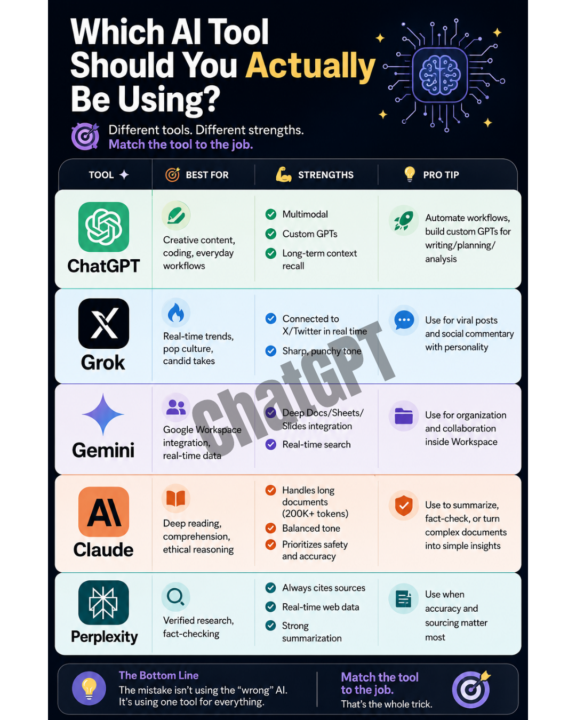
📦 Out of The Box 30 - Image Creation Update. ChatGPT vs Gemini vs Claude.
Welcome to the Out of The Box Series — where I test how far curiosity and AI can take you in 30, 60, or 90 minutes, using today's best no-code and low-code tools. No setup. No training. Just pure exploration — right out of the box. 🎬 This Episode: Default Image Creation — ChatGPT vs Gemini vs Claude 🕒 Time Limit: One prompt, default settings 📂 Category: AI Image Creation OpenAI just upgraded its image engine, and I wanted to see if it lives up to the buzz. So I ran a quick test: - Same prompt, three tools - Default settings No tweaks, no custom instructions — just hit go and see what comes back. A few surprises along the way: 🔹 ChatGPT: The image came back clean and easy to understand, with great use of whitespace. The upgrade was instantly noticeable. This is my new favorite image creation LLM. 🔹 Claude: Surprisingly, Claude still can't create images natively. But it offered to connect to Canva instead. I'm a Canva subscriber and a big fan, so that was an easy "hell yeah" from me. 🔹 Gemini: The one with the stellar reputation for image creation — is the one that missed. Notice the landscape image has two Claude panels. ✅ My verdict, two words each: 🔹 ChatGPT: Professional, Balanced 🔹 Gemini: Incorrect, Colorful 🔹 Claude (via Canva): Pedestrian, Underwhelming The results are below. 👀 You be the judge. What do you think? Prompt Used: Pasted content below into dialogue box, selected "Image Creation" mode, and hit enter. Content provided to each LLM: The chart breakdown ChatGPT — Best for: creative content, coding, everyday workflows Strengths: multimodal, custom GPTs, long-term context recall Pro tip: automate workflows, build custom GPTs for writing/planning/analysis Grok — Best for: real-time trends, pop culture, candid takes Strengths: connected to X/Twitter in real time, sharp/punchy tone Pro tip: use for viral posts and social commentary with personality Gemini — Best for: Google Workspace integration, real-time data Strengths: deep Docs/Sheets/Slides integration, real-time search

3 likes • 15h
This is helpful. I have shied away from image generation because it's looked so unprofessional in the past. I don't have a frequent need but on the occasion I do, this gives good direction.Thank you!
2 likes • 10h
@Michael Wacht doesn't get much better (or easier) than that! Seems so obvious but my brain never got there so thank you! I know what I like when I see it so this is perfect.
🔥
14d •
📬 AI Controls My Inbox: 🧪 Experiment
For the past several months, I’ve been using ChatGPT and Claude to help manage my inboxes. They’ve been reading emails, sorting intent, identifying what matters, and surfacing what needs attention. But up until now, I’ve always check the work of AI—reviewing everything alongside them and verifying decisions daily. That will change for the next 30 days. 🧪 The Experiment Starting today, I’m running a 30-day controlled experiment: - ChatGPT and Claude will be the "first systems to review my inbox" - AI will handle all first-pass triage, prioritization, and escalation - I will only respond to emails that are flagged by AI - I will only open my email every 72 hours (3 days) - I will rely on AI summaries and alerts between reviews - ChatGPT scheduling and Claude coworking workflows will run in parallel This is not convenience automation. It’s a controlled delegation test under time delay. 📬 Important Context My email is not siloed. It is a shared channel for both personal and business communication. That includes: - Clients and prospects - Financial and operational items - Personal messages and family logistics - Newsletters, system alerts, and vendor communication This is a real mixed-context inbox, not a filtered business queue. That matters, because context switching is where prioritization either succeeds or fails. 🎯 The Goal I want to understand one thing clearly. What happens when AI becomes the first decision layer in a real-world inbox with delayed human access? Not just summarization. Not just filtering. But actual prioritization that must hold for 72-hour cycles. Specifically: - What AI consistently gets right - Where urgency is misclassified or delayed too long - How well personal vs business context is separated - What gets buried that should not be - How trust behaves when human correction is delayed 🚧 The Guardrails This is not full autonomy. There is still a safety system in place: - Human review every 72 hours - Explicit escalation rules for VIP, financial, and time-sensitive messages - Dual-system validation (ChatGPT + Claude) - No irreversible actions without review - I am still responding to emails, that is not being delegated
1 like • 10d
@Michael Wacht thank you for sharing all of this! Every time I go into my email I think "this could be improved". For years I've used SaneBox which filters so much of the "noise" that I just don't need to see right now (newsletters, sales promotions, receipts, etc.). So what I do get in my Inbox now is usually not garbage. But that doesn't mean it needs my attention or a response right away (if ever). My email is also not siloed so I was happy to read that you are working with the same setup. I'm going to keep tabs on your experiment with this. It's pretty awesome!
1 like • 9d
@Michael Wacht not TMI at all. In fact, helpful. I would benefit greatly from letting reactive stuff sit idle. I have a tendency to treat everything as urgent or at the very least "it needs to be done now". But rarely is this true. And even as I'm working with AI and automation, it would be in my best interested to avoid rabbit holes, shiny things and squirrels. But your post did prompt me to build an "email janitor" to clean out specific folders with emails x old and mark others as read because it drives me nuts to see an unread count for an email folder. So at least that is done.
1-2 of 2

@karen-widas-6020
Just your regular nerd-next-door: tech, automation, programming
Online now
Joined Jun 30, 2026
Powered by