Activity
Mon
Wed
Fri
Sun
Nov
Dec
Jan
Feb
Mar
Apr
May
Jun
Jul
Aug
Sep
Oct
What is this?
Less
More
Owned by Kamil
Get strong af with bodyweight exercises you can do anywhere. All you need are rings and/or a pull-up bar for max results with our system.
🏁 UNDETERRED 🏁
40
Free
GATHR Spain
3.9k
5.0
$5/m
12 contributions to Skool Extensions 🧩

May 14 •
𝗛𝗼𝘄 𝗜𝗻𝘀𝘁𝗮𝗴𝗿𝗮𝗺 𝗱𝗿𝗼𝘃𝗲 𝟭𝟯𝗸 𝗺𝗲𝗺𝗯𝗲𝗿𝘀 𝘁𝗼 𝗼𝘂𝗿 𝘀𝗸𝗼𝗼𝗹 𝗰𝗼𝗺𝗺𝘂𝗻𝗶𝘁𝘆
First, we repositioned our Instagram to align with our offer. We used a simple strategy: analyzing successful creators in our niche. We analyzed the type of content they were creating and identified what was already working in the market. Then we researched trending editing styles and retention patterns so that we can make our reels attention-grabbing and engaging Then we modeled our reels according to analytics while adding powerful hooks (to capture viewer’s attention) and smart CTAs (to drive them into our community) Then we focused on consistency, posting 2–3 times per week. And BOOM the strategy started working. Our reels began consistently hitting 40K–200K views, eventually turning Instagram into a funnel for driving community members. ❓❓What’s your strategy to drive traffic from other platforms❓❓


🔥
1 like • May 17
you don't have a community

🔥
Apr 24 •
Skool Finder
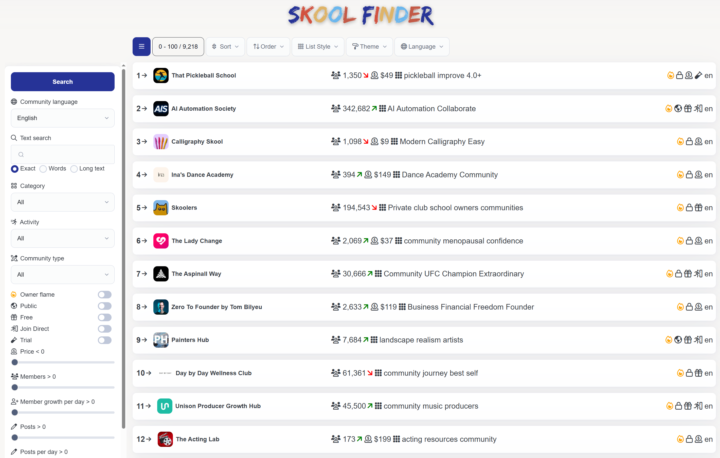
Last year, I developed the Skool Finder, enabling a completely new way of Community Discovery. Now, the site has received a fresh update. Due to the massive growth in the number of communities on Skool, I’ve put a lot of work into performance optimizations. At the same time, the Skool Finder provides the community stats for our local Skool Discovery and the statistics block. So, go ahead and check it out—especially now, just before Skool releases its own brand-new discovery tool. The Skool Finder's sorting functions and specialized filters will likely remain one-of-a-kind. Let me know if you have any ideas for improvement 👇🏼 --- Im letzten Jahr hatte ich bereits den Skool Finder programmiert und damit eine völlig neue Community Discovery ermöglicht. Nun hat die Seite ein kleines Update erhalten. Insbesondere aufgrund der enorm angewachsenen Anzahl an Communities auf Skool war einiges in Sachen Performance zu tun. Gleichzeitig liefert der Skool Finder die Community-Stats für die hiesige Skool Discovery oder den Statistik-Block. Also schau doch mal vorbei – vor allem jetzt, kurz bevor Skool selbst eine völlig neue Discovery liefert. Gerade die Sortierfunktionen oder speziellen Filter des Skool Finders werden vermutlich einzigartig bleiben. Lass mich wieder wissen, falls du Ideen zur Optimierung hast 👇🏼
🔥
9 likes • Apr 24
Nice! I've been using Skool Finder for the past year, and that's how I found this extension, because at some point the Skool Finder extension changed into this one. Haha!
🔥
Apr 12 •
Can we make the tools persistent?
I noticed that practically every functionality in this extension needs refreshing every single time I change page. This is also an issue with filters. For example when I apply the focus mode and go to another page, the focus mode disappears and I need to disable and enable it again. The biggest problem is with the feed. When I click a post, the feed disappears and I need to open it again. It then needs to load posts again and so on. Even when I pin it.

🔥
1 like • Apr 14
@Marco Berlin It works now
🔥
1 like • Apr 14
@Marco Berlin thanks
🔥
Apr 6 •
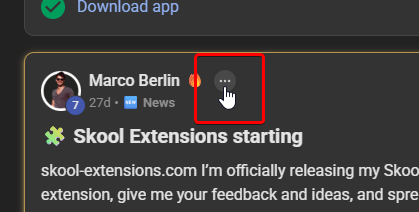
Can we please get rid of this?
For the past few days, this thing next to everyone's names has been annoying and I couldn't find a way to hide it (besides using another extension to hide elements from the website). It has been also bugging how the leaderboards look. What is it supposed to do anyway?
🔥
1 like • Apr 7
@Marco Berlin Nice. Thanks a lot man
🔥
Mar 27 •
Calendar Helpers (VIP Feature 💎)
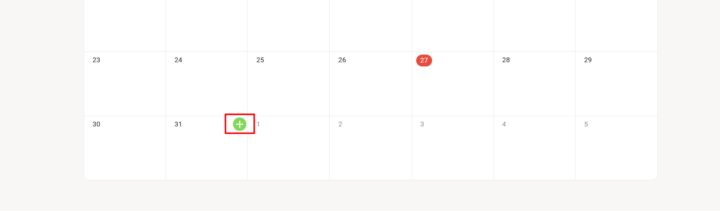
𝗖𝗮𝗹𝗲𝗻𝗱𝗮𝗿 𝗛𝗲𝗹𝗽𝗲𝗿𝘀 — 𝗤𝘂𝗶𝗰𝗸-𝗖𝗿𝗲𝗮𝘁𝗲 𝗘𝘃𝗲𝗻𝘁𝘀 𝗳𝗿𝗼𝗺 𝘁𝗵𝗲 𝗖𝗮𝗹𝗲𝗻𝗱𝗮𝗿 𝗚𝗿𝗶𝗱 Creating events in Skool means clicking the "+" button, then manually picking a date and adjusting the duration every single time. Calendar Helpers streamlines this by adding a quick-create button directly to each day in your calendar grid. Hover over any day cell and a small green "+" button appears in the top-right corner. Click it and the native event creation modal opens with the correct date already pre-selected and the duration automatically set to one hour. No more scrolling through date pickers or fixing default values — just hover, click, and start filling in your event details. The feature intelligently handles month boundaries, so days from the previous or next month shown in the grid work just as reliably. Everything happens through Skool's own event modal, so your events are created natively with no workarounds. Calendar Helpers is available for community admins and owners. Toggle it on or off in the Admin Features section of the Toolkit Settings. --- 𝗞𝗮𝗹𝗲𝗻𝗱𝗲𝗿-𝗛𝗲𝗹𝗳𝗲𝗿 — 𝗦𝗰𝗵𝗻𝗲𝗹𝗹𝗲𝘀 𝗘𝗿𝘀𝘁𝗲𝗹𝗹𝗲𝗻 𝘃𝗼𝗻 𝗘𝘃𝗲𝗻𝘁𝘀 𝗶𝗺 𝗞𝗮𝗹𝗲𝗻𝗱𝗲𝗿-𝗥𝗮𝘀𝘁𝗲𝗿 Events in Skool zu erstellen bedeutet jedes Mal: auf den „+"-Button klicken, dann manuell ein Datum auswählen und die Dauer anpassen. Kalender-Helfer vereinfacht das, indem direkt auf jedem Tag im Kalender-Raster ein Schnell-Erstellen-Button erscheint. Fahre mit der Maus über eine Tageszelle und ein kleiner grüner „+"-Button erscheint in der oberen rechten Ecke. Klicke darauf und das native Event-Erstellungsfenster öffnet sich — mit dem richtigen Datum bereits vorausgewählt und der Dauer automatisch auf eine Stunde gesetzt. Kein Scrollen durch Datumsauswahlen oder Korrigieren von Standardwerten mehr — einfach hovern, klicken und deine Event-Details ausfüllen. Das Feature erkennt Monatsgrenzen intelligent, sodass auch Tage des vorherigen oder nächsten Monats, die im Raster angezeigt werden, genauso zuverlässig funktionieren. Alles läuft über Skools eigenes Event-Fenster — deine Events werden nativ erstellt, ganz ohne Umwege.
🔥
3 likes • Mar 27
That's super useful, thanks.
1-10 of 12

Online now
Joined Mar 13, 2026
ISTJ
Alicante, Spain
Powered by