Activity
Mon
Wed
Fri
Sun
Apr
May
Jun
Jul
Aug
Sep
Oct
Nov
Dec
Jan
Feb
Mar
What is this?
Less
More
Memberships
Let's Master English
4.4k members • Free
AI Automation Society
274.8k members • Free
Free Skool Course
54.9k members • Free
Synthesizer
36.7k members • Free
7 contributions to AI Automation Society

2h •
AI Trends to Watch in 2026
In 2026, AI isn’t just evolving — it’s redefining how we work, create, and interact. This year we’re seeing: 1. AI Everywhere – AI assistants are now embedded in everyday tools from email to design software, making workflows faster and more intuitive. 2. Multimodal Models Lead – Models that understand text, images, audio, and video together are enabling richer creativity and smarter decision-making. 3. Personalized AI Experiences – AI adapts to individual users in real time, making digital experiences more tailored, efficient, and human‑like. 4. Responsible AI Takes Center Stage – With AI powering critical systems, transparency, fairness, and safety are non‑negotiable priorities in every product. 5. AI for Sustainability – AI is being used to fight climate change through smarter energy grids, precision agriculture, and emissions forecasting. 6. Democratization of AI Development – No‑code and low‑code AI tools are lowering barriers, empowering more creators and startups to build intelligent apps. AI in 2026 is not just smarter — it’s more human‑centric, more responsible, and more deeply woven into daily life. The future isn’t coming. It’s already here.😇

7h •
RAG In 7+ Languages
I just built an AI chatbot that speaks Telugu. Not just types in Telugu. It listens to you, thinks, and speaks back to you in Telugu. Out loud. In real time. I recorded a 2-minute demo walking through the whole thing and honestly, watching it work still surprises me. Here is what happens under the hood. You open the chatbot, tap the mic, and speak in whichever language you choose. English, Hindi, Telugu, Tamil, Kannada and more. The bot understands you, searches its knowledge base for the right answer, and speaks back to you in that same language with live word-synced subtitles on screen. For English, it uses ElevenLabs to create a natural, human-sounding voice. For Indian languages it uses Sarvam, which is purpose-built for Indian languages. And behind the scenes, n8n orchestrates the whole pipeline, with OpenAI powering the intelligence. Here is why I built this. Most AI chatbots are designed for English-speaking users in Western markets. But India has 1.4 billion people, and the vast majority of them are far more comfortable in their mother tongue. A chatbot that only works in English is leaving most of your potential customers behind before the conversation even starts. This is what I built for SSK AI Agency, a fully multilingual voice AI assistant that knows your business, speaks your customer's language, and is live on a website right now. If you are running a business and want something like this, drop me a message. I am taking on a few clients this month and would love to show you a live demo. What language would you want your chatbot to speak first?

2 likes • 7h
Can't wait to see that!!!!! amazing!!!!!!

🔥
15h •
Quick architecture question:
I’m using Lovable→ Webhook → GoHighLevel. The webhook fires once per day with the selected Q&A content. Now I want that to trigger an email broadcast to my email list inside GHL. But inside workflows in GHL, I can see the content coming via webhook, and I can map them, but when I send a test email, I only get an empty email, not even the subject line. Also, I don’t see a way to select a broadcast list directly. What’s the cleanest way to handle daily automated broadcasts triggered via webhook? Appreciate any insights from people who’ve done this before.

1 like • 7h
Here is a step-by-step approach - Check Your Webhook Data Mapping: Ensure the data from the webhook is being passed correctly into the email fields (subject, body, etc.). Sometimes the test emails appear empty because the webhook data isn’t properly mapped to the email fields. - Custom Fields in Workflows: You might need to create custom fields in GHL to capture the incoming data from the webhook (e.g., the subject line, content, etc.). Once you have these fields set up, map the webhook data to those fields properly in the workflow. - Selecting the Broadcast List: In GHL, email broadcasts are separate from workflows. You can't directly select a broadcast list in a workflow. Instead, set up a workflow that triggers an action (like sending an email) to a specific segment of your contacts. For the broadcast list, you’ll need to make sure your contact list is segmented and targeted correctly inside GHL. - Email Action in Workflow: Within your workflow, use the "Send Email" action and choose the custom email template that you want to send. This email should reference the custom fields you created for subject and body content. You can then choose the audience by selecting the relevant tags or contacts based on your broadcast list segmentation. - Test in Workflow: When testing the workflow, make sure you use real data from the webhook, not just the test data, to see the actual email output. Also, check the email logs to make sure no errors are happening during the email sending process. - Automation Tools: If GoHighLevel doesn’t allow you to easily trigger a broadcast from the workflow, consider using third-party tools like Zapier or Integromat (Make) to connect the webhook and trigger the broadcast list more seamlessly. Once you've mapped everything correctly and tested the workflow with live data, it should trigger the emails automatically without issue. Please don't hesitate to reach out to me if you have any questions

1 like • 7h
[attachment]

5d •
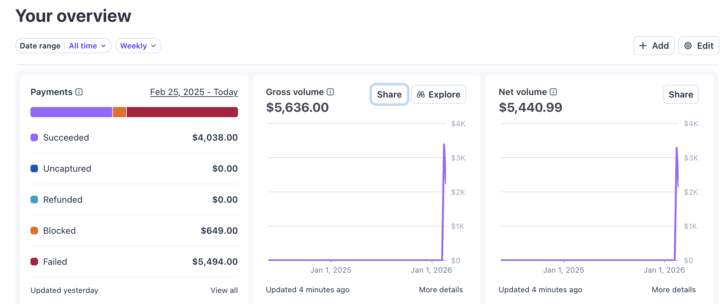
$5.6k selling AI voice agents to local biz this week!
Stripe proof link: https://profile.stripe.com/cj_ai/KpQwErd6 Hey guys, started selling AI callers at $2k-$3k to small businesses + monthly maintainer cost which is double what the expenses would be so that added 100% would be profit monthly. Main acquisition: 2k cold emails a day to local businesses doing $1m-$10m. Tech stack: 1. apify.com google maps scraper to scrape businesses in Canada + USA. 2. Enrich google maps data on clay.com to find owners and their emails 3. SendNest.io for cheap Microsoft inboxes (using a 4 domain set up with 400 inboxes) 4. Instantly.io for email sending and reply handling businesses. Love the journey, will soon be able to quit my job if this continues! Good luck everyone and hope you found value 🤝
0 likes • 7h
[attachment]
1-7 of 7

Active 51m ago
Joined Mar 3, 2026
Powered by