Activity
Mon
Wed
Fri
Sun
Aug
Sep
Oct
Nov
Dec
Jan
Feb
Mar
Apr
May
Jun
Jul
What is this?
Less
More
Memberships
AI Scaling Specialists
1.1k members • Free
AI Automation Society
419.2k members • Free
AI Automation (A-Z)
163.2k members • Free
Imperium Academy™
67.5k members • Free
AI Automation Agency Hub
328k members • Free
7 contributions to AI Automation Society

Feb 27 •
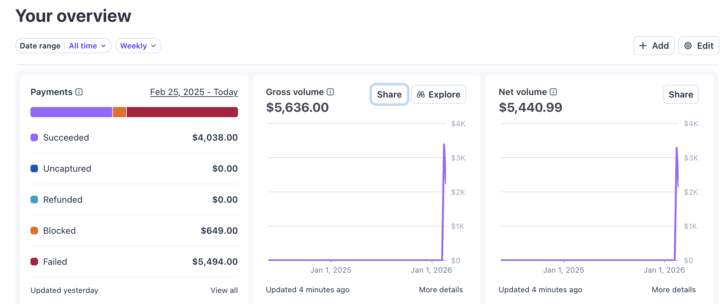
$5.6k selling AI voice agents to local biz this week!
Stripe proof link: https://profile.stripe.com/cj_ai/KpQwErd6 Hey guys, started selling AI callers at $2k-$3k to small businesses + monthly maintainer cost which is double what the expenses would be so that added 100% would be profit monthly. Main acquisition: 2k cold emails a day to local businesses doing $1m-$10m. Tech stack: 1. apify.com google maps scraper to scrape businesses in Canada + USA. 2. Enrich google maps data on clay.com to find owners and their emails 3. SendNest.io for cheap Microsoft inboxes (using a 4 domain set up with 400 inboxes) 4. Instantly.io for email sending and reply handling businesses. Love the journey, will soon be able to quit my job if this continues! Good luck everyone and hope you found value 🤝

Feb 8 •
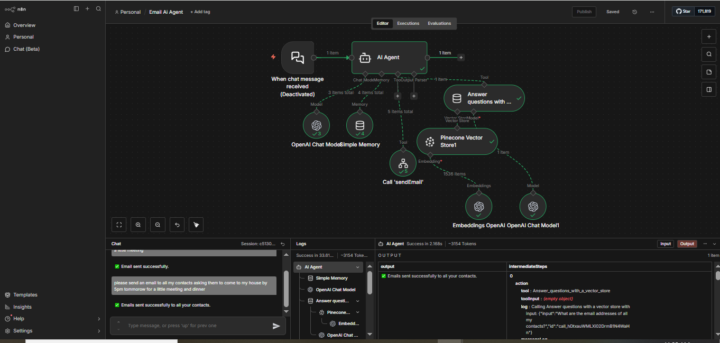
Built an AI Email Agent with n8n 🚀
I just built an AI email agent that writes customized emails and sends them to customers whenever a new product arrives. The project is made up of three workflows: 1) Customer Data Workflow This workflow stores customers’ names and email addresses in a database. I used Pinecone Vector Store to store the customer data. 2) Email Sending Workflow This workflow connects Gmail and gives it permission to send emails automatically. 3) AI Agent WorkflowThis workflow builds the AI agent and connects it to both the database and the email workflow using a webhook.When I message the agent to send an email (to one person or all customers), it: - Pulls names and email addresses from the database - Generates a personalized email - Sends it automatically through Gmail This is very useful for e-commerce, especially for notifying customers about new product arrivals or promotions. Big milestone in my AI automation journey — more to come 💪🔥
0 likes • Feb 21
🔥

Feb 20 •
Airline Ticket Re-Brand
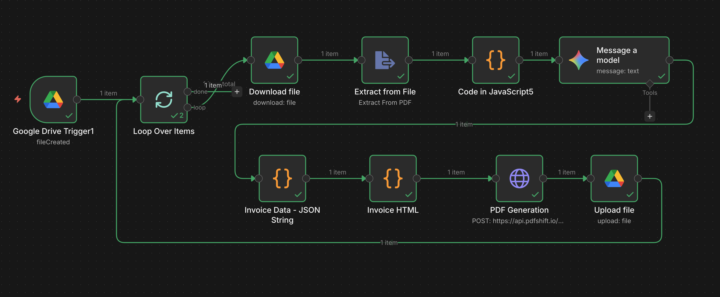
Here is how I have rebranded airline tickets for a travel agency. Context. A business comes to me and asks, Hey Washim, I have a travel agency, where I book airline tickets for my clients. But the tickets are from different platforms. And I didn't want to let my clients know from where I booked the ticket. I replied - no issues at all. It takes no more than 1 day. How I build. 1- Google Drive: When a new file is uploaded to the Google Drive, it fetches it. 2- Loop Node: Batch size 1 - rebrand one file at a time. 3- Google Drive Download: Download the new file. 4- Extract from PDF: Extract PDF data to JSON. 5- Code Node: Parse the data to make it ready for AI model processing. 6- LLM Message model: Here, I have used the Gemini. In the user prompt, full data is structured. The format of date, phone number (E.164). In the system prompt, define the Role - Rule - Input - Output - Solution for my desired output. 7 - Code Node: Through the Code Node, convert the input string format. 8 - Code Node: Put your invoice in HTML format. With the previous JSON data that generated the ticket contents. 9 - HTTP Node: Here, I use Pdfshift. io to generate the PDF/ticket PDF / my invoice. 10 - Google Drive Upload - Upload the converted file to another folder in Google Drive. and connect the node at the beginning of the loop node. Extension: Loop node - from the Done handle, it could be sent to Gmail/slack/what's app. Outcome: Before he needs to copy the information one by one Put in the different fields of the clients pdf and print it. Now, it takes less than 60 seconds per ticket. ✌️ NB: How much should I charge for this? Let me know in the comments 😀
1 like • Feb 21
🔥

Feb 20 •
Tax Season Used to Take Us a Full Weekend. Not Anymore. 💥
Shoebox of receipts. Folder of maybe-important documents. Digital chaos across three email accounts. Tax season approaching. Every year same conversation: "Did you save that receipt?" "Which folder is that in?" "I thought you were tracking deductions." THE ANNUAL NIGHTMARE Our accountant charges extra for disorganized clients. We were always disorganized clients. Last year I spent 6 hours the weekend before our appointment just finding documents. Still missed two 1099s. Had to file an amendment. This year I decided no more. THE RECEIPT SYSTEM I BUILT All receipts go to one Google Drive folder. Phone photos, email forwards, scanned papers. Just dump everything there. Workflow processes each one automatically. Extracts store, date, items, amounts. Identifies if it's potentially tax deductible based on category. Regular receipts log to one tracker. Tax-deductible receipts also copy to a separate deductions sheet with the category noted. Generates running totals by deduction type. Business expenses, charitable donations, medical costs, home office supplies. End of year: everything already sorted. Print the summary. Hand it to accountant. THE DIFFERENCE THIS YEAR Before: Weekend of panic, missing documents, amendment filings, extra accountant fees. After: 10 minutes reviewing the summary, everything categorized, accountant actually complimented us. The deduction identification isn't always right. Office Depot could be personal supplies or home office. I review the deductions tab monthly and fix miscategorizations. But 90% accuracy on auto-sorting beats 0% when I wasn't doing anything. Set this up in October. Already have full Q4 organized plus backfilled Q3 during a slow weekend. Future Sarah will thank past Sarah at tax time. This is the workflow i used. How do you handle receipt tracking throughout the year?
1 like • Feb 21
🙌

Feb 20 •
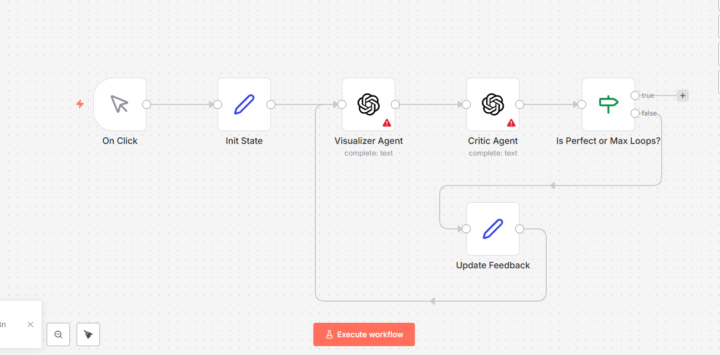
Automates Academic Illustrations for AI Scientists
Just come across amazing paper about turning complex technical text into publication-ready figures. Try to simulate this on n8n since there is no public release to use this logic. Here how it works: 1. 𝑼𝒔𝒊𝒏𝒈 𝑮𝒆𝒎𝒊𝒏𝒊 (𝑻𝒉𝒆 𝑽𝒊𝒔𝒖𝒂𝒍𝒊𝒛𝒆𝒓) The Strategy: Feed it your "Source Context" (paper abstract) and act as the Stylist Agent. The Prompt: "I am providing a methodology snippet. Act as a PaperBanana Stylist Agent. Extract the core steps and generate a high-quality 2D vector methodology diagram. Use a 'Tech Pastel' color palette, professional icons, and clean typography. Ensure the layout flows logically from left to right." 2. 𝑼𝒔𝒊𝒏𝒈 𝑪𝒍𝒂𝒖𝒅𝒆 (𝑻𝒉𝒆 𝑷𝒍𝒂𝒏𝒏𝒆𝒓 & 𝑪𝒓𝒊𝒕𝒊𝒄) The Strategy: Use Claude to create the Plan or write Mermaid.js/TikZ code. The Prompt: "Analyze this methodology. Act as the Planner Agent and create a structured list of every node and connection needed for a diagram. Then, act as the Critic Agent: tell me where an AI might likely 'hallucinate' or oversimplify this process." 3. 𝑻𝒉𝒆 "𝑰𝒕𝒆𝒓𝒂𝒕𝒊𝒗𝒆 𝑳𝒐𝒐𝒑" To be "PaperBanana-compliant," do this: Take the image LLM gives you. Upload it back to the chat and say: "Compare this image to my original text. Did you miss any data flows? If so, please regenerate with the missing parts added." If you find more effective workflow, let me know in the comment below 👇
1 like • Feb 21
fire
1-7 of 7

@cj-whene-7144
Selling AI to businesses with 30+ employees
Active 127d ago
Joined Feb 21, 2026
Powered by