Activity
Mon
Wed
Fri
Sun
Aug
Sep
Oct
Nov
Dec
Jan
Feb
Mar
Apr
May
Jun
What is this?
Less
More
Owned by Josue
The pub where we build the future of sales. Crack a cold one, talk shop, and automate your way to the top.
A space to learn AI and automation, share your journey, and grow together. 🚀
Memberships
Vibe Builders
558 members • Free
AI Automation Skool
2.4k members • Free
AI Income Lab
2.9k members • $29/month
Skoolers
167.6k members • Free
School of Content
1.4k members • Free
AI Systems & Soda
3.2k members • Free
Builder’s Console Log 🛠️
2.6k members • Free
Agent Space
706 members • Free
Chase AI Community
70.3k members • Free
51 contributions to AI Avengers Lab

Jun 2 •
I built a Claude Code skill that edits my YouTube shorts
I did not want to pay $300+ a month for a video editor just to add basic graphics to 60-second clips. So I built a Claude Code skill that handles it. The stack: 1. Record raw video on phone or webcam 2. Drop it into Tella to trim silences and mistakes (5 min manually) 3. Feed the cut to my "daily short" skill in Claude Code 4. Skill writes a storyboard. Asks me for screenshots, logos, B-roll assets I want included 5. Storyboard goes to HyperFrames (a Heygen library of Claude Code skills) which spins up a local video editor and renders the final cut HyperFrames is the part most people miss. It is not a hosted SaaS. It is a set of installable Claude Code skills. You run a single CLI command and it pulls every skill into your .claude/skills/ folder. From there your agent can drive the editor end-to-end. Adds graphics, B-rolls, sound effects, transitions. The mental model that clicked for me: Claude is not editing the video. Claude is running a real editor for you. Same UI you would touch in Premiere, except an agent moves the timeline. Two gotchas I hit: - Quality drops on render unless you explicitly tell the skill to preserve the source resolution - Captions still need a manual pass. I use the Instagram Edits app (free) for that step Watch the full walkthrough: https://youtu.be/dRcELE4vm3s

May 26 •
want to join a coalition?
i think its time to form a partnership across multiple ai automation fields. the goal to create a loose partnership between proven ai automatons that stay in touch with each other daily across time zones, languages and countries sharing their BS free insight (so not skool) and refer each other customers based on real world ai automations that each member specializes and has proven to deliver on time, budget and quality metrical (so be ready to provide contact information of your previous/current customers so we can validate experience and feedback). want in? DM your linkedin/resume/website(requirement)
0 likes • May 26
The idea's solid. The thing that kills most of these is no shared incentive. Daily check-ins fade fast unless referrals actually flow both ways and someone tracks it. What's held mine together is a narrow focus, everyone serving the same vertical so the referrals are real instead of random. What fields are you trying to pull in, or is it open?

May 25 •
Why Claude gets dumber the longer you use it - and how to fix it
There's a name for what happens when Claude starts losing the plot halfway through your session. It's called context rot. Every tool call, every file read, every result - it fills up a window. After 30-40 minutes of real work, 40% of that window is already gone. Claude is working with stale data. It starts contradicting itself. Forgetting what you told it. Giving you garbage. It's not a bug. It's just how these models work. Friday we covered three skills that solve it: - GSD (Get Shit Done) - each task gets its own fresh sub-agent. Like giving each job its own office instead of stacking everything into one room. - - Context Mode - compresses a 315KB tool output down to 5.4KB before it hits your context. Same information. Fraction of the cost. - - Claude Mem - persistent memory across sessions. Claude wakes up next week knowing exactly what you were building. The contractor forgets you between gigs. The employee remembers. That's the difference. Full recording: https://youtu.be/cr7XVJJk-Ec See you Friday.
1 like • May 26
Context rot is the real ceiling on long sessions. The fix that stuck for me: stop running one marathon chat. Break work into fresh sessions with a short markdown handoff the next one reads first, so context stays small and current. /compact helps but it's a band-aid, the durable fix is external memory the agent reloads, not a bigger window. How are you handling the handoff?
May 26 •
The /goal command turns Claude Code into a worker + evaluator loop
Claude Code shipped /goal a few weeks ago. Codex and Hermes have their version too. It replaces the old Ralph loop plugin people were running on their own. The idea is simple. You set a goal, Claude runs until the goal is met. What's actually happening under the hood: A worker model (Sonnet or Opus) does the real work. Writes code, runs bash, reads files. An evaluator model (Haiku) reads the conversation every turn and checks if your condition is met. When the evaluator says done, the goal auto-clears and you get control back. The catch most people miss: the evaluator only sees the transcript. It cannot run commands or check files itself. So your end condition has to be something the worker's own output can prove. Otherwise it loops forever and burns tokens. The prompt framework that works for me: 1. End state. One measurable thing. A test result, a file count, a markdown doc. 2. State check. How Claude proves it. A command, a script. 3. Constraints. Guardrails so it does not take shortcuts on other files. 4. Safety cap. Stop after 28 turns or 45 minutes. Non-negotiable. Real example: migrating 50 skills from one repo to another. Without /goal, Claude pings you for approval every few files. With /goal in auto mode, it ran straight through. Zero misses, zero babysitting. One gotcha. You need auto mode or bypass permissions on. Otherwise it stalls waiting for input and the loop dies. Also worth knowing: only one goal per session, condition can be up to 4,000 characters, and the goal survives if you close the session. You can resume it. Watch my full breakdown here: https://youtu.be/dcOg_xm5LUc?si=Syt1oZ_rIFo7BZQ_
1
0

May 9 •
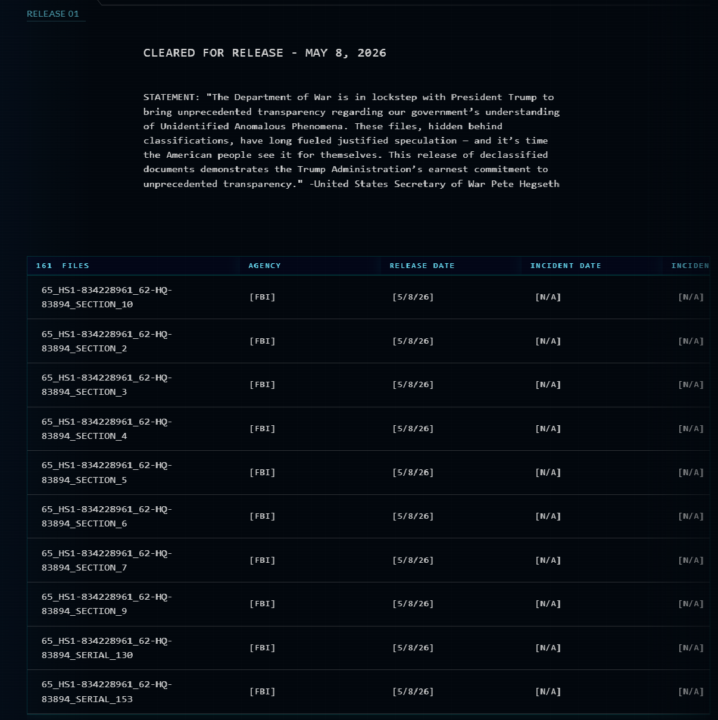
UFO release AI powered automation
created n8n + dockling + ollama + deepseek + qdrant + obsidian automation to convert all recent US government UFO files into a searchable and interconnected library that can be queried, visually searched and AI prompted.
0 likes • May 20
This is the kind of project I love seeing. Qdrant plus Obsidian for searchable plus visual is smart. Are you scraping the gov releases live or did you do a one-time dump? The ongoing updates are where most of these projects die.
1-10 of 51

@josue-hernandez-1795
Automation and AI Enthusiast
Check out my YT!
https://www.youtube.com/@AIJosue
Active 2d ago
Joined Mar 19, 2025
Phoenix, Arizona