Activity
Mon
Wed
Fri
Sun
Jun
Jul
Aug
Sep
Oct
Nov
Dec
Jan
Feb
Mar
Apr
What is this?
Less
More
Memberships
RS
Remote Sales Alliance
50 members • Free
Chase AI Community
59.9k members • Free
AI Automation Society
351k members • Free
AI Automation Agency Hub
314.3k members • Free
Founders Accelerator (Free)™
17.9k members • Free
Agency Owners
19.8k members • Free
12 contributions to AI Automation Society

Feb 27 •
Client Issue: Website Form to Webhook
I’m building out an automated outreach agent for a client that takes info from website form submissions and adds it to their CRM. It then uses this info to personalise automated outreach. Issue: They have a Wordpress site so we used a cf7 to webhook plug in to connect to the n8n workflow. The problem is the plug in won’t save the production webhook URL and keeps reverting to the test webhook URL so the workflow never gets called. Does anyone know of reliable word press plug ins to connect contact forms to webhooks? Lastly: They usually receive an email from Wordpress when a form is filled. But when the webhook was working, no emails were coming through from Wordpress, thought I’d see if anyone has experienced this. Help would be much appreciated 😅
1 like • Mar 5
@Arsh Singh Thanks Arsh, this is super helpful! I'll try this out but I'll definitely pop you a dm if I encounter any hiccups
Feb 16 •
I’ll Automate Your Business Bottlenecks
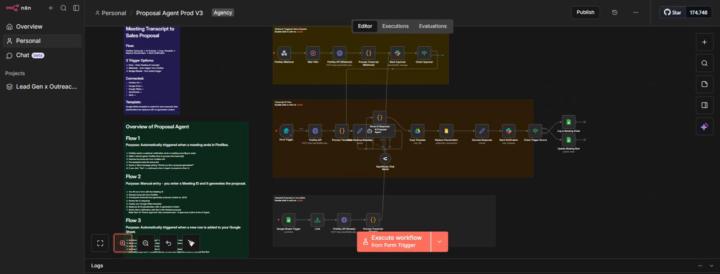
Hey everyone, I’ve spent the last few months going deep into AI automation and low-code tools, and I’m now actively looking for my first real client project. I mainly use n8n and Claude Code, and I’ve built several working systems, including: • Automated lead generation and enrichment workflows • A cold outreach system with tracking • A proposal agent that converts meeting transcripts into ready to send proposals • An AI generated UGC automation workflow I currently work in a Business Analyst/Junior Product Manager role in one of Africa’s leading Fintech company’s but my goal is to transition full time into building my own AI automation agency. I’ve been involved in initiatives such as enabling Apple Pay on the platform and helping improve interoperability between banks. A big part of my role is drafting detailed requirements, mapping processes end to end, and properly scoping projects, which has strengthened my ability to design automation systems that are clear, structured, and accurate. Although I haven’t worked with a client yet, I’ve put in serious hours learning, building, testing, and refining these systems. I’m highly motivated, disciplined, and eager to provide real value to real businesses. If anyone in this community needs help automating a manual process or wants to experiment with AI in their business, I would genuinely love to help!
1 like • Feb 17
@Mohammed Imran Thanks Mohammed, appreciate it!💪🏽
Feb 13 •
Claude Code Pricing
Just a thought I had and wondered if anyone here as done this yet. If you’re working with a client or multiple clients and use Claude Code as a key part to building automations, do you just take out the Claude Max subscription and add that to your pricing? If so, does the 200k token limit still apply on the max plan? Curious to know how anyone using Claude Code in their builds goes about this. Looking forward to your engagement! 😁
3 likes • Feb 14
@Matthew Sutherland Thanks Matthew, this really helped, especially treating it as an overhead not a line item. I’ll keep this in mind, I’ve found the 5-hour windows to be sufficient if the prompts are detailed enough and the md files not overly bloated. But as things scale I think a fixed cost would be more reliable
2 likes • Feb 14
@Muskan Ahlawat Well at the moment I’m just using the pro plan at $17/month and working on optimising my token usage. But I’ve just hit my limit after an hour of work so when more projects come in, I’ll definitely be using the $100 max plan

Feb 13 •
🤨 Which AI tool do you use the most right now?
Curious what everyone here is actually using day to day There are a lot of tools now, but most people tend to rely on just one or two as their main workflow. Vote below for the one you use the most at the moment:
Poll
56 members have voted

5 likes • Feb 13
Claude Code & n8n, very little that you can’t build with that combination 🤝🔥
Feb 10 •
Cold Outreach and Proposal Agent
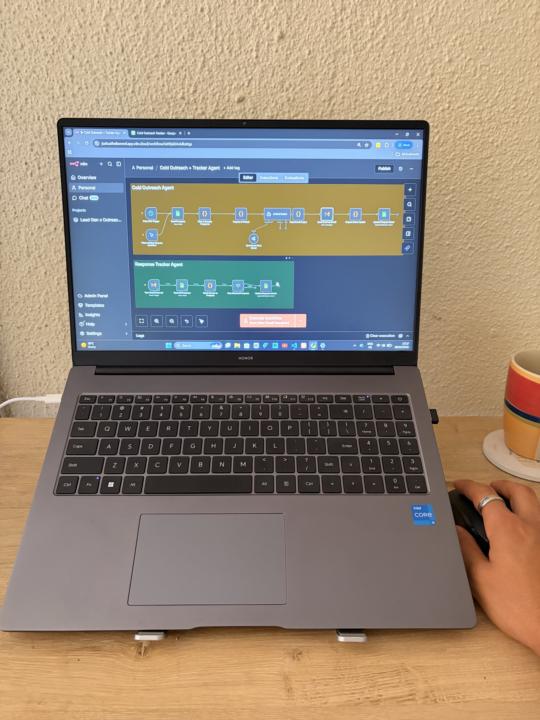
This may not seem massive, but personally it’s a big win Over the past 6 months I’ve been stuck in the loophole of overconsuming n8n content before realising I need to build. However, as soon as my workflows would break and I find myself in a debugging dead end, I’d be back to simply consuming content. Until I set up Claude code. Over the weekend I built out 2 fully functional automations using Claude code in the space of a few hours: - A proposal agent that turns meeting transcriptions into polished proposals almost instantly, sending the link over via slack for approval - A cold outreach agent that sends personalised outreach to prospects whilst simultaneously updating the CRM of choice Nothing crazy, but finally automations that are working. I also realised that all the learning I done on n8n made debugging workflows so easy, but going forward the focus will definitely be on making my prompts as clear as possible. I’m currently working a 9-5 as a junior product manager/business analyst but spend almost my time before and after work learning and building. My goal is to go full time in AI automation. I thought I’d share this small win as a reminder to myself that even if you’re just starting out, the key is to keep going, you’ll get better and the wins will come. On that note, my focus is getting as much experience in as possible and building my portfolio, so if you’re in need of any automations, feel free to reach out. I’m committed to getting results that create tangible value for whoever I have the opportunity to work with. To whoever reads this, have a blessed day ahead!
2 likes • Feb 10
@Hicham Char Definitely and thank you🙏🔥 Just doing some research on cost efficient tools to build out a lead generation and enrichment automation to add to the system
2 likes • Feb 10
@Muskan Ahlawat Thanks Muskan!🙏
1-10 of 12

@joshua-reed-8241
Committed to personal growth and pursuing mastery. Aiming to connect, study and contribute to top performers in their respective fields.
Active 8d ago
Joined Aug 11, 2025
Johannesburg, South Africa
Powered by