Activity
Mon
Wed
Fri
Sun
Aug
Sep
Oct
Nov
Dec
Jan
Feb
Mar
Apr
May
Jun
Jul
What is this?
Less
More
Owned by Vitalii
Where creators learn to build commercial AI visuals that actually convert. Realism, ads, influencers, video and workflows that make money.
Memberships
AI Creator Profits
27.4k members • Free
AI Creator School
8.9k members • Free
NextGen AI
45.9k members • Free
AI Creative Syndicate
33 members • Free
Ineffable.ai — Create with AI
479 members • $19/month
AI Realism Starter Hub
20k members • Free
Imperium Academy™
68.7k members • Free
Jack's Community
98 members • Free
Gold Circle Academy
81 members • Free
144 contributions to AI Automation Society

4d •
👑 We Have a New Heavyweight Model
I've been keeping a close eye on the visual generation space lately, and I think we might have just seen a quiet takeover for the number one spot BytePlus just dropped Seedream 5.0 Pro, and it is actively solving the exact problems that Midjourney and standard diffusion models have ignored for a year. We are finally moving past prompting and hoping for the best Here is why Seedream 5.0 Pro is currently sitting at the top of the realism tier: - Precision Pixel-Level Editing: It doesn’t just generate; it acts like a native photo suite. You can use point selection and lasso tools to isolate, swap, or delete specific props without the engine hallucinating and warping the rest of the canvas. - Zero "AI Plastic": It bridges the gap to true photographic quality. It actually understands physical lighting, accurate specular highlights, and real human skin micro-textures instead of defaulting to a CG video game aesthetic. - Native Structural Logic: If you ask it for an intricate UI blueprint or infographic, it natively structures the data hierarchy without turning it into a cluttered, unreadable mess. The baseline for high-fidelity generation just moved Drop your raw comparison renders in the comments below! 👇
5
0
4d •
🤯 Biggest Higgsfield Release Ever❗
Higgsfield just announced what they call their biggest release yet: Higgsfield Apps Instead of only generating images and videos, you can now generate full-stack applications directly from a prompt From what Higgsfield has shared, Apps can: • Build the frontend, backend and database • Generate images and videos inside your app using Higgsfield models • Create websites, browser extensions, desktop apps and mobile apps • Deploy directly to a live URL when finished • Run inside Higgsfield Supercomputer or through Claude using Higgsfield MCP The interesting part is that Fable 5 acts as the engineering layer, planning and building the app similarly to how a software engineer would, while Higgsfield handles all of the visual generation Feels like they're moving beyond an AI image platform and becoming a complete AI creation platform Anyone tried it yet? Curious how it compares to Lovable, Bolt and Replit.
6
0

5d •
📸 The Perfect Smile: Zero-Drift Identity Lock
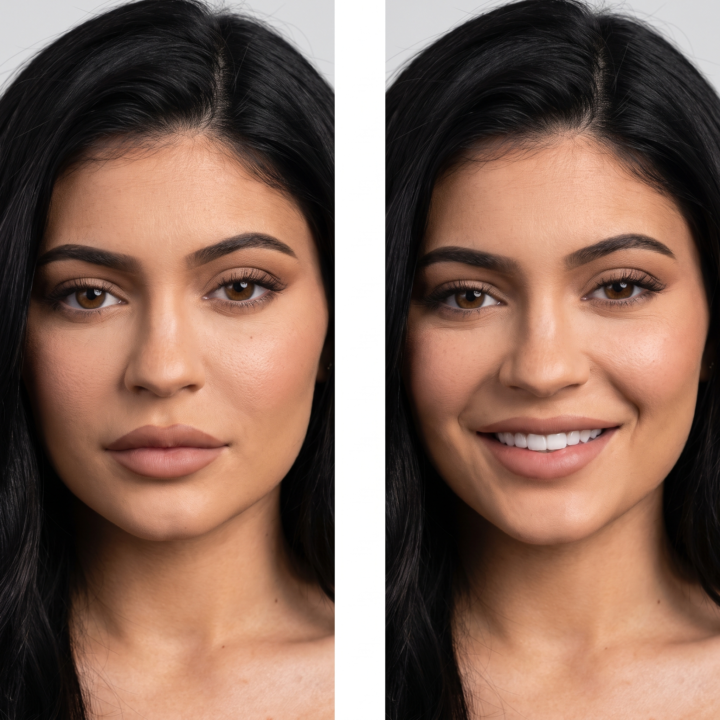
Most image-to-image tools destroy a character's identity the moment you ask for a simple facial change. If you prompt an engine to turn a neutral expression into a smile, it doesn't just adjust the mouth muscles—it completely rewires their jawline, bone structure, and eye shape, turning them into a different person. To fix this, you have to treat the prompt like a medical surgical brief. You must explicitly fence off the anatomical nodes that cannot move, and only give the AI permission to flex the specific muscle layers responsible for a natural smile. Here is the exact framework to run inside your image-to-image or inpainting workspace to execute non-destructive facial modifications. 📐 The Master Expression Prompt Drop your source image into your generator, mask the face if using an inpainting tool, and apply this exact text layout: Change the facial expression of the person in this photo to SMILING. Keep the person's identity, age, bone structure, face shape, eye shape, nose, lips, and jawline exactly as in the original. ### ANATOMICAL PRESERVATION - Preserve skin texture, pores, freckles, moles, facial hair, and hairstyle with absolute fidelity. - Adjust ONLY the local muscles involved in the new expression—specifically the mouth, cheeks, eyes, and eyebrows—so the change looks anatomically natural. - If the expression involves a smile or laugh, show teeth only if appropriate and keep them entirely consistent with the person's real teeth shape, spacing, and enamel color. ### ENVIRONMENTAL LOCK - Preserve the original lighting direction, specular highlights, shadows, skin tone, and color grading. - Do NOT change the head position, tilt angle, body pose, gaze direction, clothing, or background elements. ### QUALITY BAR The result must look like a real photo of the exact same person captured a single split-second later with a natural, authentic expression shift. Zero digital artifacts, zero identity drift.
6d •
🏆 The Reveal: Did You Spot the Real Photo?
Alright, the answers are in! Let’s see who actually has the eagle eyes in this group AI image generation has gotten insanely good at faking raw, unedited smartphone photos. It doesn't just do glossy cinematic shots anymore—it fakes bad lighting, film grain, and realistic skin. But the AI still struggles with basic anatomy and physics Here is the official breakdown of which image was actually real 🤖 Image 1: The Brown Bikini (AI GENERATED) This one tricks a lot of people because the lighting looks so natural, but it completely fails on the details: - The Hand: Look at her left hand resting on the wooden chair. The fingers are literally melting together, and the pinky finger fuses straight into the wood. - The Tattoo: The butterfly tattoo on her arm is completely flat. It looks like a digital sticker pasted on top rather than ink wrapping around a curved arm. 📸 Image 2: The Food Truck (100% REAL) If you picked the girl in the red polka-dot top, you got it! A lot of people get thrown off by the weird, wavy reflection on the left side. But that’s just how curved metal panels on real food trucks reflect light. The background makes sense, the text on the truck is readable, and most importantly, her hands have normal knuckles and joints. 🤖 Image 3: The Blonde with Glasses (AI GENERATED) This image has that flawless "plastic" AI skin, but the absolute dead giveaway is the hand on top of her head. - The Melting Fingers: Her fingers have no joints or fingernails—they are just a smooth mass that physically blends and melts right into the strands of her hair. 🧠 The Takeaway AI is getting better every single week, but it still panics when hands interact with things like hair, wood, or fabric. If you're ever unsure, zoom in on the hands! How many of you got it right on the first try? Did the reflection on the food truck trick you? Let me know below! 👇

9d •
🚨 Real Person vs. Gen-AI: The Test
The gap between mobile photography and generative AI has officially closed Take a look at these three images. Two are completely synthetic assets generated straight from a prompt engine, and one is a real human photograph The Challenge: Can you spot the real one? - Image 1: Brown Bikini / Poolside Selfie - Image 2: Red Top / Food Truck Scene - Image 3: Glasses / Lounge Composition As creators, we pride ourselves on spotting classic AI giveaways—smooth skin shaders, bad text rendering, or weird background melting. But with the latest updates to image latency pipelines, the tells are becoming nearly invisible micro-details Lock in your guess in the comments. Are you picking 1, 2, or 3? Let’s see how many professionals can actually spot the human element. 👇

1-10 of 144

@vitalii-hryhorenko-4120
Big AI Enthusiast who helps creators master AI product visuals. Simple systems, repeatable results, no studio needed
Active 2h ago
Joined Nov 17, 2025
ENTJ
Leamington Spa
Powered by