Activity
Mon
Wed
Fri
Sun
Aug
Sep
Oct
Nov
Dec
Jan
Feb
Mar
Apr
May
Jun
Jul
What is this?
Less
More
Memberships
Athlete AI Community
450 members • Free
5 contributions to Athlete AI Community

4d •
Advanced Athlete OS is live (Level 2 unlock)
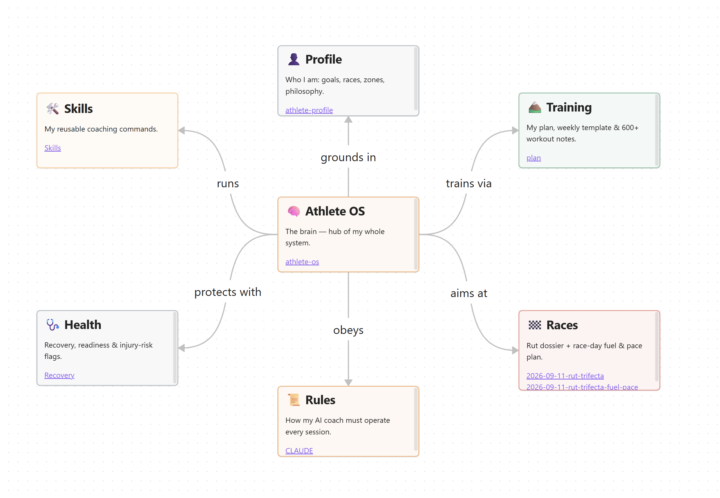
Just dropped the first lesson of the new advanced Athlete OS! This will be the first part of the advanced series where we take the Athlete OS beyond our local computer and into our every day lives. The idea - your AI coach is only as good as how your data is organized. So this one gives your Athlete OS a real brain. You take everything you've built and turn it into a connected wiki vault: your whole training history structured, tagged, and linked so your AI can actually remember all of it. What that gets you is way better answers. Instead of reacting to your last few runs, it reasons over years of your real data - and the more you feed it, the sharper it gets. It's able to draw inferences across your entire data set and provide you actionable results aimed at improving your training. One catch - it's locked at Level 2. Easy to hit though. You level up from likes on your posts and comments, and Level 2 is just 5 points. So introduce yourself, post a win, and comment on a few other people's posts. That unlocks it. See you in there. Course here: https://www.skool.com/athlete-ai-community/classroom/e8195ec4?md=ff851d9fea8f4363b69c0444f7214a23 I'll be posting the remaining initial videos of the Advanced Series later this week, so if you get through this one, hang tight as the others are coming! Pumped to get feedback and see what you all can build! Kevin

1 like • 1d
Question for the community - how does this meaningfully impact our model? Shouldnt the data organization in the MD files we have be read each time? I am a newbie at AI but it would seem this would be just organizing the information differently (unless that helps the model read it quicker)?

2d •
Monthly spend/cost
Hi everyone, I hope you’re doing well. I have a quick question before I go down this amazing rabbit hole. Could someone please tell me what to expect in terms of monthly spend? I am completely new to Claude. I understand that I need a pro subscription which is $30 USD per month. Will that be enough? I’m sure it’ll be well worth it but so far I’ve been doing a lot with free tools thanks for your help.
0 likes • 2d
Hi - had the same question, I have not hit a usage limit yet thru day 7 of the challenge! I will say, make sure to not use Fable all the time, as that does eat up usage (great for thinking thru strategy, but turn to a lower tier model for the execution). I also have usage credits turned off so if I do hit a limit, I dont accidentally wrack up a bill. You can check all of this in your Claude Desktop's settings, and it gives you notifications if you start to get close.

2d •
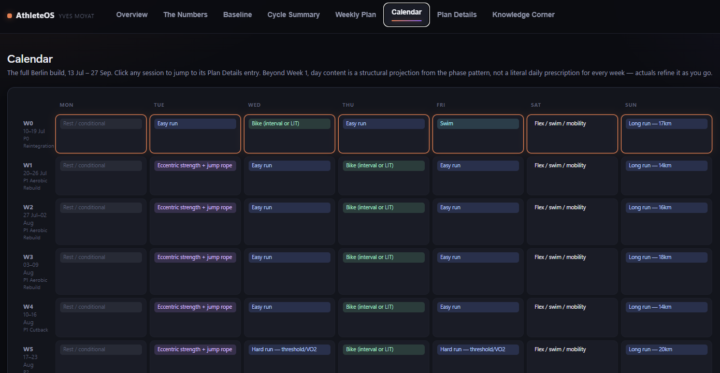
Dashboard evolving nicely!
The coolest thing I got in the dashboard is the dynamic calendar. You click on any session in the calendar. That brings you to the list of activities. Click in any activity and in the bottom the "session details" open up, that show you exactly what is on the menu today.
1 like • 2d
This is sweet - going to try something similar


1 like • 3d
This is awesome! How did you stand up your nutrition tracker? I see you have a ton of detail - I have a very basic one in my coach where I send a pic / give description of what I eat and it logs in an append only md - curious to hear if you have a better / more efficient setup and interface
3d •
Whoop x Athlete OS
Hi guys - figure there are other people who also use Whoop in conjunction with Garmin / Strava for their fitness tracking, so I integrated into my Athlete OS and had Claude spit out some simple instructions anyone can copy/ paste into their system and integrate Whoop for recovery alongside Strava for activities! Excited this worked, and my dashboard now includes my Whoop recovery score and RHR each day - and my coach takes these factors into account in my weekly reviews. Overall, process is super easy and mirrors the Strava connection almost 1:1! --- Connect my Whoop to this project so my recovery data (recovery score, HRV, resting heart rate, sleep, strain) can feed my training plans. Walk me through it like a guide, one step at a time, in plain English. I may have never done anything like this, so go slow, explain what you're doing, and wait for me whenever you ask me a question. Don't dump it all at once. Here's the plan. Take it one step at a time: Step 1 - Help me register a Whoop developer app. Tell me to sign in at developer.whoop.com with my normal Whoop account and create a new app. Walk me through the form: any app name works (it's just for me), use http://localhost:8080/callback as the redirect URI (explain that nothing needs to run there - it's just a landing spot for a code I'll copy), and select the read-only scopes: read:recovery, read:cycles, read:sleep, read:workout, read:profile, read:body_measurement, and offline (explain that offline is what lets you refresh my access without me re-approving every hour). Wait for me to come back with my Client ID and Client Secret. Step 2 - Store my credentials safely. Save the Client ID and Secret in a .env file in this project (create it if it doesn't exist) as WHOOP_CLIENT_ID and WHOOP_CLIENT_SECRET. Two hard rules: never repeat my secrets back to me in chat, and if this project uses git, make sure .env is in .gitignore before anything else happens.
1-5 of 5

Active 4h ago
Joined Jun 29, 2026
Powered by