Activity
Mon
Wed
Fri
Sun
Aug
Sep
Oct
Nov
Dec
Jan
Feb
Mar
Apr
May
Jun
What is this?
Less
More
Memberships
Business Lab | SLLHQ
56 members • Free
AI for Beginners
1.2k members • Free
197 contributions to The Founders Collective

13d •
Systems, Systems, Systems
A 79-inch robot just started patrolling the grocery aisle and most people walked right past it without thinking twice. It's called Tally. Kroger is running it in about 70 stores right now across Ohio and Indiana. It scans shelves multiple times a day, identifies what's low or out of stock, and sends action alerts directly to staff through a mobile app. No clipboard. No manual count. No end-of-shift inventory report. The data collection is automated. What's left for humans is interpretation and response. That's the shift showing up everywhere right now. AI takes the task that required a human body or a human hour. What remains is judgment, speed of action, and the ability to use the output. If you're an entrepreneur and you're still doing the "Tally" version of tasks in your own business, that's the thing to look at this week. What are you collecting, counting, or tracking manually that a system could be handling while you focus on what actually moves the business?


1 like • 12d
This is a great example of the difference between collecting information and actually building a system around it. Tally can identify the shelf problem, but the value still depends on what happens after the alert. Someone must receive it, understand the priority, take action, and confirm that the issue was resolved. That same test applies inside a small business. Automating data collection is helpful, but a complete system also needs clear ownership, a response time, and a way to close the loop. Otherwise, we have not removed the bottleneck. We have simply created a faster way to see it.
0 likes • 2d
@Chris Wahoski 😅
2d •
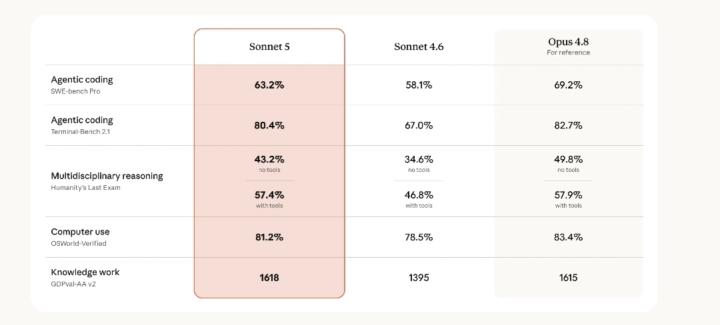
Sonnet 5
One look at these numbers and you'll see just what a good affordable model this is. 40-60% less token usage than Opus 4.8
0 likes • 2d
This is exactly the kind of comparison founders should pay attention to, but I’d separate two things: token usage and cost-per-useful-output. The big win with Sonnet 5 seems to be cost-performance, not automatically that every task will use fewer tokens. If the model gets you to a usable result with fewer retries, cleaner execution, and a lower price point, that is where the real savings show up. For founders, the question is not just “which model is cheaper?” It is “which model gets me to the decision, draft, build, or workflow with the least babysitting?” That is the cost that actually matters.
8d •
No Better Than Now
30.4 million one-person businesses are running right now in America. Not side hustles waiting to become real businesses. Not hobbies with a PayPal account. Businesses. Generating $1.7 trillion in economic output. And that number is growing faster than at any point in history. I've been building as a solopreneur for years. I remember when "one person can't compete with a team" was just accepted as truth. You needed staff, budget, infrastructure, and connections before anyone took you seriously. That era is over. We're living in the first moment where a single person with a laptop, a strategy, and the right AI systems can build something that used to require a team of 10. The barriers that kept solo operators small aren't gone. They're just not the same barriers anymore. 64% of solopreneurs are already using AI for marketing. 37% for customer service. 36% for sales. The ones who haven't figured that out yet are still trading time for output. The ones inside communities like this one are building leverage. Here's what the data actually confirms: 77% of solopreneurs are profitable in year one. Not eventually profitable. Year one. 84% funded themselves. No investors, no permission, no pitch decks. The biggest reason people started? To own their time and build on their own terms. That's not a hustle stat. That's a freedom stat. We are not grinding our way to success in The Founders Collective. We're building systems that let one person operate like a force multiplier. AI is the infrastructure. Strategy is the edge. Community is the compounding asset. There has never been a better time in history to build as a solo operator. Not in the industrial age. Not in the dot com era. Not during the early social media boom. Right now. This moment. With what we have access to today. The only question worth asking isn't whether the opportunity is real. The data settled that. The question is: are you treating your business like the real operation it is, or are you still waiting for permission to go all in?
2 likes • 7d
This is such an important distinction. Solo does not mean small, underbuilt, or less legitimate anymore. It just means the operating system has to be smarter. The trap I see a lot of solo founders fall into is thinking AI replaces the need for structure. It doesn’t. It exposes whether you have any. If the offer is unclear, the follow-up is scattered, the customer journey lives in your head, or every decision depends on your energy that day, AI just helps you make the mess faster. The real leverage is when one person has clear strategy, simple systems, useful tools, and a community that keeps them from building in isolation. That is when “solo” stops meaning alone and starts meaning focused. What part of your business still depends too much on your memory, mood, or spare time?
1 like • 7d
@Marcie Thompson 👋🏽Exactly! Thanks
10d •
Wanna Win a $100 Amazon Gift Card?
We started a social media challenge this week. There's still time to join. If you would like to be a part drop "100" in the comments and I will send you the info.
1 like • 8d
[attachment]
13d •
Dario Amodei Interview
Study successful people. Here's a link to the transcription summary and notes. Video below. https://web.plaud.ai/s/pub_1eac9d52-c3c6-413f-a044-038d4e641d61::AcfEzzKWotpAovCALT5148wZuhuWMt5Xt1QNVz-wSSwEtsmfZ6QCOYMkNkW7BbLz9KyQq9CpdJ4UH5EC

0 likes • 12d
Very cool! What stood out to me was not one specific prediction. It was the way Dario thinks about what will remain valuable as AI makes more work easier to reproduce. If complex software, polished content, and basic execution become cheaper and faster, those things alone are no longer strong protection. Customer relationships, trust, domain knowledge, judgment, and the ability to understand a problem deeply may become even more valuable. A useful exercise for any business is to list everything you currently consider an advantage. Then ask which advantages a competitor could reproduce with AI within a year and which ones would still be difficult to copy. Studying successful people becomes most useful when we study how they evaluate change, make decisions, and recognize when yesterday’s advantage may not protect tomorrow’s business.
1-10 of 197
@jordanna-shean-8798
Listen → Audit → Identify where Revenue is slipping through the cracks → Recommendation → Installation → Training & Support through Business Lab
Active 4h ago
Joined Dec 31, 2025
Mesa, AZ