Activity
Mon
Wed
Fri
Sun
Jul
Aug
Sep
Oct
Nov
Dec
Jan
Feb
Mar
Apr
May
What is this?
Less
More
Memberships
Clief Notes
36k members • Free
AI Automation Mastery
29.5k members • Free
AI Architects
292 members • $97/m
Vibin' Coders
240 members • $399/y
The Vibe Marketers
2.7k members • $199/y
Content Academy
14k members • Free
Startup Empire
734 members • $2,999/y
AI Automation Society
389.4k members • Free
4 contributions to AI Automation Society

May '25 •
MS MarkItDown
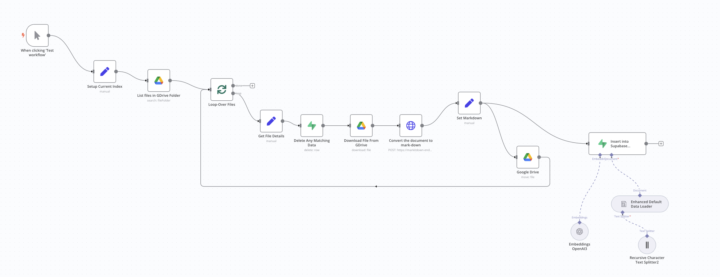
Hi Everyone, Microsoft released an open source product for converting almost any file into markdown, which can then be injected into your RAG setup . Its a python package, I created a web wrapper than you can host for free on platforms like https://leapcell.io You can then build this into your n8n work flow, the attached image is the way I use it , it watches. google drive folder, parses the file, injects into supabase vector and then moves the file to a completed folder. If anyone wants to use the wrapper service for there own projects you will find it on my GitHub account https://github.com/sqaured-lemons/markitdown-endpoint-webwrapper Hopefully this helps some of your just get this stuff out of the door

Feb '25 •
Extract Data and Set fields from a user message - Telegram Bot
I was wondering how can I extract certain details from a user's message and save it in fields to be processed later in the workflow. Assume a user sends a message to telegram bot "I'm planning a trip to Kenya for 7 Days, starting on 5th July 2025 and we will be 2 adults, 1 teen and 1 kid. Please give me the packages and prices" The workflow must extract and store the information as below to be processed later in Google Sheet to fetch package prices. Travel Duration: 7 Days Tour Start Date: 05/07/2025 Group Size Adults: 2 Teen: 1 Kid: 1 Sorry if the question is too basic. 🙈
0 likes • Feb '25
for simplicity I would pass this to an LLM, give it telegram chat message and ask it to generate structured data , the set fields against the json object it outputs . Hope this helps

💎
⭐
Dec '24 •
🚀New Video: The Best RAG System On YouTube
Learn how to create a powerful Retrieval-Augmented Generation (RAG) system using n8n, Supabase, and Postgres. This system automatically uploads documents to your vector database based on file type and seamlessly updates your records whenever changes are made to your files. Perfect for streamlining data management and enhancing your AI knowledge base.
3 likes • Feb '25
Hi Everyone , and thanks Nate. I had built a RAG system with Cursor but defiantly moving across to this, I have one problem that I cannot figure out . On my Mac when I copy the files to the watched folder, because the MAC copies the created date across (sigh). The files are then not getting picked up. Does anyone have any work arounds. ? Thanks in advance !
3 likes • Feb '25
I have a work around using the file updated workflow, if anyone gets stuck here, enable the file updated workflow and your good to go

Feb '25 •
Question About The Best RAG System On YouTube (Steal This!)
Hey guys This is my first interaction with the community, I have a question that may have already been answered in a previous video but it's blocking me. I ran the complete flow without errors but supabase doesn't have any records, should I have created the tables previously or would the pipeline itself do this? Can anyone help me? If it is necessary to create the documents and chat tables, does anyone have the create statement?
1 like • Feb '25
The Memory client will automatically create the table. Your documents table you can find the create statement on the Langchain website . https://js.langchain.com/docs/integrations/vectorstores/supabase/ if you are using Nates template, this should work , if not check the statement is match_documents
1-4 of 4

@jonathan-gill-moss-3649
I help growing businesses fix messy ops with clear systems, smart tech, and practical support—no jargon, just structure that scales.
Active 25d ago
Joined Feb 4, 2025
Kent
Powered by