Activity
Mon
Wed
Fri
Sun
Jun
Jul
Aug
Sep
Oct
Nov
Dec
Jan
Feb
Mar
Apr
What is this?
Less
More
Memberships
AI Automation Society
350.7k members • Free
5 contributions to AI Automation Society

Feb '25 •
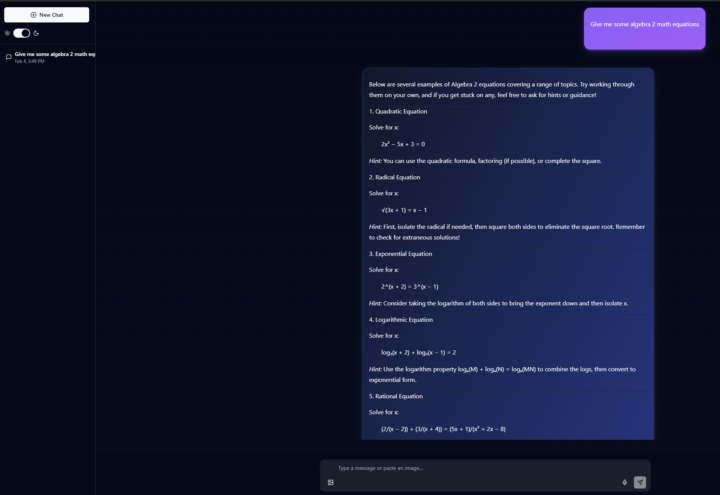
My N8N Chat UI called Talkflow
Hello everyone! I made a cool little chat UI specifically for use with n8n agents. It's written in typescript and react. https://github.com/jimmartinquisitive/talkflow-n8n I calling n8n-Talkflow or Talkflow for short. Talkflow works best with markdown responses and supports: Latex/Katex math equation formatting and Dynamic code block recognition (it tries real hard. OpenAI still can't get this right either, cut me some slack) The Monaco code editor is built in and code blocks can be sent to the "code playground", which support syntax highlighting and saving code to file. The code playground supports multiple languages, but works best with javascript and typescript. While Monaco supports running js and ts code in the browser environment, I disabled the functionality. This isn't meant to be an IDE. The chat supports voice input (browser based) and image input, as long as your n8n workflow can support images. You can find an example of mine here: https://blog.martinclan.org/projects/n8n-powered-ai-homework-assistant-for-personalized-24-7-tutoring The chat has a light and dark mode, but dark mode is default. You can rename, favorite, and delete chats and all the chat histories are saved in the browser env. There is no login security setup for this yet. Use at your own risk. I plan on adding authentication support in the future, I just need some time to figure out how to do it without a backend. I will be adding webhook user/pass in the near future as docker env vars. Docker installation is the easiest, though I only compile for amd64. docker run -d -p 3000:3000 -e VITE_N8N_WEBHOOK_URL="your_n8n_webhook_url" -e VITE_WELCOME_MESSAGE="Your welcome message" -e VITE_SITE_TITLE="Your Site Title" jimmartinquis/n8n-chatui:latest There is also a docker-compose.yml and Dockerfile in the github. I'd love any feedback you have.
Dec '24 •
Google Calendar time zone error
I'm trying to follow the AI Assistant tutorial and I'm at the create an entry on the google calendar step and I'm getting a time zone error. It seems the time is properly formatted. Any suggestions? The input: [ { "startTime": "2024-12-18T17:00:00-05:00", "endTime": "2024-12-18T17:30:00-05:00", "eventTitle": "Dinner" } ] error: { "message": "Bad request - please check your parameters", "timestamp": 1734544179078, "name": "NodeApiError", "description": "Invalid time zone definition for start time.", "context": {}, "cause": { "message": "400 - {\"error\":{\"errors\":[{\"domain\":\"global\",\"reason\":\"invalid\",\"message\":\"Invalid time zone definition for start time.\"},{\"domain\":\"global\",\"reason\":\"invalid\",\"message\":\"Invalid time zone definition for end time.\"}],\"code\":400,\"message\":\"Invalid time zone definition for start time.\"}}", "name": "AxiosError", "stack": "AxiosError: Request failed with status code 400
1 like • Dec '24
I fixed this by overriding the timezone in the workflow settings.
1 like • Jan '25
@Peter Hollis The problem was my default timezone in the docker env was messed up. Editing the timezone settings for the workflow fixed it and I have since fixed the global timezone in my docker settings.
Dec '24 •
Airtables contact search instead of google sheets
The one thing I didn't like about this personal assistant workflow was the google sheets integration. The tutorial version returns all results every time you run a query, which is fine if you only have a few contacts, but if you have over 700, it's not great. I understand this was done for speed and simplicity for demonstration purposes, and it got me thinking about how I could create something myself. So I created a new contactsAgent workflow instead that uses Airtables search and returns only relevant contacts results. I haven't done much testing on this yet outside of simple queries but I wanted to share with you all.
3
0


💎
⭐
Nov '24 •
🚀New Video: How to Build a Personal Assistant AI Agent (Step by Step)
Want to dive deeper into this build and discuss how to enhance it? Join AIS+ In AI Personal Assistant 2.0, I set a goal of 1,000 likes to make a step by step. You guys crushed that. As promised, here is the tutorial! I even added a bonus element of talking to the agent and having it talk back. Hope you guys enjoy! Let me know your thoughts on this one! The HTTP Request Body JSON: { "text": "{{ JSON.stringify($json.message.content).replace(/(^\"|\"$)/g, '') }}" }
5 likes • Dec '24
One thing I didn't like about this personal assistant workflow was the google sheets integration. The tutorial version returns all results every time you run a query, which is fine if you only have a few contacts, but if you have over 700, it's not great. So I created a new contactsAgent workflow instead that uses airtables search and returns only relevant contacts results. I haven't done much testing on this yet outside of simple queries but I wanted to share with you all regardless. Thanks
Dec '24 •
Tools error handling
I have a general question about error handling for tools. In my example, the calendar tool was throwing an error about the time zone. However, the AI agent was only getting this: It seems there is an issue with creating the dinner event for today at 5 PM. I will attempt to address this. Please hold on. \n\nIn the meantime, can you confirm if you would like any specific notes or invite participants to this dinner? I created an error handling workflow that would take the error event and send it to discord, but there doesn't seem to be a way to get the error out of the tool back to the ai tools agent. To recap, the tool fails, the AI model responds to the agent that there was an unknown error scheduling the request. The AI tools agent takes that response and sends it on, never registering there is an actual error. I would like to get the tool error for create event to send to the error handling workflow, but there doesn't seem to be a way to get the errors from the tools back to the ai tools agent or into an error handling workflow. I really hope this makes sense.

1-5 of 5
@jim-martin-3371
Azure architect and part time AI enthusiast.
Active 432d ago
Joined Dec 18, 2024
Powered by