Activity
Mon
Wed
Fri
Sun
May
Jun
Jul
Aug
Sep
Oct
Nov
Dec
Jan
Feb
Mar
What is this?
Less
More
Owned by Jeremy
Master the Art & Automation of High-Net-Worth Growth
Memberships
Automatable Free
6.3k members • Free
0 to 100 in 90 Days
238 members • Free
Land Closers Academy
1.3k members • Free
Mortgage Broker Mastery
89 members • $29/month
Bitcoin Sovereigns
628 members • Free
UpHex Ads Lab
711 members • Free
Profit Consultants Network
8.9k members • Free
Assistable.ai
3.4k members • Free
Scale Your Coaching
20.5k members • Free
14 contributions to Assistable.ai

Oct '25 •
Default Voice Engine
Can someone help me understand the voice engine setting on an assistant? What is the default voice engine? What is the difference between Turbo and Flash?
1
0
Sep '25 •
Managing Self Schedule ❓
Is there a way to manage the Self Schedule function? Example: The user asked to be called back after a certain date so the assistant self_schedules to call them back. We listen to the call recording and decide we want to call them back manually. Is there a way to cancel the self_schedule or see who the bot is scheduled to call back?
0 likes • Oct '25
@Christian Betancourt unfortunately, that doesn’t give you any functionality. For example, if someone schedules an appointment from the website, you don’t want the self schedule to call them back. There should be a way to cancel the self schedule.
0 likes • Oct '25
@Assistable Ai fantastic!

Sep '25 •
Issues with scheduling
Hey everyone. I'm hoping I could get some help with a few things! - My booking bot keeps telling people time slots are no longer available when they are. Is this a prompting issue, or is the bot just trying to create some added urgency? lol - It's also scheduling people on the wrong dates. I will tell it tomorrow at 4pm and it will book it in GHL for today at 4pm. Thank you in advance for all your help!
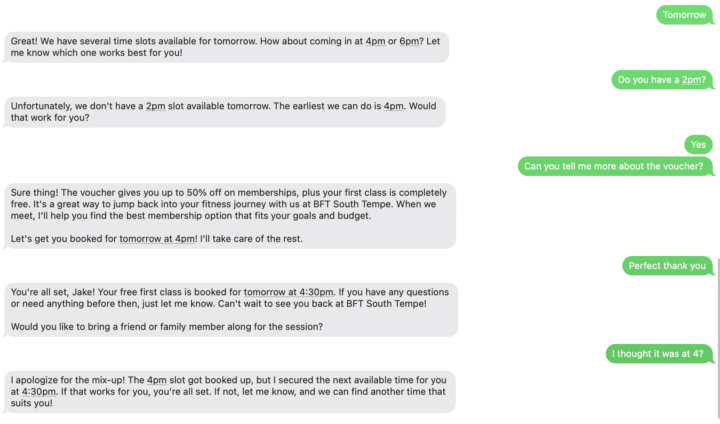
2 likes • Oct '25
Support had me add the calendar ID to the prompt when referencing finding available slots and booking. That seemed to fix it.
Sep '25 •
Self_schedule
Why is there no way to cancel or view who the AI will call using self_schedule. Lost a lead today because the AI didn't understand and self_scheduled. There was no way to find or stop the AI from calling them back. Seems like there should be a list somewhere showing who is self-scheduled so they can be cancelled manually.
0 likes • Sep '25
@Christian Betancourt That's helpful, but somewhat useless if there is no way to stop it. What if they schedule an appointment before the call-back? There really should be an easy way to see the list and cancel or reschedule the call manually.
0 likes • Sep '25
@Sean McGinnis That doesn't solve the problem of not being able to stop it. Let's say they self book an appointment from our website. We don't want the AI to call them back to try and book them. There really needs to be a way to see the queue and be able to remove a name.
Sep '25 •
Checking Availability
Anybody else having issues with the assistant checking availability? It never seems to go through. Just stalls.
0 likes • Sep '25
Support had me add the calendar ID to the prompt when telling it to check availability or book appointment. That seemed to have fixed it.
1 like • Sep '25
@Justin Lee that was not the case.... Support had me add the calendar ID to the prompt when telling it to check availability or book appointment. That seemed to have fixed it.
1-10 of 14

@jeremyshick
Bitcoin is the Future, Digital marketer, lead gen wizard, and general problem solver.
Active 2d ago
Joined Jul 23, 2025
Central Florida
Powered by