Activity
Mon
Wed
Fri
Sun
Jun
Jul
Aug
Sep
Oct
Nov
Dec
Jan
Feb
Mar
Apr
May
What is this?
Less
More
Memberships
Business Builders Club
8k members • Free
AI Automation Society Plus
3.6k members • $99/month
AI Automation Society
362.4k members • Free
7 contributions to AI Automation Society

3h •
#7dayAISChallenge - Day 4
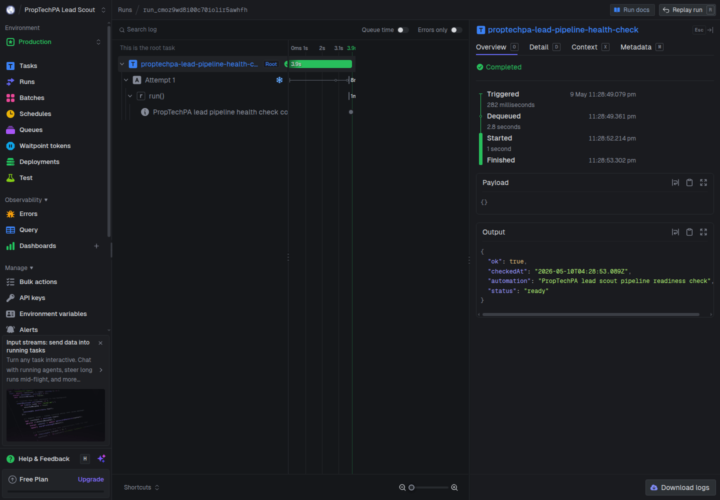
Just deployed my first Trigger.dev automation 🚀 I’ve already been running small automations from my Raspberry Pi, which has been great for personal/local workflows. For PropTechPA, I’m starting to move toward a setup that can scale better: cloud runs, retries, logs, safer deploys, and easier monitoring. What I deployed: a PropTechPA Lead Scout project with a scheduled lead-scout task plus a production pipeline health check. What it does: The lead-scout workflow is built to search for Panama residencials /property-administration leads, deduplicate URLs, and append the best new candidates into a Google Sheet for sales follow-up. I ran `proptechpa-lead-pipeline-health-check`, a lightweight task in the same deployed project that confirms the production pipeline can execute successfully before touching live sales data. One thing that broke / changed: Local Raspberry Pi automation is simpler because env files and execution live on one box. In Trigger.dev, production config is separate, so the Google Sheets/SerpAPI credentials need to be added in the Trigger.dev dashboard too. Claude Code helped me separate the production health check from the real scheduled workflow, so I could verify deployment safely and set things up for scaling.

💎
⭐
5h •
🚀New Video: Hermes Agent: Zero to Personal AI Assistant (1 Hour Course)
This is a complete walkthrough of getting Hermes Agent set up from scratch on a VPS. You'll see how to install it on Hostinger, connect it to Telegram, set up your first skill and cron job, and back everything up to GitHub. By the end you'll understand the five pillars of Hermes, when to use it instead of Claude Code, and how to scale to multiple agents without breaking anything.
5 likes • 3h
man keeping up is a mission!! haha just finished setting up openclaw and telegram, I love it! Time to review this!
1d •
#7dayAISChallenge - Day 3 Linkedln Skill
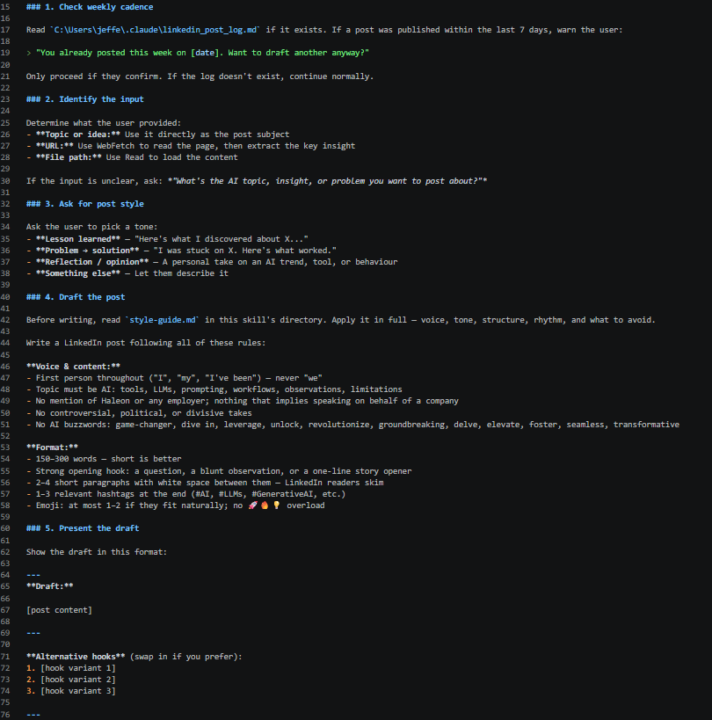
To be totally honest, I used to look at LinkedIn with completely different eyes. I found most posts pretty corny and soppy, so I never really bothered to post there. But once I started my AI automation journey, I realized LinkedIn is a huge asset when you're starting an agency, so this challenge felt like exactly the push I needed as I had been procrastinating on that front! So I took the chance to build /linkedin-post. What it does: Drafts AI-focused LinkedIn posts in my voice, between 150 and 300 words, in first person, with no employer references. · Shows me 3 alternate hooks to swap in. · Publishes through the Blotato MCP only after I explicitly say "post it". · Logs every publish date and warns me if I try to post twice within the same 7-day window, because I want to keep a once-per-week cadence. How I trigger it: Natural language only. · User-invocable: false in the frontmatter, so there is no /linkedin-post slash command. · Phrases like "draft a LinkedIn post about what I learned with Claude this week" or "write a reflection on this AI tool" pull it in through the description match. One optimization after watching it run: · My first drafts sounded like every other AI thought leader on LinkedIn, full of words like "unlock," "leverage," "game-changer," "delve into," and "transformative." · The skill was technically working, but the output didn't sound like me. · So I added an explicit banned-words list to the voice rules: game-changer, dive in, leverage, unlock, revolutionize, groundbreaking, delve, elevate, foster, seamless, transformative. · That one edit killed the generic AI-influencer tone, and the drafts started reading like me, not a press release. The lesson: telling the model what not to do can be more effective than telling it what to do, especially when you're fighting overlearned patterns from training data.
0 likes • 1d
@Aaron Trosper thank you! I'm glad to hear this! this is the beauty of this community and course Nate has put together, we are all compounding on each others growth!
0 likes • 1d
@Jenisa Sheth thank you!
2d •
#AISChallenge Day 2! Check!
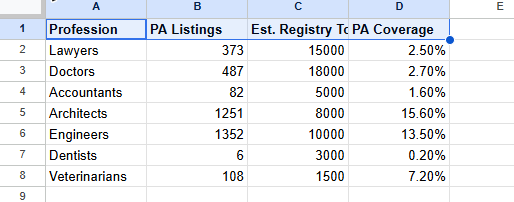
What I scraped: Used Firecrawl to scrape Paginas Amarillas Panama — the countrys yellow pages, The goal was TAM validation: how many professionals are actually listed vs. how many exist in government registries. One thing I learned:C laude Code automatically chose firecrawl_scrape instead of firecrawl_crawl without me specifying. I was expecting to have to tell it which tool to use, but it inferred that I just needed a spot-check of listing counts — not a full site crawl. That saved me from burning through credits unnecessarily. One use case idea: Competitive landscape research for clients. Instead of manually browsing directories, scrape the local business directory, pull counts by category, and show the client exactly where they sit relative to competitors. Works for any niche in any local market — and takes 2 minutes instead of 2 hours #AISChallenge
6
0
3d •
AIS Challenge Day 1 Win
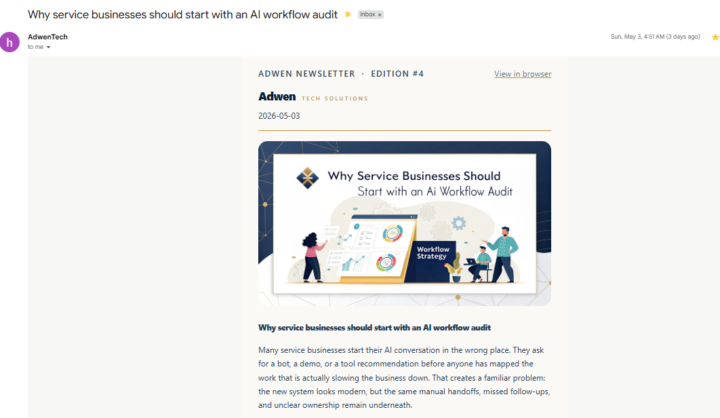
Hello everyone just wanted to share my small win here in the path towards leaving my 9-5 (wish it was just those hours lol) and working for myself building workflows and agents to support local businesses🚀 So for the AIS Challenge of building a newsletter, I went a step further than just setting things up — I actually used what I learned to write educative blog posts for my tech solutions startup, then pulled excerpts from it to send as a newsletter. The whole idea is to give readers a taste and drive them back to the full article on the site, content repurposing on autopilot! One thing that clicked for me: The RAG piece honestly blew my mind. Once I understood how it works, I could see exactly how to pull from source content and turn it into newsletter snippets automatically. The blog → newsletter → traffic loop just made total sense after that. One thing I'd improve: Image generation. The branding is there but the visuals aren't consistent enough yet. Next iteration I want images that feel truly cohesive and on-brand across every piece of content. #AISChallenge
1 like • 2d
@Joao Nene The blog generation pipeline: Topic planning: - OpenAI GPT generates a 34-week content calendar (topics-queue.json) — each topic has an angle which then brings it back to my business, bilingual title, keywords, and teaser copy Content generation (two-pass): - Pass 1 — Drafter: Gemini 2.5 Pro writes the initial post - Pass 2 — Editor: Claude Haiku refines and polishes it (with prompt caching for speed/cost)
1-7 of 7

@jeffery-gyamerah-2602
AI Enthusiast and Buddying Entrepeneur
Active 2h ago
Joined May 1, 2026
Powered by