Activity
Mon
Wed
Fri
Sun
Oct
Nov
Dec
Jan
Feb
Mar
Apr
May
Jun
Jul
Aug
Sep
What is this?
Less
More
Owned by Jeff
Trades and service owners: build simple AI systems that quote, invoice and track the job for you. Less hype. More help.
177 contributions to Clief Notes

4h •
Gameplan at breakfast, live on YouTube by night... what the @RyMac production line did for me
I used the production line by @Ry Mac to make my second YouTube video, and I want to share how it went. I started the gameplan Saturday morning. By the end of the night the video was on YouTube, the blog post was live on my site, and the lesson was in my Skool classroom. That included the recording and the edit. The line has 9 stages, and it will not let you skip one. Gameplan, script, spec, reader, storyboard, a 90 second test render, the full render, the package, and the blog. I wanted to skip the spec at one point. It stopped me, and it was right, because the spec is where the problems showed up before I recorded anything. A few things that stood out for me: The reader is a slide page I record my voice from. One line at a time, with a hold marker when I need to pause. I recorded the whole script in one take and only had to fix one line. Everything is timed to my real voice. It listened to the recording and lined every slide up to the words I actually said. When I said a line a little differently than the script, it changed the caption to match me. It checks its own work. Before it showed me the final video, it went through every cut and found 3 captions that came up a beat late, and a banner in one of my screen recordings that should not have been public. It fixed them before I saw them. The renders run in the cloud. My laptop stayed free, and all of the rendering for the day cost less than a dollar. It is built as a folder system, the same ICM idea we talk about here. Every stage is a file I can open, so I always knew where it was at. Thank you @Ry Mac . The production-line is amazing!!!

1 like • 4h
@Ry Mac That's the plan tomorrow!
0 likes • 2h
@Dino Behler you’re right! Killer stuff from @Ry Mac !!!! Can’t wait to get my hands on all of it!
1d •
Jeff is in The Vault... Here's what I'm building
I'm in The Vault now and working my way through it, its amazing! Right now I'm building folder systems for trade businesses. I start each one with the same question: what is the pain, and how can I solve it? The first one is a painter who works for builders. His pain is the purchase orders he gets paid on. They are often wrong, and nobody checks them, so I'm building a tool that checks each PO against his price list and what he actually measured on site. What drew me here was the Workflow Audit Package. I'm pointing it at my own office first. On Monday, the person who does our accounts payable is going to run the interview on their invoice entry. I also liked the Harbor Studio example in the Workflow Templates, because it shows you what a good result looks like before you build anything. Over the next month, I want to take what the AP interview finds and start automating whatever part of our invoice entry is worth it. I also want to get the PO checker running on one of the painter's real jobs. If anyone has automated part of AP, or run discovery with a small business owner, I'd like to hear how you approached it.
1 like • 18h
@Ron Davis for sure! I’ll share the skill with you. Right now I have the guy sending me all of his data sheets for each house (need to get him hooked up with cowork so it’s easier, but…) then I’ll put that against the po’s then build the skill.
0 likes • 2h
@Jordan Shaw thanks for the icm factory! Got it spinning up right now! Installed an implemented.

1d •
Awesome Resources
Hey Clief Notes fam! 👋 I'm Amy Johnson and I'm happy to be here. 🙋 A little about me: I am a franchisor of a donut business. I have over 50 franchisees and am working on building AI systems for all of us to make business easier. 🎯 My current goal: Building an AI Franchise Kit Biggest Struggle right networking and finding people who can talk ICM with.
0 likes • 4h
@Amy Johnson welcome! AI franchise kit sounds amazing! Can’t wait to hear more!

Jul 3 •
I am but a beginner...but look
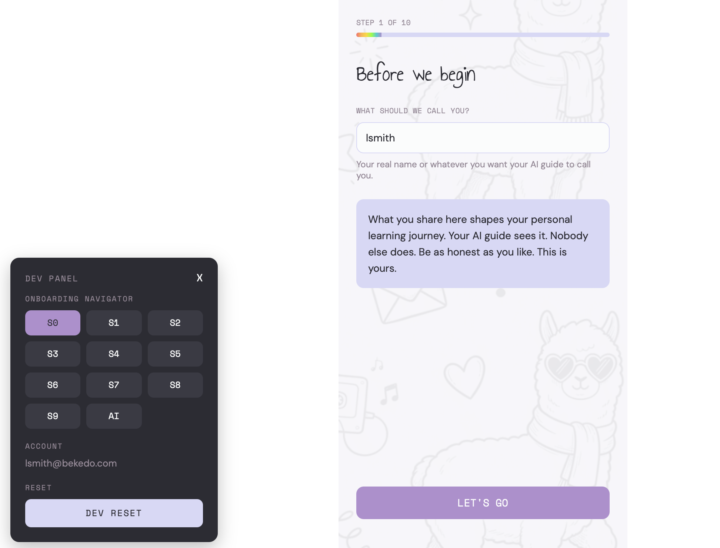
So I am a teacher and honestly I have been trying to get out of it. I have done more certificates than most people I know - I have a Masters a PGCE and I know there are so many more people in the world that are smarter, more capable and honestly doing the things they love. Like this entire community. So in order to change my perspective and get into a field that I will thrive in I started building (using Van Clief Methodology and Claude Code using free credits from Loveable to create the following- I use the client brief method) LlamaLogIt (yes like let me log it...) and the reason is that the onboarding asks questions to meet you where you are at and try to find the optimised journey for your development to get into a new career or grow in your career. And you can go Liani but like so many people are doing this... yes sure I mean it is based on the Duolingo Streaks and motivational quotes that are a bit unhinged #millennial - but it logs any course you do within the site holds your badges (like credly) gives you a personal dashboard you can share with prospective employers but my favourite part is that whilst you are doing it you can update your CV and hopefully match it with a job you like... think Jack & Jill... now is this going to work... nope... will it work for me.. yes... Is it ADHD friendly well I am trying my best...am I building it to work for multiple people (yes and this is the first time I am building for scale instead of private based which I am learning so much). If you said a few months ago I would be building something (even if turns into nothing or whatever) I would scoff and say no way. But I am building something. I am excited and I get to play! So I also added a dev panel so I can make navigation between pages easier and honestly even if no one reads this... Thanks @Jake Van Clief for giving me back my curiosity.
0 likes • 4h
@Liani Smith glad you are here! Looking forward to seeing more!
10h •
Checking out Discord... Always...!
Already introduced myself into the Discord a while back, so this is more of an update. I'm in Discord more now because I'm running Lyceum and Clief Notes in parallel, along with Eduba, and the Discord is where the useful stuff shows up first. Case in point: @Ari Evergreen reasoning scaffolds post. I put all seven, plus the 8-item Sound Test, into the standing rules my Claude reads at the start of every session. The one I had nothing for was pixel quarantine. My setup would look at a screenshot and tell me what it saw with full confidence. Now it has to measure the image with a script before it claims anything. I also built a leak-scrub list for my client work: names, base IDs and file paths it has to grep for before anything goes public.
9
0
1-10 of 177

@jeff-van-leenen-1363
Business owner, bassist, Former science teacher
Active 43m ago
Joined Aug 6, 2026
Powered by