Activity
Mon
Wed
Fri
Sun
Aug
Sep
Oct
Nov
Dec
Jan
Feb
Mar
Apr
May
Jun
Jul
What is this?
Less
More
Owned by Jason
This community is your unfair advantage! AI tools, prompts & blueprints to start or grow a business faster than everyone else!
Memberships
DevsUnlocked
8 members • Free
ZeroOne Systems
11.4k members • Free
AI Automations by Jack
3.2k members • $87/month
AI Automation Vault
19.7k members • Free
AI Automation Circle
11.9k members • Free
Skoolers
167.1k members • Free
AI Automation Society
419.1k members • Free
AI Automation Agency Hub
328k members • Free
PropFirmKings English
127 members • Free
253 contributions to AI Automation Society

1d •
Day 6 - scheduled automation
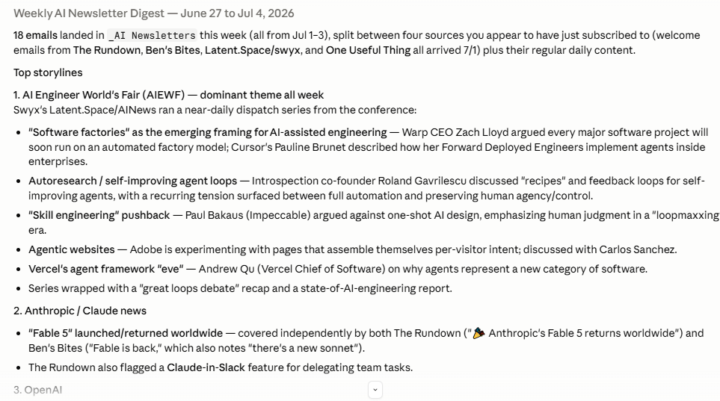
I built an scheduled task to help me mentally keep up with some AI newsletters I signed up for. 1. Once a week, Claude will go to my Gmail and check the _AI Newsletters folder. It will read and summarize everything from the past 7 days, helping me reinforce what I had read previously, or reminding me to go back to a specific topic. 2. I chose a scheduled task because I intend to do this once a week, not just in a 3 day window. (I did play with loops though for other things.) 3. Again, I'm amazed at how quickly Claude can work and correct itself. PS - Which newsletters are you subscribed to? #AISChallenge

2 likes • 14h
This is exactly the kind of scheduled workflow that keeps AI learning from turning into another inbox to babysit. I’d have the digest split into three buckets: signal, actions, and “worth revisiting,” so that folder becomes a weekly learning loop instead of a pile of unread guilt.

16h •
My VPS turned "cursed" this week. Claude found 4 different root causes in one session
The last 4 days my home server felt cursed. Telegram bots dying almost daily, SSH access randomly blocked (had to VPN through Frankfurt just to reach my own server). On top of that, an older mystery: CPU overload roughly every two weeks that a cleanup would temporarily fix. My AI OS was supposed to be my right hand and instead it kept falling apart. Yesterday I gave Claude Code (Fable 5) SSH access and one instruction: "audit everything, find out why my system keeps dying." What it actually found (none of it was what I thought): 1. My "daily bot crashes" were planned token-refresh restarts that wiped the conversation memory. Fix: resume the last conversation on restart. 2. A second bot had been silently dead for 2 WEEKS: expired OAuth token, no auto-refresh. It looked alive, it just never answered. 3. The "blocked SSH": not the server at all. My hotel and home Wi-Fi block outbound port 22 entirely. tcpdump showed my packets never even arrived. Tailscale solved it permanently, no more VPN. 4. The biweekly CPU overload: orphaned background processes multiplying after every bot restart (this one it found in my own wiki's incident history and confirmed the cleanup cron now handles it). Best part: it documented every finding in my markdown wiki, added self-audit crons that report to Telegram weekly, and wrote "hard rules" into its own config files so future sessions don't repeat the same mistakes. It even caused one incident itself, then found and fixed it 15 minutes later and documented that too. Takeaway: don't ask AI "is my server ok?". Give it real access, ask it to point to evidence for every claim, and make it write everything down where the next session can find it. What's the longest-running "mystery bug" AI has solved for you?
1 like • 15h
This is the part a lot of people miss: the biggest win wasn't that Claude found four bugs, it was that it turned a messy incident stream into operating memory. In systems engineering, a fix isn't really closed until you have evidence, recurrence prevention, and a place the next maintainer can find the lesson. Your weekly self-audits, hard rules, and wiki updates are what turn AI from a clever debugger into a real reliability layer. The pattern I'd steal from this is simple: every incident gets a cause, evidence, corrective action, owner, and prevention rule before the session ends. That's how you stop solving the same mystery twice.

16h •
How to properly Upload on Digital Brain
So I have been watching all these videos of second digital brain but all my stuff are spread around Antigravity, Codex, Claude, Gemini, Claude Code, GPT... And I couldn't find a way to extract all and compile everything into one big mind map. And even if we do what will be the end goal of that?
0 likes • 15h
The end goal is not one giant mind map. It is a decision-ready memory system that tells each tool what matters, where to look, and what rules to follow before it starts working. I would think in layers: a small index, a few project hubs, then retrieval rules like "for client work, check this folder first" or "for strategy, pull these notes before drafting." The real win is when Claude, Codex, Gemini, or whatever tool you use can re-enter the same context without you re-explaining your life every time. Big maps look impressive, but small trusted memory files that get retrieved at the right moment are what actually save you time.

2d •
I burned ~1M tokens overnight — two rules fixed it
Burned about a million tokens overnight on a single automation run. Roughly 4x what I estimated. I set up an overnight job to fan a bunch of agents out across a big task, went to sleep feeling clever, woke up to a quota warning. The mistake: I never checked my quota before launching, and I didn't right-size the job. I just told it "go" and let it multiply agents until it ran out of room. No cap, no anchor. What saved me: I'd committed the state to git before the run. So the work wasn't lost — I could resume from the last checkpoint instead of paying to redo all of it. Two rules I follow now before any overnight run. Check the quota first — if the job needs more than I have, it doesn't launch. And anchor state before you fan out — git commit, save point, whatever. Assume the run dies halfway. Cheap lesson to learn once. Expensive to learn twice. What's the most tokens or money you've torched on an automation that got away from you?
0 likes • 16h
The systems-engineering move is to treat an overnight agent run like a test range event, not a normal prompt. My go/no-go would be: quota verified, max agents capped, token or spend kill limit set, checkpoint created, resume path tested, and stop condition written down before launch. The hidden trap is that most people only plan for success, but the money gets burned in the failure mode. Trust the process, especially before you go to sleep.

16h •
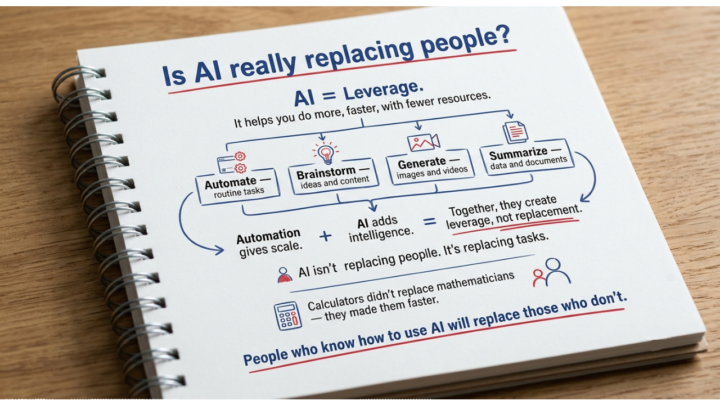
Is AI really replacing people?
What's really happening 👇 The core idea of AI is Leverage, It gives you Leverage- to do more faster, with fewer resources:- ~Automate : Routine tasks ~Brainstrom : Ideas & content ~Generate : Image & videos ~Summarize : Data & Documents Automation gives scale AI adds intelligence together they create leverage not replacement. ~Ai isn't replacing people. It's actually replacing takss. ~Just like calculators didn't replace mathematicians they made them faster. ~People who know how to use AI will replace those who don't. Do you agree? different opinions are most welcomed 👇 Harsh Singh
1 like • 16h
I agree with the leverage framing, but I think the missing layer is documentation. AI replaces poorly documented tasks first, because those are easy to turn into repeatable instructions. The bigger opportunity is for people to stop being "tool users" and become workflow owners, where AI handles the repeatable 80 percent and humans keep the judgment, context, and final call.
1-10 of 253

@jason-elam-2821
AI Strategist & Consultant. I help SMB owners build custom AI Powered Operating Systems to buy back time and empower their teams.
Active 5h ago
Joined Feb 16, 2026
Powered by