Activity
Mon
Wed
Fri
Sun
Aug
Sep
Oct
Nov
Dec
Jan
Feb
Mar
Apr
May
Jun
Jul
What is this?
Less
More
Memberships
AI Guerrillas
666 members • Free
The AI Advantage
126.4k members • Free
Ecom Blueprint Community
287 members • Free
WeScale Free Course
33.1k members • Free
Business Synergy Sisterhood
5.1k members • Free
AI Pixels to Profit by Bailey
3.5k members • $1/m
Creator X
12.7k members • Free
36 contributions to AI Pixels to Profit by Bailey

🚀
Dec '24 •
💲 List THESE Now to Make MORE in January
Happy Monday! This time of year can feel slow and like you missed the big rush because... Admittedly, it is a bit too late to get Christmas listings up and running. BUT! February - March have some serious traffic on Etsy for certain niches and holidays! So today, here are a few areas of focus in the world of digital designs! Hit 2025 running by getting these listings up NOW! They work for products like Clipart Packs, Digital Papers, SVGs, PNG designs, tumbler wraps, coffee mug designs, wind spinners and many more! Focus #1: Upcoming Events Between holidays, appreciation days, and seasons, there are still many opportunities to make some serious cash. 1. Valentine’s Day 2. Mardi Gras 3. Black History Month 4. 100th day of school 5. St. Patrick's Day 6. Easter/Spring (yes, even now) Focus #2: Don't Forget to Keep Up the Evergreen As always, your shop needs a balance of evergreen products, as well as trending holidays and occasions. Be sure to focus on listing evergreen products as well such as Hobbies, Occupations, Animals, etc.! Focus #3: Relatively NEW Product Alert, BUT Growing FAST! Laser tumbler wraps are EXPLODING on Etsy right now, and it will be my FIRST design masterclass of 2025 in the Design Club, but if you know how to already design and list these, don't sleep on them!! 🛑Don't Forget!! The Design Club price INCREASES on 1/1/25, so get in now to lock in the lower pricing and access all of the many design tutorials, daily trending products/prompts and so much support!! Join Here➡️ https://www.skool.com/etsydesignclub

1 like • Dec '24
Timely reminder. Thank you Bailey.
🚀
Dec '24 •
Which one?!
Prompt: A serene oil painting with watercolor, alcohol ink, and drawing style, of a randomize cactus dream in the style of the Bloomsbury Group. The painting has detailed compositions and a joyful celebration of nature. The background contains a sky, mountains, and trees. The painting has textural detail and is an outdoor art piece. MJ: --v 6.1 --ar 80:71 --s 750
Poll
161 members have voted

5 likes • Dec '24
I like the first and last two as they fill the serene dream theme with insubstantional dream like quality. I especially like the goddess figure in the first one. I think the second would be popular with kids for the colourful cartoon like style. The midjourney one appeals for the bright colors which I rather have a thing for but not so much for a tmbler wrap. :D
🚀
Nov '24 •
📢 Newly Added to the Design Club for Etsy!
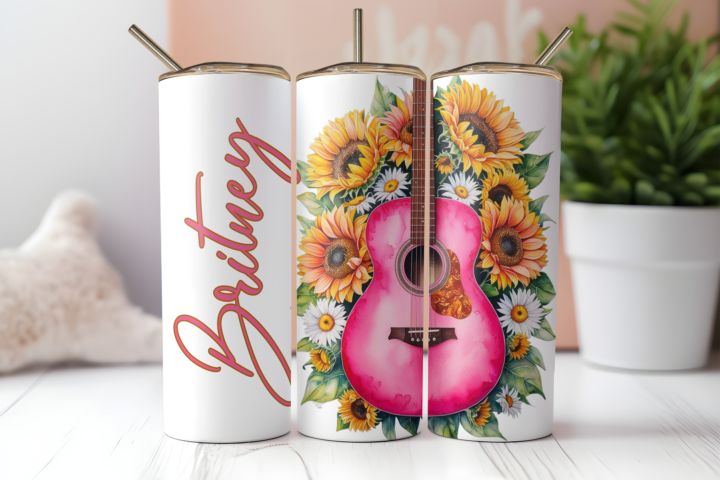
Hi all! Moving forward, I'll be adding the prompt/example output for Canva's Dream Lab AI generator! Below are some prompts I was just playing around with today! Canva is great option, since most already have it or use to edit in! :) Prompts: a hand drawn watercolor western guitar, pink colors, sunflowers, hand drawn, ultra detailed, artistic, 8k, realistic, hand drawn bright colors, sunflowers and daisies, white background hand drawn watercolor cowboy boots, sunflowers, hot pink flowers,, hand drawn, ultra detailed, artistic, 8k, realistic, hand drawn bright colors, sunflowers and daisies, hot pink aztec tribal background Fusion between Pointillism and Alcohol ink painting, Vibrant, sunflowers and hummingbirds, ethereal, 8K A hand drawn tattoo style vibrant and intricate design featuring sunflowers and other floral elements. The sunflowers are predominantly in shades of white and black, with neon bright pink and blue accents. They are surrounded by ornate patterns, feathers, swirls, and decorative motifs. The background is a deep black, which contrasts with the neon-like glow of pink, blue, and yellow streaks. The entire composition gives off a mystical and artistic vibe, with the sunflowers appearing as the central focus amidst the colorful and dynamic background. A watercolor detailed illustration of a dragonflies and sunflowers natural scene in various colors, such as yellow, blue, and green. Surrounding the dragonflies are an array of sunflowers in yellow shades, interspersed with green leaves and other floral elements. The background of each object is a soft watercolor pastel color palette, creating a serene and dreamy ambiance. 🔴 Get in before the price goes up!!➡️ Bailey's Design Club for Etsy 😴Are you tired of creating digital design products that NEVER sell? I've spent thousands of hours researching & creating AI prompts for creative digital products on Etsy so you can fast-track your results!
3 likes • Nov '24
Wow. Love the results. Must have a play!
🚀
Nov '24 •
10x Your Prompts & Designs with AI - New on the Channel!
This will help you scale your prompts to get multiple variations from just one prompt AND have AI create your designs at one time :) Here on the channel: https://youtu.be/ydmWkYYFfW4?si=kHo_ukC0bh2aat82

5 likes • Nov '24
Excellent run through with a great explanation of the process.

Oct '24 •
How do y'all upscale your images?
Hey everyone, I hope you're having a great day wherever you are! I have a question. Since I'm finishing my subscription with Kittl on Nov 23, I was wondering how you guys upscale your images and make them 300dpi. For me, until now it worked like this - if the image was good off the bat, I upscaled it in Kittl and had created the artboard at 300dpi, so I did it all there. If I had to fix it, I took it to Canva or Photoshop, then I came back and upscaled it again in Kittl. Now I have MyDesigns but I did upscale a couple of images and their dpi ended up being 96, not 300, which was probably something I did wrong - once I used the image in the Canvas system and saved and upscaled it from there, it ended up being 300dpi 🫠. I just don't know, MyDesigns' upscaler is probably good enough, but I also don't wanna stress about potentially receiving bad reviews because of the stupid resolution. How do you guys go about things when it comes to 300dpi and upscaling? Do you use another program, do you use a free one? Please help a girl out! 🙏🏻
4 likes • Nov '24
I use a service called dgb.lol In their own words: "DGB.LOL offers a collection of completely free tools mostly for image manipulation by utilizing the power of AI. All of our tools are completely free, with OpenAI API key you can use some of our specialized GPT's for image creation or image tagging. These tools are a good fit tor the POD (Print on Demand) creators, for Stock image enthusiasts, KDP creators, but basically for everyone who wants to experiment, or have fun with their images. If you have the commercial rights for your input images, dgb.lol guarrantees you the commercial rights also for the output images! For free! No wires attached, no catch. Most of our tools works in bulk." I've been using this service for quite some time and the number of upgrades and additional features since I joined is astonishing. The free service is just that free! I've subscribed to support the owner because it is an awesome tool. Subscription also gives access to quicker process times. Totally recommend you give it a go. It is very easy to use and there are youtube vids on the different tools and upgrade modes available. There is also a comparison tool you can open for each image to see the difference after upscale. Like, wow!!
1-10 of 36
@janice-oconnor-6512
I've been arty since I could use a stick on the ground. I repeatedly painted my bedroom door in wild abstract art. Gosh my parents were so cool!
Active 1h ago
Joined Sep 24, 2024
Kentville Australia