Activity
Mon
Wed
Fri
Sun
Jan
Feb
Mar
Apr
May
Jun
Jul
Aug
Sep
Oct
Nov
What is this?
Less
More
Memberships
AI Developer Accelerator
10.7k members • Free
7 contributions to AI Developer Accelerator

3d •
Git Branches with Antigravity
I am looking for a way to run different chat sessions on different branches. Example working on docs, database and scripts at the same time without having a cultured source control window. Has anyone found a solution to that? I had the same issue with CLI tools.
0 likes • 15h
@Carlos Aguilar Thanks I did not know about that feature.
Sep 14 •
Extension issue
Does anyone have any solution to this malware risk of using Cursor? This is the main reason I am mostly using VScode and Gemini CLI right now. I'd use cursor more if I had a solution to this.

Sep 13 •
Beyond AI 3 Buckets -
Hello folks, The other day i was thinking about AI app use cases for majority of businesses that we study here and how to use the course to build an app. So what i could see is that majority of the use cases fall into 3 categories Chat / Chat+RAG and AI Agents for x and y. Correct me if i am wrong there may be edge cases ( mine is i think) . I would like to know your opinions and if this bucket logic works or not. Also since I think 🤔 my use case is an edge case i cannot wrap my head around the vision problem. The thought comes from developing a solution for my own domain of construction as we need to do read pdf drawings which are plotted from cad applications. Also the data is available in excel sheets. The thing is i am not sure about the selection of ai model selection for vision purpose since i tested this with gemini chatgpt or claude and all of it majorly failed to extract the data against my instruction prompt so the whole logic of app fails. In such cases how can i approach this problem? Any thoughts ideas? Fine tuning etc? Also system architecture?
1 like • Sep 13
The models likely need more context and more examples of what it should be doing. Are you familiar with providing AI input and output examples? Also I don't know what type of CAD drawings your using. Hope I can help with my engineering background. I'd definitely deal with the issue of the excel documents and the CAD files separately. Even though your final output might have data from both. Dealing with both at the same time will likely confuse the models and also cause you to pull out your hair.

Sep 13 •
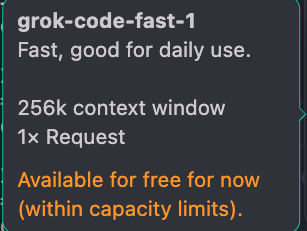
Make sure to try out grok-code-fast-1
Claude-4 is incredible! I’ll keep recommending it as the #1 model because the reasoning and depth it brings to coding projects is hard to beat. The challenge is that I’m building 9 projects at once right now. When you are coding daily at that scale, even the best models start to add up in cost. So I went hunting for a lighter option I could lean on in Cursor. I tried Gemini-2.5-Pro. I tried GPT-5. Both solid. Then I tested grok-code-fast-1. Here is what I found: - Way faster than Grok-4 (they were not kidding with “fast” in the name) - Free right now in Cursor - For raw speed and responsiveness, I have been enjoying it more than Gemini-2.5-Pro and GPT-5 If you are coding on a budget or just tired of waiting around for long completions, this is worth trying. I will keep sharing how it holds up as I push it across my projects. If you try out the model, I'd love to hear what you think about it!
2 likes • Sep 13
@Keith Price seems to work good to review Gemini code. Example pointing out where to improve documentation and testing. Things it finds that are broken or don't make sense. Did about 500 000 tokens worth of code audit and audit write up in just a few minutes. Then had gemini read and consider the details of the report and provide it's feedback. I still get Gemini trying to do a lot of really bad ideas. With Gemini CLI 10-20% reject rate is normalfor me. Some of that is my reference documents still needing work. So human review is still helpful.
Aug 22 •
Gemini CLI Adds 7 New Features — Here's What Actually Works (And What Doesn't)
Gemini CLI just dropped 7 major updates and if you're exploring AI dev tools, this open-source project is worth a look. In this new video, I break down all 7 new features inside Gemini CLI 2.0 — from editor integration to GitHub PR reviews — and share what’s actually working and what still feels unfinished. 🧠 What you’ll learn ✅ Gemini CLI Companion — connect Gemini directly to Cursor or VS Code ✅ Init Command — auto-generate a full project memory file with one prompt ✅ Persistent Rules — train Gemini to follow your coding preferences ✅ Stats Mode — track model usage and tool calls per project ✅ Multi-Workspace Mode — pull from multiple codebases at once ✅ Chat History — save, resume, and name CLI conversations ✅ GitHub Actions — PR review automation (still a bit buggy, but promising) Get the latest version of Gemini CLI here: 👉 brandonhancock.io/ai-driven-development P.S. Want to take AI-driven development even further? 👉 Pre-order here: shipkit.ai What is Shipkit? • Prebuilt templates for the most common AI apps: Chat, RAG and ADK agents • A course with 14 AI-assisted modules that takes you from idea to a production app • Cursor-first workflows that help you build the entire AI application faster and with fewer mistakes Pre-order today and get instant access to: • 15+ AI prompt templates • 40+ Cursor rules • my previous full-stack marketing course (https://www.skool.com/ai-developer-accelerator/classroom). Launch: September 20. Questions? Comment below or DM me.
1 like • Sep 4
@Pasquale Salomone I have a lot of issues with VScode lagging or freezing completely. Did you have that issue?
0 likes • Sep 4
@Brandon Hancock about the costs of Claude code vs Gemini CLI. I found with the standard paid plan I can do the below. As Gemini Flash seems to be awful at coding. I split my code base into multiple services. With a docs repo for high level tasks and architecture. Then can assigned tasks to the other repositories in the poly repo setup. With milestones Claude and Grok can be used to audit the work of Gemini 2.5 pro. Each repo can have a separate Gemini CLI doing it's tasks at the same time. Making use of git braching to be able to go back on parts that break. That being said typically I decline 10-20% of the things that Gemini wants to do still.
1-7 of 7

@james-rennie-4718
I am a tech and finance nerd passionate about learning more.
Active 15h ago
Joined Sep 2, 2025
Powered by