Activity
Mon
Wed
Fri
Sun
Jul
Aug
Sep
Oct
Nov
Dec
Jan
Feb
Mar
Apr
May
Jun
What is this?
Less
More
Memberships
SW Automation
8.6k members • Free
Agencia IA desde 0 (Starter)
724 members • $25/m
AI Fellowship Hub
8.6k members • Free
Futuro Digital Academy
8.3k members • Free
AI Automation Skool
2.4k members • Free
AI Marketing by Kia
21.4k members • $1/month
5minAI
2.9k members • Free
AndyNoCode
34.4k members • Free
AI Automation Society
407.5k members • Free
7 contributions to AI Accelerator

Feb '25 •
Can n8n be connected to Bitrix24?
How about friends, the most master of automation, I wanted to ask about Bitrix24, is it possible to connect it with n8n? The company you work for uses Bitrix, it would be great to present an improvement project. Please tell me so I can investigate a little more.
1 like • Feb '25
Yes, I found the documentation. thanks for the support

Feb '25 •
How to access the templates
Hey everyone! To prevent people from immediately entering the community, downloading the templates and leaving I've set the course module as Level 2. To level up to 2 you just have to post and engage with others in the community. This will not only foster engagement but also help others as well! For instant access to all of my templates, we have them in our paid community here - https://perspectivefunnel.co/6617fd18f0b706001486893e/673549057e9121003cbfdf11/ 🛑 DO NOT just post asking for others to like your post, your post will be immediately deleted. Instead, please post something of value. This is how we make the community a better place by helping commenting something of value on others posts and creating thought-provoking or insightful posts!
2 likes • Feb '25
Todavia no puedo acceder a las plantillas :C
2 likes • Feb '25
Help me get to 2 please.
Feb '25 •
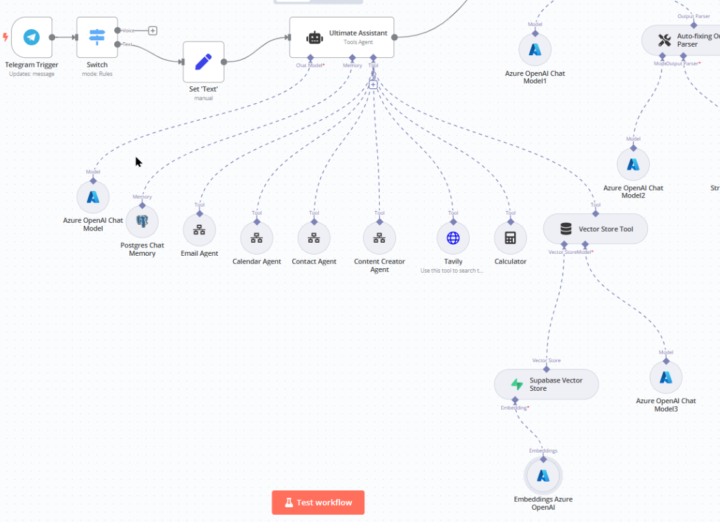
Differences between OpenAi and Azure OPenAI?
How's it going, friends? I've noticed that everyone uses the OpenAI Chat Model, but I personally use Azure OpenAI. This is because I have an Azure account and have deployed a chat on Azure AI Foundry; I even have an Azure OpenAI Embeddings deployment. Do I have any disadvantages compared to OpenAI?
Feb '25 •
Bitrix24 integration with n8n
I found this, it's quite general, but it gives you an idea of how it could work and how to run tests. I hope it helps you. Links:https://n8n.io/integrations/bitrix24/https://www.bitrix24.com/apps/app/vebstudiya_redham.resthooks_wom/API Documentationhttps://apidocs.bitrix24.com/ Guide: Connecting Bitrix24 with n8n 1. Obtain Bitrix24 CredentialsTo connect Bitrix24 with n8n, you can use the Bitrix24 API directly or the API & Webhooks app from the Bitrix24 marketplace, which simplifies webhook setup and API interaction, though it is limited to 50 calls per day. Steps: - Access Bitrix24 - Configure the "API & Webhooks" App (Optional if not using the API directly) 2. Configure n8nSince Bitrix24 does not have a native node in n8n, we will use the HTTP Request node to interact with the Bitrix24 API. Steps: - Open n8n and create a new workflow. - Add an "HTTP Request" node. 3. Example: Retrieve Users from Bitrix24To get the list of users, configure the HTTP Request node as follows: - Method: POST - URL:https://YOURDOMAIN.bitrix24.com/rest/WEBHOOK/user.getorhttps://YOURDOMAIN.bitrix24.com/rest/USER_ID/TOKEN_AUTH/user.get - Expected Response: A JSON object containing the user list. 4. Example: Create a Lead in Bitrix24If you want to create a potential customer, use the following configuration: - Method: POST - URL:https://YOURDOMAIN.bitrix24.com/rest/WEBHOOK/CRM.LEAD.ADDorhttps://YOURDOMAIN.bitrix24.com/rest/USER_ID/TOKEN_AUTH/CRM.LEAD.ADD - Body:When running this flow in n8n, you should receive a Lead ID if the operation is successful.
3
0
Feb '25 •
New Video! I Built a Human In The Loop Sales Agent That Waits for Approval in n8n
Hey all, new video! Pretty cool feature that's been requested for quite some time so wanted to show off a practical use case and how you can use human in the loop! Get the template here - https://www.skool.com/systems-to-scale-9517/classroom/a850f009?md=51eec68301f441de9a0bc335c2162ccb Watch the video here - https://youtu.be/OOK2-h3irzA
0 likes • Feb '25
I want to access this template and I still can't :C
1-7 of 7
Active 99d ago
Joined Feb 12, 2025
Powered by