Activity
Mon
Wed
Fri
Sun
Jul
Aug
Sep
Oct
Nov
Dec
Jan
Feb
Mar
Apr
May
Jun
What is this?
Less
More
Owned by Nick
A community for mastering AI, Agents, and Automation. Join today for immediate value!
If you're serious about learning & growing with AI, this community gives you an unfair advantage. Join and start implementing & selling AI 🚀
Memberships
Ultimate Editors 2.0
410 members • $97/month
AI Accelerator Mentorship
21 members • Free
Skoolers
175.4k members • Free
854 contributions to AI Accelerator

7h •
🚀 New Video: The AI Agent That Runs My Business From WhatsApp
There's a new AI agent called Super Agents, and it's the first in its category that isn't a terminal install — it's just a browser tab. You tell it what you want and it works. I run my inbox, calendar, and posts through it, and I control the whole thing from my phone. - No terminal, no code, no API keys. It's from Base44 (the team Wix bought for ~$80M), runs Claude by default in their cloud, and you sign in with Google. - The pieces. Chat, 200+ one-click Connectors, 130+ Skills, scheduled Tasks, Memory, Files, and Channels (WhatsApp / Telegram / iMessage) so you run it from your phone. - The demos. I texted it "summarize my unread emails and flag what needs me," "draft a reply but don't send it" (it lands in drafts — nothing leaves without me), and "turn this YouTube video into a LinkedIn post and publish it" — done in about a minute. - Why it's safer than OpenClaw/Hermes. It's cloud-locked, so it can't touch the files on your computer — only the apps you connect, with permissions you set. OpenClaw is building a PC from parts; this is buying a MacBook. - Honest: it's newer (sometimes slow, a task occasionally fails), less powerful than OpenClaw/Hermes for deep technical work, and cheaper plans have usage limits. But it's a flat ~$20/mo vs OpenClaw quietly burning $20–60 in a single day. My take: if every agent tutorial sent you running for the terminal and you gave up, this is the one to start with. Grab the free version and connect your Gmail. 📎 Full Super Agents guide PDF pinned below — every part of the app, the exact demo prompts, and the honest comparison vs OpenClaw and Hermes. We break down tools like this inside The AI Accelerator (free, 19k+ members). 👉 What's the first job you'd text your agent? Drop it in the comments. [Watch the video here ▶️]
2 likes • 6h
@Robert Kok ❤️give it a try then
2d •
🚀 New Video: I've Used Claude Every Day for 2 Years — Here's My Entire Setup (Beginner's Guide 2026)
Most people use about 5% of Claude. It quietly stopped being a chatbot and turned into a coworker that remembers you, does research, builds real apps, and runs work while you do something else. This is the complete beginner's setup, fully up to date. - The reframe. Stop treating it like a smarter search box. Hand it real jobs: write this, research that, build me this, go through these files. - Plans, simply. Free to learn (now includes memory), Pro at $20 for almost everyone (every model, research, plugins, connectors), Max only if you live in it. Start on Pro. - Make it know you. Projects are folders that hold your files + instructions across chats; Memory auto-remembers you (and you can edit, wipe, or import it from another assistant). Set one up and stop re-explaining yourself. - Reach + build. Research mode returns cited reports; connectors plug in your apps (start read-only); Artifacts build real docs, calculators, and apps you can publish — and shared apps run on the other person's account, not your limits. - Teach it your way. Skills are reusable recipes (free, call with /); Plugins bundle skills + connectors for a whole role (Pro). Plus Cowork (does work in your folders, on a schedule) and Code (ships software). My take: if you do one thing tonight, set up a Project and drop in a page about yourself. Everything else works better once Claude actually knows you. 📎 Full beginner's setup guide PDF pinned below — every level, every prompt, and a first-10-minutes checklist. 👉 What would you hand Claude as your first real job? Drop it in the comments. [Watch the video here ▶️
0 likes • 7h
@Micky R 🙌
7h •
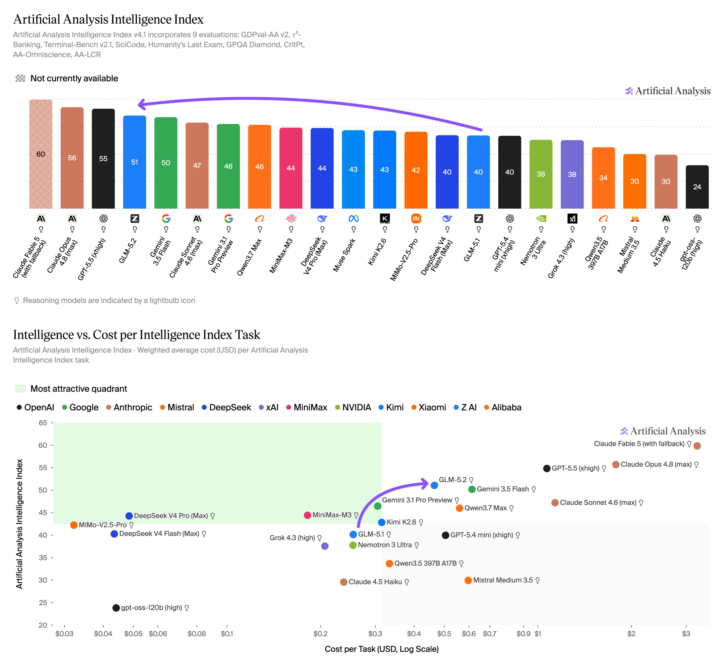
An open-weights Chinese model just hit #2 on coding — right as the US pulled Claude's best models offline
The timing on this is almost too perfect. Let me connect the dots 👇 The news: Z.ai (formerly Zhipu AI) released GLM-5.2 with full MIT-licensed open weights. The benchmarks: → #2 on Code Arena, behind only Fable 5 — ahead of Claude Opus 4.7 AND 4.8 in thinking mode.→ Within ~1 point of Opus 4.8 on agentic coding.→ Beats GPT-5.5 on long-horizon coding benchmarks — at roughly 1/6th the cost.→ Ranks #1 among ALL open-source models. It's a 753B mixture-of-experts model that only activates ~40B parameters per query, so it punches at frontier level without frontier compute. MIT license means you can download it, fine-tune it, and run it commercially with basically zero restrictions. Now here's why the timing matters: Three days ago, the US government pulled Fable 5 and Mythos 5 offline for all foreign nationals. So for any developer or business outside the US, the most capable Claude models just vanished overnight. And right into that gap drops GLM-5.2 — open weights, self-hostable, frontier-class coding, a fraction of the cost. That's not a coincidence in vibes, it's a coincidence in consequence: when access to closed models gets politically fragile, open weights stop being the budget option and become the strategic one. My take for builders and operators: This is the exact argument I made in my Fable shutdown post, now proven in real time. Model access is a geopolitical variable. The thing that makes open weights powerful isn't just price — it's that nobody can switch them off. You download GLM-5.2 once, it's yours. No directive, no export control, no API ban takes it away. For anyone building client work: a model this capable, this cheap, that you can self-host, is a genuine option for production now — not a toy. The "open models can't keep up" excuse is dead. #2 on coding, behind only a model the government just banned, says it plainly. The honest caveat — and it's important: If you use Z.ai's hosted API, you're subject to China's National Intelligence Law, which can compel data sharing. For anything sensitive — healthcare, client data, regulated work — that's a real risk. BUT: the MIT open weights let you self-host and sidestep that entirely. So the move for serious use isn't "call their API," it's "run the weights yourself." Know the difference. It matters.
1d •
New drop: turn Claude into a second brain that runs your business!
Claude Fable 5 just dropped last week (and should back up soon) — Anthropic's most powerful public model yet. Now, the real unlock isn't the model itself. It's giving AI a permanent memory of your business 👇 Right now, every time you open Claude, you spend the first few minutes re-explaining who your customers are, what you sell, how your offers work, and what your pricing looks like. That's not a teammate. That's a very smart stranger. A second brain fixes that. It's a simple folder of text files that contains everything important about your business, plus a router file that tells Claude where to find the right information. Once it's built, you stop explaining and start assigning work: "Draft this month's client update." "Write a proposal using my pricing." "Create a follow-up sequence for this lead." And Claude already has the context. I put together a step-by-step guide that shows you exactly how to: • Build the brain in 20 minutes• Turn repeat tasks into reusable skills• Safely put it on autopilot No coding required. Works with Claude, ChatGPT, Gemini, and other AI models. 👉 Grab it here: https://flicker-celestite-7b6.notion.site/Turn-Claude-Into-A-Second-Brain-That-Runs-Your-Business-381d180d8c8081029255c597ba94685a?source=copy_link Build it, then tell me the first task you'd hand off 👇
1-10 of 854

@nick-puruczky-8573
Scaling Businesses With Custom AI Solutions
https://www.reprisesai.com
Active 23m ago
Joined Aug 8, 2024
Tampa, Florida
Powered by