Activity
Mon
Wed
Fri
Sun
Apr
May
Jun
Jul
Aug
Sep
Oct
Nov
Dec
Jan
Feb
Mar
What is this?
Less
More
Memberships
Learn Power Apps
2.5k members • Free
4 contributions to Learn Power Apps

Jan '24 •
Patch to SQL with Lookup Record
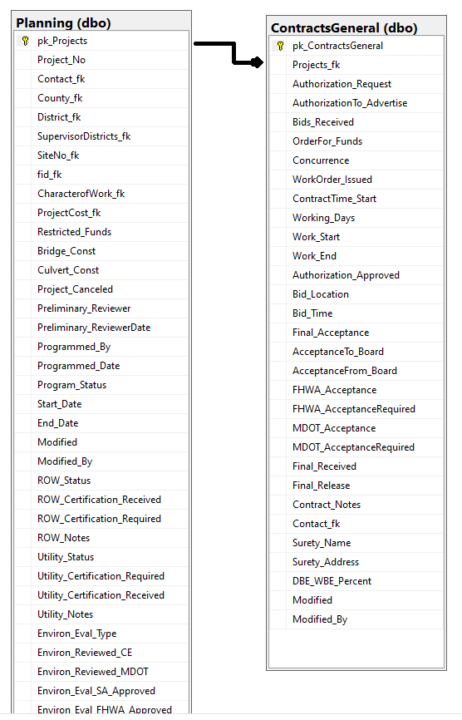
I am wanting to patch to an SQL table using a lookup as the record. Here is a summary of the setup: 1) I have a primary SQL table called "Planning". This table contains basically a project number and primary key that is related to every screen in my PowerApp. 2) A user searches and selects the Project No from a gallery which sources the "Planning" SQL table. 3) Upon selected of the Project No., the user would navigate to a general screen for "Contracts" data, which is the "ContractsGeneral" SQL table. 4) On the "General" screen, the user can add a new record and is blank if there is no record for the Primary Key. Or if there is a record for the Project No's Primary Key, then just modify the data and hit save. 5) For the Patch function, using LOOKUP function for the record is not working. "Invalid argument type (Number). Expecting a Record value instead." Both columns in SQL are INT type. Here is my patch function and screen shots below: If(gblNewGeneralContract, Patch( ContractsGeneral, Defaults(ContractsGeneral), { Projects_fk:gal_Contracts.Selected.pk_Projects, Bids_Received:Date_BidsReceived.SelectedDate, Modified:Now(), Modified_By:User().FullName } );, Patch( ContractsGeneral, LookUp(ContractsGeneral,gal_Contracts.Selected.pk_Projects=Projects_fk,pk_ContractsGeneral), { Projects_fk:gal_Contracts.Selected.pk_Projects, Bids_Received:Date_BidsReceived.SelectedDate, Modified:Now(), Modified_By:User().FullName } ); ); Set(gblNewGeneralContract,false) 6) I was expecting this to work easy. I have several solutions that I could try but wanted to know if anyone has experience this. I could just create a gallery on this screen to select the record but didn't want to clutter up the screen.

1 like • Jan '24
Thanks for sharing this Patch scenario.
Dec '23 •
SQL Varbinary type to Display within PowerApps Form
I am still very new to Power Apps and this is my first application build. Apologies if this is a duplicate post, but I wasn't able to locate I'm in the process of creating a new Power Solutions but having issues with display a varbinary(max) field into a text - SQL Server backend (condensed data sources and normalized) - Each Screen will be a drill down into modifying /updating record details of an operational task - Some records have to verify either an image or PDF upload (can accept multiple files) - Images and PDF files are originally collected from a webhook and inserted into the varbinary field as well as a Image Type field (image/jpg value) - Images are stored on the SQL database only and are not stored on network drive, SharePoint List or SQL FileStream reference - Created a secondary column to convert varbinary(max) to varchar(max) Main Issue: - Obvious issue - Power Apps doesn't directly display/show varbinary(max) within an Image Control - Unable to show the varchar(max) within a Form / Image Control correctly Found this to use within the Image Control "data:image/jpeg;base64," & ImageUpload Troubleshooting: - Several online searches for this scenario but can't get a clear resolution to the formula/conversion needed to correct the display problem Conversion Code used for the varbinary field type to varchar: CAST('' as xml).value('xs:base64Binary(sql:column("CommunityProjects.ImageUpload"))', 'varchar(max)') Note: The above I am still questioning if the CAST syntax is correct for what Power Apps needs. Other considerations: - Not sure if I have all the Property values correct - Possible the original webhook collected did not collect all the information required for the field type conversion that is preventing the image display Still testing other areas, but if someone has come up with a more elegant solution, I would love to try it out.
2 likes • Dec '23
@Jan van Kruiningen Thanks for this video link. It hit perfectly on some of the areas of the application functionality being built in. However, I did discover my root issue was actually with the webhook from an online form submission first. The length of the data collected for the varbinary(max) value (less than 1500 bytes) was minimal compared to a full image being stored correctly. So, basically it would export as an incomplete/invalid file. I'm implementing a solution to move the file to a temporary storage location and then moving it into the SQL database as a reference to application tables that need to display record images. This should resolve the issue I was experiencing minus my limited Power Apps knowledge.
0 likes • Jan '24
@Kurt Larson Thank you for the structured approach here and notes on PDFs as I haven't tested that area yet. I did see where I could trim the fat with some of the areas I originally was testing. Here are some additional context notes to my requirements: - Data Refreshes - Very often and team of up to 2-3 team members that will be performing data entry and other data view calls - Multiple image types and PDFs are part of a majority of the records So far, I've been able to address or identify the pain points or bugs, which predated the application / UI development.

Dec '23 •
If you're old like me, you'll find this funny....
You'll get the madness that happened in 1999! 😂

1 like • Dec '23
Everything is going to crash! The world is coming to an end! It was definitely humorous back then all for just 2 characters.
Sep '23 •
Introduce Yourself to the Rest of the Group!
I'd love to hear more about each of you, what your goals are, and what you're currently working on with Power Apps! ...if you have a cool workstation set up, share it! I'll go first...

6 likes • Dec '23
Just joined. I've more recently served as a generalist and data architect as a consultant but my main background is the SQL Server and the BI Stack. A few years back, I began developing websites and the backend solutions needed for managing business operations and reporting. Looking to expand more knowledge and implement my first Power Apps application into an environment.
1-4 of 4

@james-lucas-5248
IT Generalist and experience with database administration, reporting, website and app development. I architect various solutions at different scales.
Active 615d ago
Joined Dec 23, 2023
Arlington, TX
Powered by