Activity
Mon
Wed
Fri
Sun
May
Jun
Jul
Aug
Sep
Oct
Nov
Dec
Jan
Feb
Mar
Apr
What is this?
Less
More
Memberships
Open Source Voice AI Community
908 members • Free
5 contributions to AI Automation Society

💎
⭐
16d •
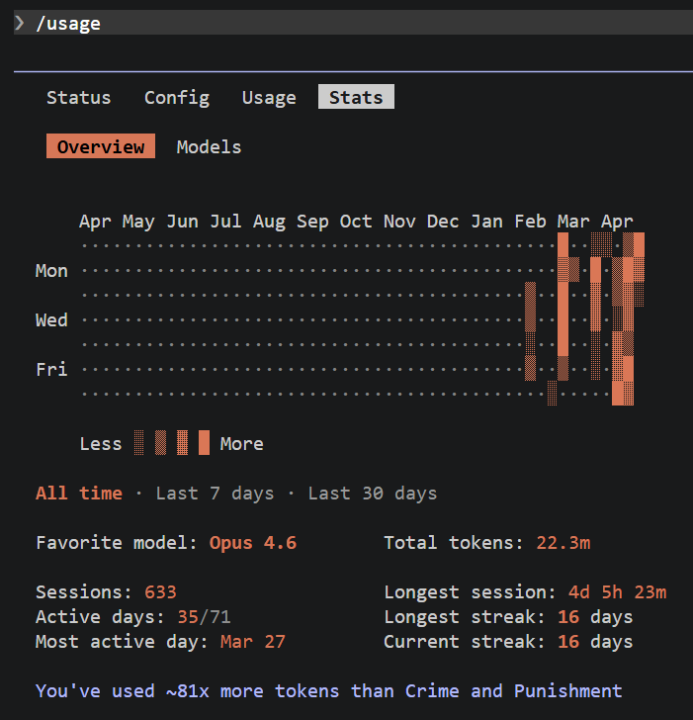
/usage in Claude Code
Go check it out! The dates seem a little weird considering were only a week into April. Also, this looks at your statistics locally per account. So if you're constantly switching between devices, you will see two separate stat profiles.

0 likes • 12d
@Ayyub Ahmed Thanks - It's what I've built all of my businesses around. From auto-monitoring and reporting systems (for voice ai), restructuring data, to communication enablement + more. Anything in particular that interests you?
0 likes • 8d
@Ayyub Ahmed Start with one tool and go deep before touching anything else. Most people jump between Make, n8n, Zapier and never get good at any of them. Pick n8n — it's free, self-hostable, and forces you to actually understand what's happening under the hood. Build real things for real problems, even small ones. That's where the learning compounds fastest.
15d •
Build your own slash commands | Claude Code
Easy peasy - most people don't know you can create custom /commands inside Claude Code. This can drastically improve speed and consistency, without having to type it out every. single. time. Here's the full setup: Step 1 — Create the folder - From your project root, run: mkdir -p .claude/commands (Want it available across all your projects? Use ~/.claude/commands/ instead) Step 2 — Create a .md file in that folder - The filename = the command name. Example: update-weather.md Step 3 -- Write the file Pick and mix from the three methods below. - Method 1: Static prompt command (e.g., "review.md") Review the current status file for: - Logic errors or edge cases - Naming clarity Give me a prioritized list, most critical first. Usage: /review → fires that exact prompt instantly. - Method 2: Command with arguments (e.g., "commit.md") Write a git commit message for: $ARGUMENTS Follow conventional commits format. Be specific, not generic. Usage: /commit added retry logic to the webhook handler The $ARGUMENTS placeholder gets replaced with whatever you type after the command. - Type 3: Context injection (no question needed, e.g., "scope.md") Before we start, here is the architecture context for this project: - Stack: Next.js + Supabase + GHL webhooks - Auth is handled by middleware, never in components Acknowledge this and wait for my next instruction. Usage: /scope at the start of any session to prime Claude before a big task. That's it. No config changes. I'd recommend just opening a new Claude Code thread, but you could just drop the file and the command is live.
1 like • 15d
First one to build: start with *scope.md* file for your current project. You'll use it every session.
1 like • 14d
@Muskan Ahlawat 💪

21d •
Claude code builder:-
Hey , Claude code builder's. Claude code provided virtual pet in terminal Claude code users! Which one did you get ?? It doesn't matter that much but what's most beneficial command in Claude what's most useful variables?
Poll
21 members have voted
1 like • 16d
I also usually build my own slash commands when I need to run them often 🤷♂️
1 like • 15d
@Muskan Ahlawat Sure! https://www.skool.com/ai-automation-society/build-your-own-slash-commands-claude-code?p=c00042b9
15d •
Wrong Question? | voice ai
Most conversations about Voice AI agency ops focus on: how do I build better agents? I’ve started thinking that’s the wrong question — at least past a certain point. Once you have paying clients and real deployments, the question that actually determines whether you keep those clients isn’t “how good is my agent” — it’s “how quickly do I know when something isn’t right, and can I prove the agent is working before anyone has to ask?” Building better agents doesn’t help you if your client finds out about a failure before you do. And it doesn’t help you if there’s no automatic proof of value being delivered between build and renewal. I’m not saying quality doesn’t matter. It obviously does. But I’ve seen good agents lose clients — and mediocre agents retain them — based entirely on whether the operator was on top of what was happening operationally. Am I off base here or does this match what others are seeing?
3
0
16d •
Attained Level :-> 9
hey , I'm finally attained level 9 !! thanks for this much support to all of you and so happy to be here . I learned a lot of things from here and also geted my great team member from here !! And as well going to keep it up and share more and as well learn more !! Appreciate you all guys !! 🎉I want all of your suggestions to improve more in work??
4 likes • 16d
Whoa - That's impressive! I'm level 1 😅
1 like • 15d
@Esayas Tesfaye Awesome!!
1-5 of 5

@jakin-harper-7439
Built the ops layer Voice AI agencies have been missing.
Co-founder @ VoiceLens — Founding Beta open.
https://link.voicelens.io
Active 3h ago
Joined Apr 8, 2026
Texas, USA
Powered by