Activity
Mon
Wed
Fri
Sun
Nov
Dec
Jan
Feb
Mar
Apr
May
Jun
Jul
Aug
Sep
Oct
What is this?
Less
More
Owned by MamaJ
Get paid for your genius, not your time. Helping accomplished professional women navigate non-linear career moves on their own terms.
For Three Principles practitioners to write to prison residents and share insights. A space to ground your understanding through meaningful work.
Cash Flow Association
761
Free
Leadership Skool
1.9k
5.0
Free
Summit Speaker Hub
132
Free
Thrive Together Womens Circle
284
Free
Evolved Health
364
Free
YouTube For Skool
169
5.0
$9/m
Self Publishing for Leaders
186
5.0
$5/m
The Live Event Studio
695
5.0
Free
6 contributions to Skool Extensions 🧩

🔥
Jun 20 •
Schedule Posts (VIP Feature 💎)
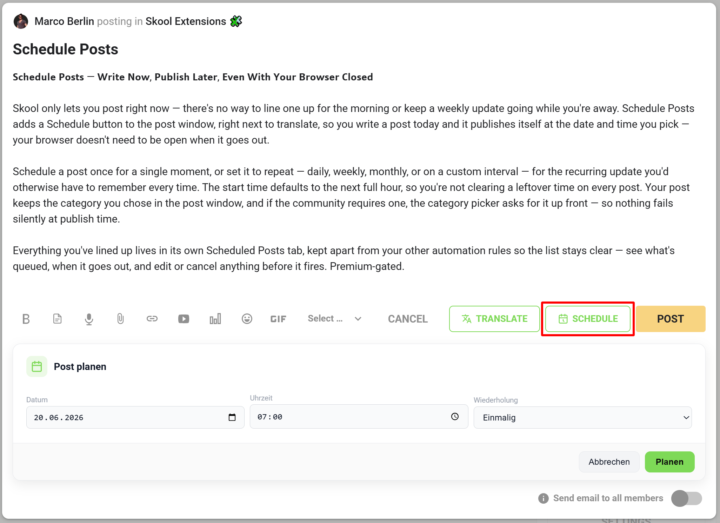
𝗦𝗰𝗵𝗲𝗱𝘂𝗹𝗲 𝗣𝗼𝘀𝘁𝘀 — 𝗪𝗿𝗶𝘁𝗲 𝗡𝗼𝘄, 𝗣𝘂𝗯𝗹𝗶𝘀𝗵 𝗟𝗮𝘁𝗲𝗿, 𝗘𝘃𝗲𝗻 𝗪𝗶𝘁𝗵 𝗬𝗼𝘂𝗿 𝗕𝗿𝗼𝘄𝘀𝗲𝗿 𝗖𝗹𝗼𝘀𝗲𝗱 Skool only lets you post right now — there's no way to line one up for the morning or keep a weekly update going while you're away. Schedule Posts adds a Schedule button to the post window, right next to translate, so you write a post today and it publishes itself at the date and time you pick — your browser doesn't need to be open when it goes out. Schedule a post once for a single moment, or set it to repeat — daily, weekly, monthly, or on a custom interval — for the recurring update you'd otherwise have to remember every time. The start time defaults to the next full hour, so you're not clearing a leftover time on every post. Your post keeps the category you chose in the post window, and if the community requires one, the category picker asks for it up front — so nothing fails silently at publish time. Everything you've lined up lives in its own Scheduled Posts tab, kept apart from your other automation rules so the list stays clear — see what's queued, when it goes out, and edit or cancel anything before it fires. --- 𝗣𝗼𝘀𝘁𝘀 𝗽𝗹𝗮𝗻𝗲𝗻 — 𝗝𝗲𝘁𝘇𝘁 𝘀𝗰𝗵𝗿𝗲𝗶𝗯𝗲𝗻, 𝘀𝗽𝗮̈𝘁𝗲𝗿 𝘃𝗲𝗿𝗼̈𝗳𝗳𝗲𝗻𝘁𝗹𝗶𝗰𝗵𝗲𝗻, 𝗮𝘂𝗰𝗵 𝗯𝗲𝗶 𝗴𝗲𝘀𝗰𝗵𝗹𝗼𝘀𝘀𝗲𝗻𝗲𝗺 𝗕𝗿𝗼𝘄𝘀𝗲𝗿 Skool lässt dich nur sofort posten — es gibt keine Möglichkeit, einen Beitrag für den Morgen vorzubereiten oder ein wöchentliches Update laufen zu lassen, während du weg bist. „Posts planen" fügt dem Postfenster einen Planen-Button hinzu, gleich neben „Übersetzen": Du schreibst einen Post heute, und er veröffentlicht sich von selbst zum Datum und zur Uhrzeit, die du wählst — dein Browser muss dafür nicht offen sein. Plane einen Post einmalig für einen einzelnen Zeitpunkt oder stell ihn auf wiederkehrend — täglich, wöchentlich, monatlich oder im eigenen Intervall — für das regelmäßige Update, an das du sonst jedes Mal denken müsstest. Die Startzeit steht standardmäßig auf der nächsten vollen Stunde, sodass du keine übrig gebliebene Uhrzeit bei jedem Post wegklicken musst. Dein Post behält die Kategorie, die du im Postfenster gewählt hast, und braucht die Community eine, fragt die Kategorie-Auswahl gleich danach — so scheitert nichts still beim Veröffentlichen.

🔥
7 likes • Jun 20
Wow
🔥
Apr 13 •
Skool Extensions Chatbot
𝗦𝗸𝗼𝗼𝗹 𝗘𝘅𝘁𝗲𝗻𝘀𝗶𝗼𝗻𝘀 𝗖𝗵𝗮𝘁𝗯𝗼𝘁 — 𝗬𝗼𝘂𝗿 𝗜𝗻-𝗔𝗽𝗽 𝗛𝗲𝗹𝗽 𝗔𝘀𝘀𝗶𝘀𝘁𝗮𝗻𝘁 The Skool Extensions Chatbot is a built-in help assistant for the extension itself. It answers questions about the Skool Extensions toolkit: how features work, where to find settings, troubleshooting, release notes, and anything else related to the extension. Open it from the toolkit settings panel or the extension popup and ask in plain language: "How do I enable the focus mode?", "Why don't I see the members panel?", "What's new in the latest release?". The chatbot pulls from the current feature documentation and release notes, so its answers stay in sync with the version you have installed. The chatbot supports English and German, preserves your conversation history locally, and works offline-aware — if the backend is unreachable, you get a clear error instead of a silent failure. No community context or personal data is sent to the backend; only your question and the extension version. --- 𝗦𝗸𝗼𝗼𝗹 𝗘𝘅𝘁𝗲𝗻𝘀𝗶𝗼𝗻𝘀 𝗖𝗵𝗮𝘁𝗯𝗼𝘁 — 𝗗𝗲𝗶𝗻 𝗶𝗻𝘁𝗲𝗴𝗿𝗶𝗲𝗿𝘁𝗲𝗿 𝗛𝗶𝗹𝗳𝗲-𝗔𝘀𝘀𝗶𝘀𝘁𝗲𝗻𝘁 Der Skool Extensions Chatbot ist ein eingebauter Hilfe-Assistent für die Extension selbst. Er beantwortet Fragen rund um das Skool Extensions Toolkit: wie Features funktionieren, wo du Einstellungen findest, Troubleshooting, Release Notes und alles andere rund um die Extension. Öffne ihn über das Toolkit-Einstellungen-Panel oder das Extension-Popup und stelle deine Frage in natürlicher Sprache: „Wie aktiviere ich den Focus Mode?", „Warum sehe ich das Members Panel nicht?", „Was ist neu in der aktuellen Version?". Der Chatbot greift auf die aktuelle Feature-Dokumentation und die Release Notes zu, sodass seine Antworten immer zur installierten Version passen. Der Chatbot unterstützt Deutsch und Englisch, speichert deinen Gesprächsverlauf lokal und ist fehlerresistent — wenn das Backend nicht erreichbar ist, bekommst du eine klare Fehlermeldung statt eines stillen Abbruchs. Es werden weder Community-Kontext noch persönliche Daten an das Backend übertragen, nur deine Frage und die Extension-Version.

🔥
4 likes • Apr 13
Brilliant
🔥
Apr 13 •
Video Download in Postings (Premium Feature 👑)
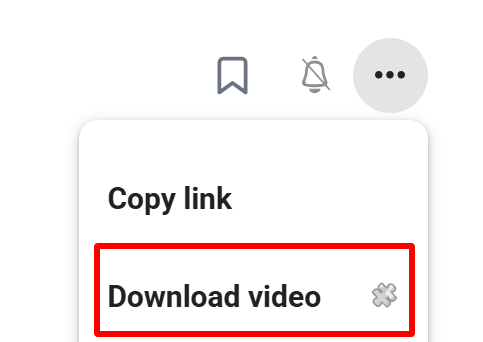
𝗩𝗶𝗱𝗲𝗼 𝗗𝗼𝘄𝗻𝗹𝗼𝗮𝗱 — 𝗦𝗮𝘃𝗲 𝗔𝗻𝘆 𝗦𝗸𝗼𝗼𝗹 𝗩𝗶𝗱𝗲𝗼 𝗮𝘀 𝗠𝗣𝟰 Skool posts often contain valuable video content — tutorials, walkthroughs, live replays — but there's no built-in way to save them for offline viewing. Video Download adds a "Download video" entry directly to the 3-dot menu of any post that contains a video. One click and the full-quality MP4 lands in your downloads folder. Under the hood the extension detects the video in the post, extracts the HLS stream URL, and sends it to a secure server-side ffmpeg transmuxer. The stream is remuxed to a valid MP4 container without re-encoding — lossless, fast, and ready to play in QuickTime, Windows Media Player, VLC, or any other standard player. A toast shows the download progress and confirms when the file is ready. Perfect for archiving course content, watching on the go, or keeping a backup of your own community's material. --- 𝗩𝗶𝗱𝗲𝗼 𝗗𝗼𝘄𝗻𝗹𝗼𝗮𝗱 — 𝗝𝗲𝗱𝗲𝘀 𝗦𝗸𝗼𝗼𝗹-𝗩𝗶𝗱𝗲𝗼 𝗮𝗹𝘀 𝗠𝗣𝟰 𝘀𝗽𝗲𝗶𝗰𝗵𝗲𝗿𝗻 Skool-Posts enthalten oft wertvolle Video-Inhalte — Tutorials, Walkthroughs, Live-Aufzeichnungen — aber es gibt keine eingebaute Möglichkeit, sie für die Offline-Nutzung zu speichern. Video Download fügt einen "Video laden"-Eintrag direkt ins 3-Punkte-Menü jedes Posts mit Video ein. Ein Klick, und die MP4 in voller Qualität landet im Downloads-Ordner. Im Hintergrund erkennt die Extension das Video im Post, extrahiert die HLS-Stream-URL und schickt sie an einen sicheren server-seitigen ffmpeg-Transmuxer. Der Stream wird ohne Neukodierung in einen gültigen MP4-Container remuxt — verlustfrei, schnell und sofort abspielbar in QuickTime, Windows Media Player, VLC oder jedem anderen Standard-Player. Ein Toast zeigt den Download-Fortschritt und bestätigt, wenn die Datei fertig ist. Perfekt zum Archivieren von Kursinhalten, zum Anschauen unterwegs oder als Backup für das Material deiner eigenen Community.
🔥
3 likes • Apr 13
I actually found this by accident 🫶
🔥
Mar 30 •
Course Overview (VIP Feature 💎)
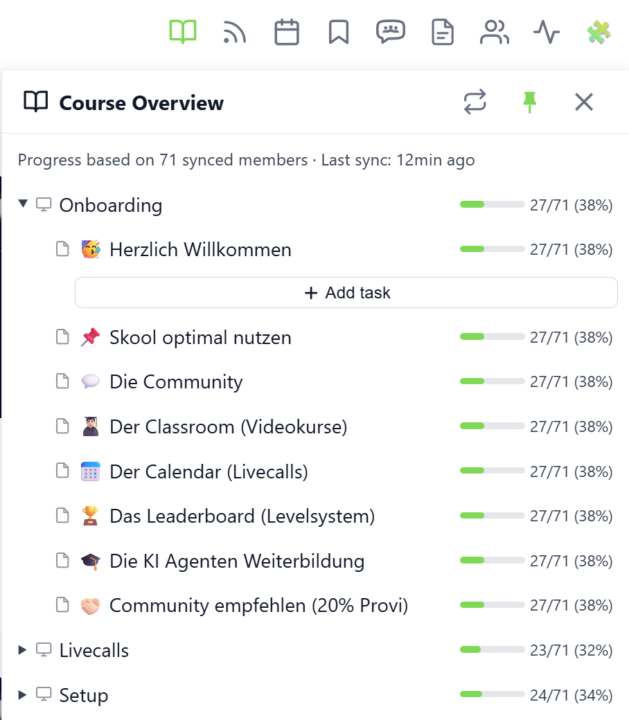
𝗖𝗼𝘂𝗿𝘀𝗲 𝗢𝘃𝗲𝗿𝘃𝗶𝗲𝘄 — 𝗬𝗼𝘂𝗿 𝗘𝗻𝘁𝗶𝗿𝗲 𝗖𝗹𝗮𝘀𝘀𝗿𝗼𝗼𝗺 𝗦𝘁𝗿𝘂𝗰𝘁𝘂𝗿𝗲 𝗮𝘁 𝗮 𝗚𝗹𝗮𝗻𝗰𝗲 Managing a Skool classroom with multiple modules, folders, and pages means a lot of clicking and scrolling to understand the full picture. Course Overview adds a dedicated sidebar panel that shows your complete course structure as an expandable tree — every module, every folder, every page — without leaving the page you're on. Click the book icon in your toolbar to open the panel. Each module shows as a collapsible row with a folder icon for subfolders and page icons for individual lessons. Click any module to expand it and reveal its nested content, loaded directly from Skool's data. The tree remembers which modules you've expanded, so your view stays consistent as you navigate. The real power comes from the completion stats. If you've synced your members' course progress, each module displays a green progress bar showing what percentage of your members have started it. Hover over the bar to see member names, or click it to open a popup with the full list — complete with avatars, tags, and pipeline status. A note at the bottom shows how many synced members the percentages are based on. Hit the refresh button to reload the course structure or update completion stats. The panel respects the 24-hour sync cooldown and shows when the next sync is available. You can pin the panel to keep it open while you browse, resize it by dragging the left edge, or close it when you're done. Course Overview is available for admins and owners only, and works on any page within your community. The feature can be toggled in the Toolkit Settings under the Admin section. --- 𝗞𝘂𝗿𝘀ü𝗯𝗲𝗿𝘀𝗶𝗰𝗵𝘁 — 𝗗𝗲𝗶𝗻𝗲 𝗴𝗲𝘀𝗮𝗺𝘁𝗲 𝗖𝗹𝗮𝘀𝘀𝗿𝗼𝗼𝗺-𝗦𝘁𝗿𝘂𝗸𝘁𝘂𝗿 𝗮𝘂𝗳 𝗲𝗶𝗻𝗲𝗻 𝗕𝗹𝗶𝗰𝗸 Eine Skool-Classroom mit mehreren Modulen, Ordnern und Seiten zu verwalten bedeutet viel Klicken und Scrollen, um das Gesamtbild zu verstehen. Die Kursübersicht fügt ein eigenes Sidebar-Panel hinzu, das deine komplette Kursstruktur als aufklappbaren Baum zeigt — jedes Modul, jeden Ordner, jede Seite — ohne die aktuelle Seite zu verlassen.
🔥
2 likes • Apr 8
Wow 😮 I hadn’t even noticed that. Must go find 🙏🏻
🔥
Mar 10 •
🧩 Skool Extensions starting
skool-extensions.com I’m officially releasing my Skool Extensions! 🥳 Install the extension, give me your feedback and ideas, and spread the word! --- Hiermit veröffentliche ich offiziell meine Skool Chrome Extension 🥳 Installier dir die Extension, geb mir Feedback und Ideen und erzählt es weiter.

🔥
8 likes • Mar 27
It's amazing, and I am introducing it to my community, some of whom have Skool communities themselves. Thank you so much.
🔥
5 likes • Mar 29
@Leeanne Hurren me toooo 💃🎉
1-6 of 6

🔥
@jacqueline-hollows-9412
Helping women build a meaningful business after a career, on their own terms.
Take my free 2-min quiz 👇🏼
✍️ Author 💞 Coach 🎙️ Speaker
Active 5h ago
Joined Mar 27, 2026
Rugby
Powered by