Activity
Mon
Wed
Fri
Sun
Apr
May
Jun
Jul
Aug
Sep
Oct
Nov
Dec
Jan
Feb
Mar
What is this?
Less
More
Memberships
AI Automation Society
293.7k members • Free
Communauté IA
49.1k members • Free
9 contributions to AI Automation Society

Jan 28 •
The WhatsApp AI agent is not working.
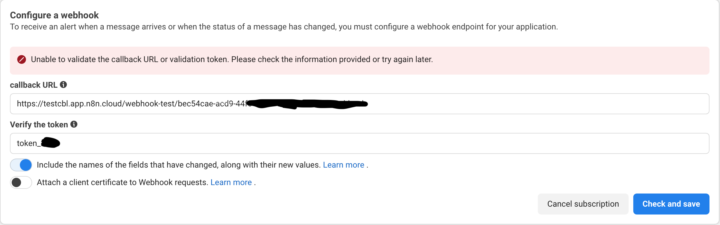
In a previous post, I mentioned a problem I was having trying to create a WhatsApp AI agent. The connection between the WhatsApp application triggers in n8n and the MetaPass application is problematic. The issue is that when I send a test message, the trigger node doesn't activate. Here's the problem I'm encountering with my app: webhook creation fails. I get an error message, and I don't know why. I've switched business managers, but the problem persists. Please help me fix this problem.
1 like • Jan 29
@M. talha Faraz Similarly, at my place, practically all the tutorials skip this step. Or is this a recent problem?
0 likes • Jan 29
@Shivam Raj Technically, how did you do it? The WhatsApp node provides a webhook for both GET and POST requests. It's with this webhook that you create a callback URL with a token that you're free to choose yourself. Here's how I do it.

💎
⭐
Jan 28 •
🚀New Video: I Tested Clawdbot Against Claude Code: What You Need to Know
In this video, I put Clawdbot head-to-head against Claude Code to see which AI coding tool actually delivers. I break down everything you need to know across the metrics that actually matter: ability, setup, risk, cost, security, usability, ROI, and raw power. The verdict? Claude Code still comes out on top, but Clawdbot is a super young tool has some interesting strengths if you know what you're doing. That said, you need to be careful with Clawdbot unless you really understand the risks involved. Whether you're considering making the switch or just want to understand what these tools can actually do, this video will give you the full picture.
3 likes • Jan 28
I've made the observation. Claude is very good at technical actions compared to other AIs.
Jan 20 •
Need help getting an automation up and running
Hi everyone. Please, I'd like some help understanding something. I'm a beginner in automation, and my first challenge is to create an AI agent for WhatsApp. I created an application on developer.facebook.com and connected it to the n8n WhatsApp Business "on message" node. When I click on "execute a test event" and send a message, the node doesn't trigger. I put the application live and publish the workflow, and I run more tests, but still nothing. Please help me understand the underlying issue so I can fix it. I installed my n8n on EC2 (I got help from Chat GPT to complete the installation). Do you think the problem might be related to that? Thank you.
0 likes • Jan 21
@Hector Diaz youtube permet de traduire les audios. Cela m'aide énormément. J'ai supprimé mon compte n8n sur ec2. Je compte réinstaller mais avec elest.io Connaissez-vous une autre et bonne plateforme permettant d'installer n8n plus avantageux que elestio.io ?
0 likes • Jan 27
@Hector Diaz A YAML file, can you tell me what that is?

Jan 18 •
Built a Automation system that collect leads and save time
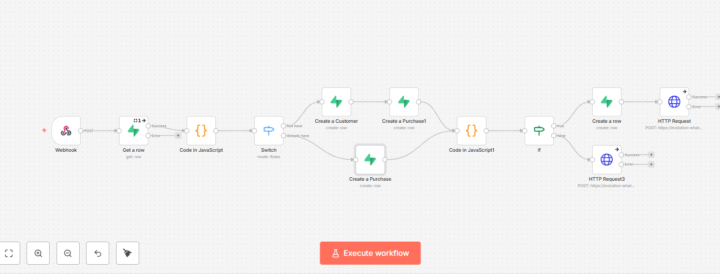
Built a Automation system today using n8n and Supabase. Logic:– New user → create customer– Purchase logged – Cashback auto-calculated - WhatsApp message sent All through Supabase and evolution api Help brands save time and collect lead data without any cost. Happy to share the JSON file if anyone wants 👇
0 likes • Jan 19
Thanks for sharing
Jan 17 •
Trigger Agent AI WhatsApp is not activating
Hello experts, Hi everyone, I'm a complete beginner with n8n and I need your help understanding something. I want to create a WhatsApp AI Agent. To do this, I created a WhatsApp Meta application and connected it to the WhatsApp Business Cloud "on message" node. The webhook was created with the production URL. I published the workflow and put the application into production. When I send a message directly, nothing appears in the workflow. However, when I listen for a test event and send a message, I see the information in the node. The information is only visible in the WhatsApp node when I put it in test event listening mode. In normal mode, nothing appears, the trigger remains static, and I don't see the information in the node. Could you help me understand this? Is this normal? If not, what could be the cause? Thank you.
2 likes • Jan 17
@Hicham Char Thank you so much for your reply.
1-9 of 9