Activity
Mon
Wed
Fri
Sun
Dec
Jan
Feb
Mar
Apr
May
Jun
Jul
Aug
Sep
Oct
Nov
What is this?
Less
More
Invest & Retire Community
4.2k
5.0
Free
AI Money Lab
94.8k
Free
AI Automation Society
480.9k
Free
AI Ranking (FREE)
9.9k
Free
ChatGPT Users
12.8k
Free
Freedom Fastlaner
6.6k
Free
Creator Party
5.6k
Free
Start Writing Online
22.4k
Free
Max Business School™
266.7k
Free
53 contributions to ChatGPT Users

Mar 29 •
Summarizing News Articles
I use ChatGPT to summarize news articles from various newsletters into a format I developed to save me time each day. It tells me I need to copy and paste the articles before it can summarize them for me which also takes time. Is there a way I could automate this process?

0 likes • May 22
@Heidi Richards Mooney. Thank you for this. I do copy and before. I now know there is an easier way to get this done.

Apr 5 •
Newbie intro
I am a total AI chatgpt newbie and I have just started Learning how to make Master prompts and system prompts. It's kind of like having my own private coach or mentor. It's amazing how AI and ChatGPT have already acquired the functional knowledge how YouTube, LinkedIn, Facebook, etc. Etc. Already work.
1 like • May 22
@Julie Helmer Does ChatGPT bundled in Abacus.ai still give the same output ?

May 1 •
ChatGPT vs Claude: Which is better?
Ive been using ChatGPT for a while now but never really looked into Claude, but Ive been hearing a lot about Claude recently. thoughts?
3 likes • May 22
I just started using Claude recently for writing. It is quite good.

May 7 •
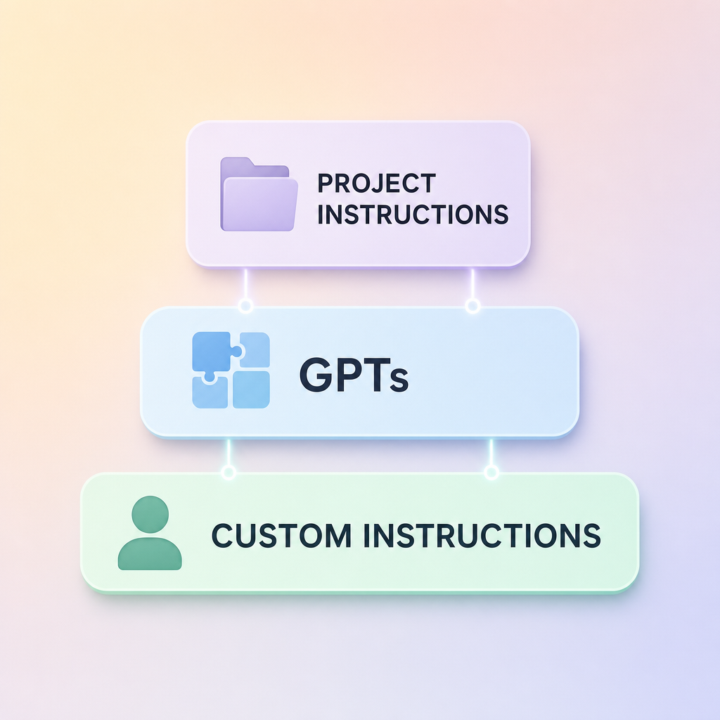
GPTs vs Custom Instructions vs Project Instructions: which one should you use, and when?
If you've ever set up Custom Instructions, then built a GPT, then added Project Instructions and wondered "wait, which one of these is actually being used right now?", you're not alone. They overlap, they sometimes conflict, and most people end up using just one and ignoring the others. Here's the simple frame I use: Custom Instructions → tell ChatGPT who YOU are. This is the stuff that's true in every chat: your business, your role, your voice, your defaults. Set it once, forget it, every conversation benefits. GPTs → package up a specific JOB. Build a GPT when you keep doing the same kind of task (generating LinkedIn posts, drafting cold emails, summarising calls) and you want a reusable tool with its own instructions, files, and behaviour. You can share GPTs with your team or the public. Project Instructions → give ChatGPT context for ONE body of work. Use Projects when you have a chunk of work with its own knowledge base, like a specific client, a course you're building, or a launch you're running. Inside that project, the instructions and files are scoped to it. The order of override, in plain English: In a normal chat → Custom Instructions apply. Inside a Project → Project Instructions take priority over Custom Instructions. Inside a GPT → the GPT's instructions take priority. So: Custom Instructions for who you are. GPTs for what you do. Projects for what you're working on right now. Pick the level that matches the lifespan of the task and you'll stop fighting yourself. Cheers Jason West 🙌
0 likes • May 22
This a big clean up for me. Thank you

Mar '23 •
PromptGenerator
I got this from the Discord app, and this may be the best prompt I've seen so far. It asks ChatGPT to revise the prompt you want to get the best possible answer. It's gonna blow your mind! Copy and paste or type this in: I want you to become my Prompt Creator. Your goal is to help me craft the best possible prompt for my needs. The prompt will be used by you, ChatGPT. You will follow the following process: 1. Your first response will be to ask me what the prompt should be about. I will provide my answer, but we will need to improve it through continual iterations by going through the next steps. 2. Based on my input, you will generate 3 sections. a) Revised prompt (provide your rewritten prompt. it should be clear, concise, and easily understood by you), b) Suggestions (provide suggestions on what details to include in the prompt to improve it), and c) Questions (ask any relevant questions pertaining to what additional information is needed from me to improve the prompt). 3. We will continue this iterative process with me providing additional information to you and you updating the prompt in the Revised prompt section until it's complete. Keep revising until you're happy with it, then simply copy and paste the revised prompt into a new chat. Watch the magic! You'll have some fun with this one. 😉
2 likes • Jun '23
@Bret Littlefield This is awesome. Thanks for sharing.
0 likes • Feb 14
Thanks for sharing
1-10 of 53

Active 10m ago
Joined Mar 8, 2023
Powered by