Activity
Mon
Wed
Fri
Sun
Jul
Aug
Sep
Oct
Nov
Dec
Jan
Feb
Mar
Apr
May
What is this?
Less
More
Memberships
AI Automation Vault
13.8k members • Free
The CSM Collective
193 members • Free
New Earth Community
7.1k members • Free
AI Automation Made Easy
18k members • Free
AI Automation Society
384.1k members • Free
AI Automation Agency Hub
319.8k members • Free
Born To Close (Free)
1.1k members • Free
4 contributions to AI Automation Society

1h •
First Client
Hi guys, I just wanted to put out an update. I have made the decision in November to go all in on the AI Agency model I have since followed Nick Sarav and Nate Herk and I did instantly cold emails, LinkedIn outreach, I did the Upwork route and I spent a fair amount of money only to land my first client yesterday. The proposal to be signed and the payment to be sent so it's not completely done but it's an 11.5k deal building a spec reviewer and personal optimization setup which I'm very excited about. And now I'm looking into how do I actually gather all the important information from the person without exposing passwords and things like that. From the little research I've done, I think Proton actually allows you to send the passwords and then it explodes. Or gets eliminated after a while. And I do have a Proton account. But yeah, I'm curious as to what you guys do usually once everything is signed and you're doing the kickoff call... What's the best approach to gather the necessary data?

Apr 27 •
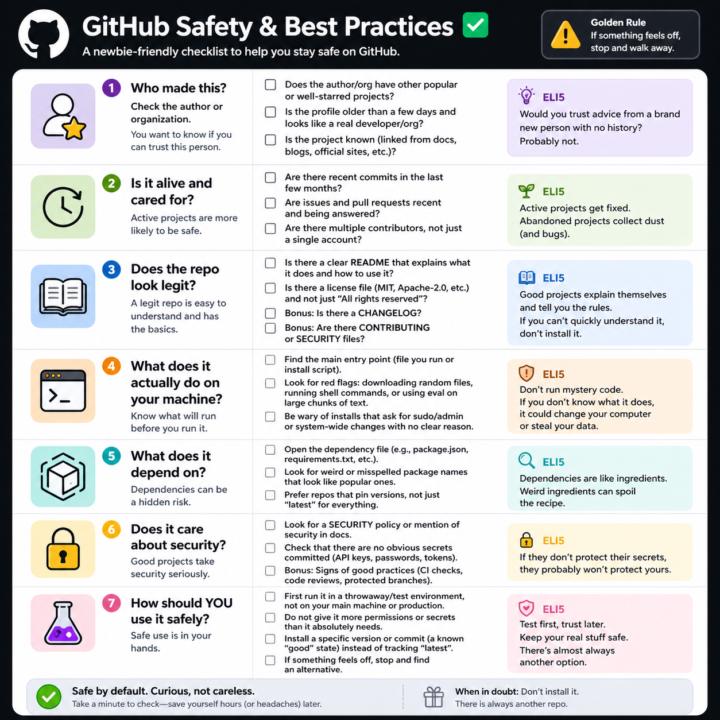
GitHub Safety and Best Practices Checklist
Here’s a simple, newbie‑friendly safety checklist you can run through every time you look at a GitHub repo. ## 1. Who made this? - Does the author or org have other popular or well‑starred projects? - Is the profile older than a few days and look like a real developer/org? - Does the project feel “known” (linked from docs, blogs, official sites, etc.)? If it’s a totally new account with one flashy repo, be extra careful. ## 2. Is it alive and cared for? - Are there recent commits in the last few months? - Are there recent issues and pull requests being answered? - Do you see multiple contributors, not just a single throwaway account? Abandoned projects aren’t always bad, but they age poorly from a security angle. ## 3. Does the repo look legit? - There is a clear README that explains what it does and how to use it. - There is a license file (MIT, Apache‑2.0, etc.), not just “All rights reserved”. - Optional but nice: CHANGELOG, CONTRIBUTING, SECURITY files. If you can’t quickly understand what it does, don’t install it. ## 4. What does it actually do on your machine? - Find the main entry point (the file you run, or the install script). - Look for obvious red flags: downloading random files, running shell commands, or calling `eval` on big chunks of text. - Be wary of “install” steps that ask for sudo/admin or system‑wide changes with no clear reason. If you don’t understand the install steps, don’t run them yet. ## 5. What does it depend on? - Open the dependency file (like `package.json` for Node, `requirements.txt` for Python). - Scan for weird or misspelled package names that look like popular ones. - Prefer repos that pin versions (not just “latest everything forever”). If the dependency list looks messy or huge for a simple tool, treat it carefully. ## 6. Does it care about security? - Look for signs of security features: security policy, mention of security in docs, or badges for scans/CI. - Check that there are no obvious secrets committed (API keys, passwords in plain text).
3 likes • Apr 28
Very helpful for us newbies. Thank you.

💎
⭐
Oct '24 •
Welcome! Introduce yourself + share a career goal you have 🎉
Let's get to know each other! Comment below sharing where you are in the world, a career goal you have, and something you like to do for fun. 😊
6 likes • Apr 16
Hi, my name is Hendrik. I am living here in Montreal and I've been trying to build an AI agency so far unsuccessfully but I'm not giving up. I know this is the future and I'm quite fascinated by it. I've built multiple workflows. I've worked in high ticket sales for the last couple of years and I'm always excited to see another Nate video Although I can't watch the whole thing. I often skip through them. But I would love to connect with like-minded people and thanks for having me.

Apr 16 •
Is it necessary to learn n8n?
Context: Using claude code for agentic workflow automation. Triggers are handled by modal or trigger.dev. So I am looking to find my way in AI automation, but a lot of people here are using n8n. I have never used n8n. So do I need to learn it now. As the agents are getting better and better, does n8n still gives me the edge. Or I just keep moving forward by building automation with claude code. I do understand the workflow and trying to learn that to for businesses. Any approach with clear explanations would be helpful.
1 like • Apr 16
@Tobias Gloeckler I agree with Tobias here because I think you can you can basically just use claude code to build you the workflow and if if a client likes to see it it's nice to see the notes and then you just paste it in there and there's your Workflow done. But I don't think you need to learn it anymore.
1-4 of 4

@hendrik-kaiser-3080
Sales | AI | Father | Building something Grand
Active 56m ago
Joined Sep 16, 2025
Montreal
Powered by