Activity
Mon
Wed
Fri
Sun
Feb
Mar
Apr
May
Jun
Jul
Aug
Sep
Oct
Nov
Dec
Jan
What is this?
Less
More
Memberships
#TheTechHustle Community 🤝🏽
290 members • Free
Closers.io - Remote Sales Reps
13k members • Free
Front End Now Community
168 members • $47/month
119 contributions to Front End Now Community

30m •
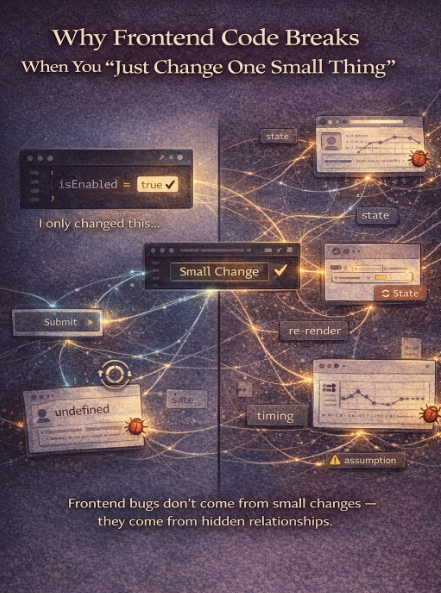
Why Frontend Code Breaks When You “Just Change One Small Thing”
Almost every frontend developer has said this at some point: “I only changed one small thing… why did everything else break?” That moment is frustrating but it’s also very revealing. Because frontend code usually doesn’t break because of the change itself. It breaks because of what that change was connected to. The hidden truth about frontend bugs Frontend bugs are rarely isolated. Most UI code is built on relationships: - Components depend on shared state - State depends on previous state - UI behavior depends on timing - Multiple parts of the app assume the same thing So when you change “one small thing,” you’re often changing a shared assumption—not just a line of code. A common JavaScript state issue Here’s a pattern I see constantly: You update some state because it seems local. But another component was also relying on that state, indirectly. Now: - Something re-renders unexpectedly - Something stops updating - Something breaks “somewhere else” It feels random, but it’s not. The dependency was always there. You just didn’t notice it yet. Why beginners experience this more often When you’re newer to frontend, you’re usually focused on: - Making the thing work - Fixing what’s visibly broken - Getting past the error That’s normal. What’s harder early on is seeing: - What else depends on this? - What assumptions does this code make? - What state flows through multiple places? Those questions take practice not intelligence. How experienced engineers approach “small changes” When senior frontend developers change something, they pause first. They ask: - What state is this touching? - Who else reads this state? - What re-renders when this changes? - What assumptions exist around timing or data shape? That pause is often the difference between a clean change and a cascading bug. Why guessing makes things worse When something breaks unexpectedly, the instinct is to: - Add conditionals - Patch around the issue - Change multiple things quickly
0
0
1d •
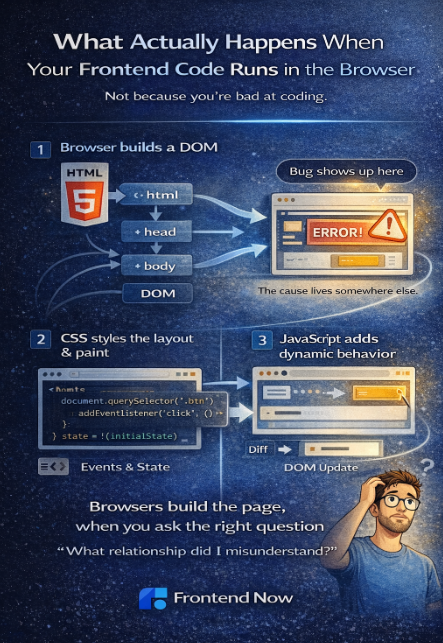
What Actually Happens When Your Frontend Code Runs in the Browser
A lot of frontend confusion comes from one simple thing: Most beginners write code without really knowing what the browser is doing with it. So things feel mysterious. Re-renders feel random. Bugs feel unpredictable. Let’s slow it down and walk through what actually happens, without going low-level or adding too much detail. Step 1: The browser builds a map of the page When your HTML loads, the browser doesn’t just “show a page.” It builds a structure called the DOM (Document Object Model). Think of this as the browser’s internal tree of: - elements - text - relationships This is what the browser uses to understand what exists on the page. Step 2: CSS tells the browser how things should look Next, the browser applies CSS. CSS doesn’t change structure, it answers questions like: - Where should this be positioned? - How big is it? - What color, font, and spacing should it use? The browser combines HTML + CSS to calculate layout and paint pixels on the screen. That’s why small CSS changes can cause big visual shifts. Step 3: JavaScript adds behavior JavaScript is where frontend becomes dynamic. When your JavaScript runs, it can: - Read data from the page - Listen for events (clicks, input, scroll) - Change state - Update the DOM Important point: JavaScript doesn’t magically “update the UI.” It changes data, and the browser reacts by updating what’s rendered. That’s the core idea behind how frontend code works. Step 4: Events trigger change When a user clicks a button or types into an input: - An event fires - Your code runs - State changes - The browser updates the UI This loop happens constantly. Frontend development is really about managing what changes, when it changes, and what depends on it. Step 5: Re-rendering isn’t magic In modern frameworks like React, the browser isn’t updating everything. Instead, React is: - Comparing what should be shown - Updating only what changed That’s why understanding browser rendering basics makes React feel less mysterious.
0
0
3d •
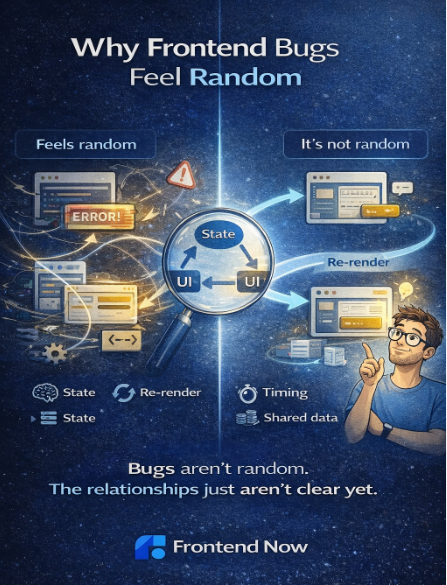
Why Frontend Bugs Feel Random
If frontend bugs ever feel random, you’re not alone. Most beginners tell me things like: “It was working… then I changed one small thing and everything broke.” That experience is incredibly common. And the important part is this: Frontend bugs usually aren’t random at all, they just feel that way when the mental model isn’t clear yet. Why frontend bugs feel unpredictable at first When something breaks, beginners often look straight at the line of code throwing the error. That makes sense. But frontend bugs rarely live in a single line. They usually come from: - State changing in a way you didn’t expect - Multiple pieces of UI depending on the same data - An assumption about timing or order - A component re-rendering when you didn’t think it would If you’re not tracking those relationships, the bug feels like it came out of nowhere. What experienced frontend engineers do differently Senior frontend developers don’t start by “fixing” the code. They start by asking a few calm questions: - What changed right before this broke? - What state was updated? - What parts of the UI depend on that state? - What assumption did I make that’s no longer true? That turns debugging from guesswork into pattern recognition. A simple example You update one piece of state… and suddenly a different part of the UI breaks. That’s not React being weird. It usually means: - Two components depended on the same state - Logic lived in the wrong place - Data changed shape unexpectedly The bug shows up here, but the cause lives somewhere else. Once you trace that path, the fix is usually obvious. Why guessing makes bugs worse When bugs feel random, people often: - Change multiple things at once - Add conditionals “just in case” - Copy fixes without understanding them That can make the app work again temporarily, while making future bugs harder to reason about. Experienced engineers do the opposite: They change one thing, then observe. How to make frontend debugging predictable
0
0
4d •
🎯 What Senior Frontend Developers Actually Look For (This Decides Who Gets Hired)
I just dropped a new YouTube video that I really want everyone in this community to watch, especially if you’re trying to break into frontend, level up from junior, or stop getting overlooked. 👉 Watch here: https://www.youtube.com/watch?v=3cw5Irc2uTU In this video, I break down what senior frontend developers and hiring teams ACTUALLY care about when they look at your work and it’s probably not what you think. This isn’t about: memorizing more frameworks adding another tutorial project or chasing every new tool It’s about the signals you’re sending. I cover things like: Why “clean code” matters more than fancy features What makes a project look real vs “tutorial energy” The frontend skills that separate juniors from mid-level devs How seniors evaluate problem-solving, not just syntax What instantly makes someone think: “I’d trust this person on my team” If you’ve ever wondered: “Why am I not getting interviews?” “What am I missing?” “How do I think more like a senior?” This video will give you clarity. 👇 After you watch, drop a comment here and answer this: What’s ONE thing from the video that you’re going to change about how you build projects? Let’s make sure the work you’re doing actually moves the needle.
0
0
4d •
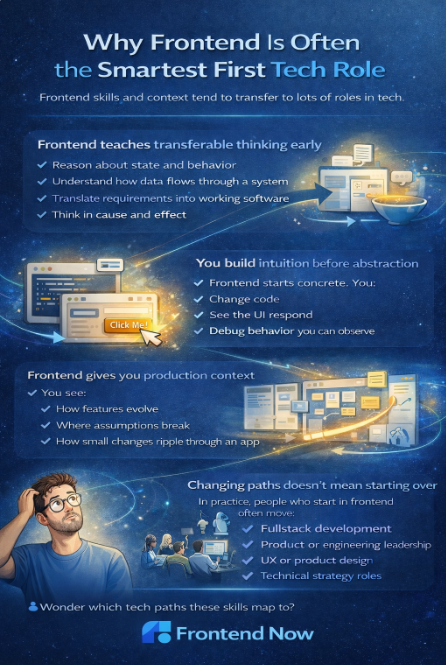
Why Frontend Is Often the Smartest First Tech Role (Even If You Change Paths Later)
One of the quiet fears I hear from people starting out is this: “What if I choose frontend and later realize I want something else?” That fear makes sense. No one wants to lock themselves into the wrong first tech job. The interesting part is that frontend development is rarely a trap, it’s often a launchpad. Frontend teaches transferable thinking early When you learn frontend development properly, you’re not just learning tools. You’re learning how to: - Reason about state and behavior - Understand how data flows through a system - Translate requirements into working software - Think in cause and effect Those skills show up everywhere in tech. That’s why frontend developer skills tend to transfer well into other roles. You build intuition before complexity Many tech roles start abstract and ask you to trust systems you can’t see yet. Frontend starts concrete. You: - Change code - See the UI respond - Debug behavior you can observe That visible feedback builds intuition early, and intuition makes later complexity easier, not harder. Frontend gives you production context As a frontend developer, you work close to real users and real products. You see: - How features evolve - Where assumptions break - How small changes ripple through an app That production context is valuable no matter where you go next, backend, full stack, product, or leadership. Changing paths doesn’t mean starting over One of the biggest misconceptions is that switching roles means resetting your progress. In practice, people who start in frontend often move into: - Full stack development - Product or engineering leadership - UX or product design - Technical strategy roles Because the mental models carry forward. You’re not relearning how software works, you’re applying it in a new area. Why this matters for beginners If you’re choosing your first tech job, the best question usually isn’t: “What will I do forever?” It’s: “What role will give me strong fundamentals and room to grow?”
0
0
1-10 of 119

@harry-ashton-2348
I help beginners land remote jobs in tech without a degree or previous experience 🚀
https://learnfrontendnow.com 💻
Active 25m ago
Joined Feb 4, 2025
Powered by