Activity
Mon
Wed
Fri
Sun
Dec
Jan
Feb
Mar
Apr
May
Jun
Jul
Aug
Sep
Oct
What is this?
Less
More
Storebuild.ai - By Zendrop
5.1k
Free
Dopamine Digital
10.4k
Free
Community F.I.R.E. Mojo
1.6k
5.0
Free
Emprendedores.com
8.5k
Free
Clief Notes
54.2k
5.0
Free
Selling Online / Prime Mover
36.8k
Free
Skool Extensions 🧩
1.2k
5.0
Free
AI SaaS Launchpad
3k
4.7
Free
Chatea PRO
2.1k
Free
5 contributions to Skool Extensions 🧩

🔥
7d •
Members Near You
𝗠𝗲𝗺𝗯𝗲𝗿𝘀 𝗡𝗲𝗮𝗿 𝗬𝗼𝘂 — 𝗦𝗲𝗲 𝗪𝗵𝗼 𝗟𝗶𝘃𝗲𝘀 𝗔𝗿𝗼𝘂𝗻𝗱 𝘁𝗵𝗲 𝗖𝗼𝗿𝗻𝗲𝗿 Skool tells you how many members a community has, but not who among them lives near you. Members Near You adds a tile below the community card on every community page: the members whose profile location is close to yours, sorted by distance — "Köln · 357 km". Members from a neighbouring country show up too when they live within 300 km, with the country next to the city: "Copenhagen, Denmark · 289 km". Each row shows avatar, name with the usual member badges, place and distance, plus when the member was last active; a click opens the profile in a new tab with this community already selected, so the feed stays where you left it and a DM or a follow is one step away. The tile reads the location each member typed into their Skool profile — the same field Skool shows on the members page — and nothing else. Distances are worked out on your device from a built-in city list, measured between city centres; no map service ever sees a location. Members in a small town the list doesn't know still appear for your country, below the measured ones and without a km value. Members without a location simply don't appear, and if your own profile has none, the tile asks you to add it and links to your settings. Up to five members show in the tile; "Show all" expands it to the full list. If you run the community and keep its member list in the Members Panel, the tile uses that complete list right away. Everyone else sees what Skool shows a regular member: a snapshot of 30 members, the ones online right now first. The tile keeps everyone it has seen and looks again every few hours while you visit, so the list grows from visit to visit. As long as it knows fewer members than the community has, a footnote says so — "Based on 30 of 313 members". Locations rarely change, so members stay in the list for two months after they were last seen. Members Near You is on by default and can be toggled in the Extension Settings, right below Community Stats.


2 likes • 2d
@Melli Heinz That’s interesting, Melli Having run an offline business before must have taught you a lot about business and dealing with people. I’m also into business, and I run an online store, so I always enjoy connecting with people who have entrepreneurial experience. What kind of business did you have back then, and have you ever thought about starting something online
0 likes • 2d
@Melli Heinz That’s wonderful, Melli Having a businesswoman as a mother must have taught you some valuable lessons from an early age. I’m also an entrepreneur, and I run an online dropshipping store in the fashion niche that generates around $45K to $50K per month. I’ve learned so much through experience, and I’m always happy to connect with other business minded people. What kind of business did your mother have, and did you eventually follow a similar path
🔥
Aug 10 •
100% Extension users 🤔
Imagine a community with 100% Extension users 🤔 Which functions would be interesting for you as a community owner or as a community member? --- Stellt euch eine Community mit 100% Extension Nutzern vor 🤔 Welche Funktionen wären dann für euch als Community Owner oder als Community Mitglied interessant?

1 like • 2d
@Aurailia Arnold I can relate, Aurailia I’m a businesswoman and run my own online store, which generates around $45K to $50K in monthly revenue. I’m always looking for ways to improve how I manage my business and connect with the right audience. I think features like posting to specific membership tiers could be really helpful. What kind of community are you building
0 likes • 2d
@Aurailia Arnold That sounds amazing, Aurailia! I love how you’re creating spaces for women to grow their businesses while connecting and supporting each other I will love to know, how has Human Design helped the women in your communities grow their businesses
🔥
Mar 14 •
Next Feature ?
Guys, the possibilities right now are insane! I’ve built a setup that lets me develop awesome new Skool features at lightning speed to make our daily Skool life so much better. Share your wildest ideas below! 👇🏼 --- Leute, die Möglichkeiten sind gerade unglaublich. Ich hab jetzt ein Setup, mit dem ich im rasenden Tempo geiles Zeug an Skool ranentwickeln kann und uns so den Skool Alltag versüßen kann. Teilt hier eure wilden Ideen 👇🏼

1 like • 2d
@Terri Hargrave-Bradley Haha, right, Terri What part surprised you the most?
🔥
May 15 •
🔥 Activity Update
I’m officially launching the 🤣 Fun Section here in the Skool Extensions community 🥳 Let’s have some fun and get things moving. Full activity is the goal. My vision is to push this community into the Top 30 someday. Maximum visibility means the extension spreads everywhere on Skool, allowing even more people to benefit from it. You know the Activity Flame in the top left, right? Usually, clicking it copies your stats to the clipboard. But here in this community, under this post, it’s even easier: just click the puzzle icon in the comments and insert your personal activity stats directly. Let’s see who’s the most active on Skool! 🔥🔥🔥 --- Hiermit starte ich den 🤣 Funbereich in der Skool Extensions Community 🥳 Lasst uns hier richtig Spaß haben und Action machen. Volle Aktivität. Mein Ziel ist es diese Community irgendwann mal unter den top 30 zu bekommen. Maximale Sichtbarkeit, damit sich die Extension wirklich überall auf Skool verbreitet und noch mehr davon profitieren. Du kennst doch die Activity Flame oben links. Bei Klick erhälst du deine Activity Stats in der Zwischenablage. Noch einfach geht es hier in dieser Community unter diesem Post. Klick auf das Puzzleicon im Kommentar und füge direkt deine persönlichen Activity Stats ein. Lasst uns hier mal schauen, wer am aktivsten auf Skool ist 🔥🔥🔥

2 likes • 2d
@Rose Colbourne Wow, Rose! A 123-day streak is impressive! Your consistency is definitely paying off. What helps you stay so motivated and consistent every day
🔥
May 21 •
Community Pins
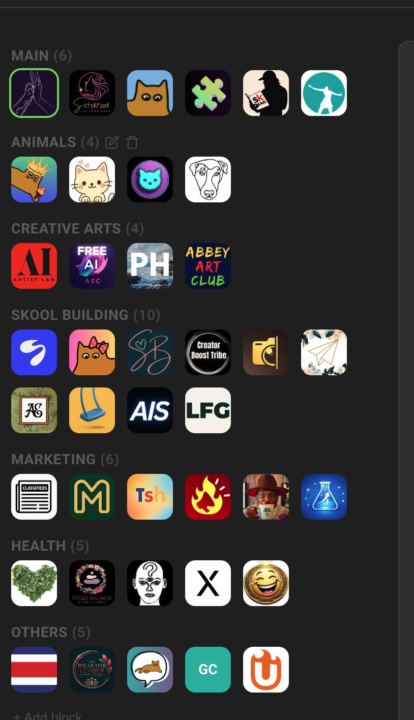
Replace Skool's left community switcher with a strip that holds every community you belong to, grouped into named blocks Skool's left sidebar only surfaces a handful of communities at a time — the rest sit behind a switcher dropdown you have to open every time. If you're active in a dozen or more, the ones you visit daily end up buried in a list you keep scrolling through. Community Pins replaces that switcher with a redesigned strip down the left edge that shows every community you belong to at once — your logos flow in rows across the space beside the page instead of one cramped column. Hover any community to see its name in a tooltip, and the one you're currently in is marked. Group your communities into named blocks. Add a block, head it "AI", "Clients", or whatever fits — each heading carries a live count of how many sit inside. A permanent "Pinned" block catches every community on its own: join a new one and it lands there, leave one and it drops out. Manage it all inline in the strip — "+ Block" adds one, the pencil renames a heading, and the trash icon removes a block (after a quick confirm) and drops its communities back into "Pinned". The "Pinned" block itself can be renamed but never deleted. Drag to organize. Reorder communities inside a block, pull one across to another block, or grab a block's heading to move whole blocks up and down. A custom mouse-driven drag tracks your cursor one-to-one, with no HTML5 ghost image or forbidden-drop flicker to get in the way. The strip scrolls quietly once the list grows long — a slim green scrollbar appears on hover and stays hidden otherwise, so the sidebar stays calm at rest. The whole arrangement is cloud-synced: lay your blocks out on one device and they show up the same on the next. Community Pins can be toggled in the Extension Settings under Appearance. --- Skools linken Community-Switcher durch einen Streifen ersetzen, der jede Community enthält, in der du bist, in benannten Blöcken organisiert Skools linke Sidebar zeigt immer nur eine Handvoll Communities auf einmal — der Rest steckt hinter einem Switcher-Dropdown, das du jedes Mal aufklappen musst. Wenn du in einem Dutzend oder mehr aktiv bist, sind die täglich besuchten in einer Liste vergraben, durch die du immer wieder scrollst.
1 like • 2d
@Charlene Grant Hey CharleneThat sounds frustrating. I hope you’re able to get it sorted out soon. Have you tried refreshing Skool or checking whether your communities are still listed under your profile
1 like • 2d
@Charlene Grant Ohh, that’s good to hear Thanks for letting me know, Charlene. By the way, what do you do, and what are you currently working on? It’s nice connecting with you here, even if it’s a little late
1-5 of 5

Active 29m ago
Joined Oct 27, 2026
Powered by