Activity
Mon
Wed
Fri
Sun
Jun
Jul
Aug
Sep
Oct
Nov
Dec
Jan
Feb
Mar
Apr
May
What is this?
Less
More
Memberships
2D Digital Artist Community
22 members • Free
The Illustrator's Club
73 members • Free
14 contributions to The Illustrator's Club
Dec '25 •
Teaser trailer
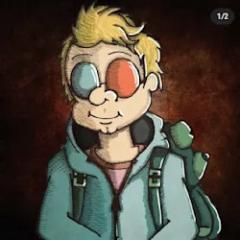
I am currently working on a video game based on my children’s books karma and jonar. Here is a little teaser trailer :-)

2 likes • Dec '25
Very cool! 🔥
Dec '25 •
Thanks for the tips!
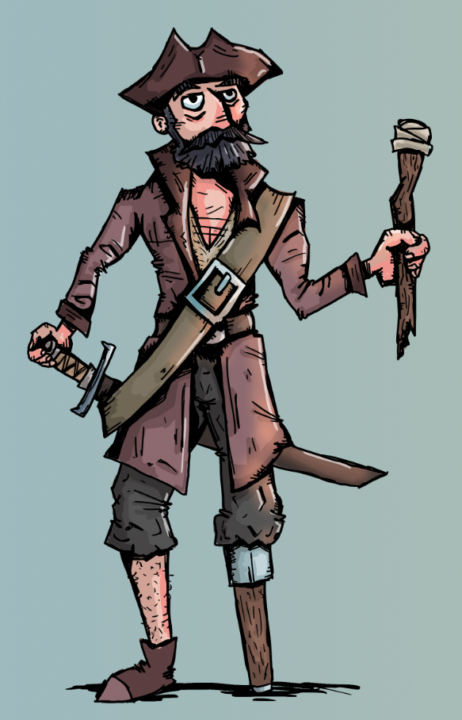
Since joining this community I found my love to learn again. In my previous post I tried a new style and I did that again. Only to discover one I might stick with for a while! The tips you guys gave me about character poses really helped me! Both silhouetting and starting with simple anatomy sketches really helpt making this character really stand in this scene, in stead of 'floating' in an akward pose. Thanks!
Nov '25 •
Advice?
Hi - I'm new here. Several years ago I drew illustrations for a childrens book (old skool way - on paper) for a friend who wrote the story. However, when we tried to contact a publisher or self-publish we ran into the issue that the images needed to be in Vectors for publications. This is something that wasn't in my wheelhouse. I had the images professionally scanned, with hi-resolution. I was told even this way, it wouldn't work for publication. I've tried contacted/Hire mulitple illustrators to re-draw (or copy) my work into a digital form, but they either use AI, or they can't/won't recreate my drawings. I have lost a bit of money trying to do this. I tried using Procreate - to try and recreate them myself, the few I did came out with okay results but not exactly the way I wanted them. I'm not knowledgable enough using this. Is there a way to learn how to digitally draw (a program, lesson, school etc.) for this? What have you found are the best tools to create digital art? I want them images to look hand drawn with either color pencil look or watercolor. Any suggestions would be so greatly and sincerely appreciated. It's been 5 years (off and on) of trying to figure it out with no success.
0 likes • Nov '25
Hi, To be honest, if you want those illustrations in vector format, you’d essentially need to recreate them. There are tools that can convert images to vector, but they only work well for simple, clean shapes. Not for detailed or painterly artwork. I’ve published 4 picture books myself, and I’ve never used vector-based drawings for any of them. For many illustration styles, vector simply isn’t the right medium: it’s mathematical and geometric by nature. It can be done, technically, but it’s not designed to capture the texture and nuance of painted artwork. For my first book, I drew everything on paper, scanned the drawings, and then vectorized them in Illustrator. But for that to look acceptable, I had to upload the lineart and the coloured version separately. If you don’t separate them, you’ll never get the same result. And even then, the final vector looked quite different. Which in my case was fine, because that was the style I wanted. Even with that book, the final PDF I sent to the printer didn’t contain vectors anymore, because I used other software for layout and text, which rasterized everything. My later books were all painted in Photoshop and placed directly into the layout as regular images, not vectors. Of course, if the illustrations are too small or the scan quality is poor, that can cause problems for print. But aside from that, it really doesn’t make sense for a printer to insist on vector artwork. Offcourse Henric (comunity creator) has way more experience with this.
1 like • Dec '25
@Loura Cote I'm going to talk from my own experience so this is probably not the only option. It depends on how you are going to deliver them: Are you delivering the complete lay-out of the book to the printer or only the illustrations and will they do the lay-out? - From my own experience: Procreate and Photoshop are 100% go-to tools for digital drawing. - From experience from my network: Clipstudio pro can do everything Photoshop can regarding illustration and digital painting - From what I read online: Afinity photo can more or less do the same, but seems to be a bit behin in terms of features and pen behavior Photoshop, Procreate and Clipstudio are considered leading tools in this area All the options above can export to PDF. Now, in my case I didn't export them in pdf, I exported them as highly detailed images and imported them into my book lay-out made in Indesign. I don't recommend doing the complete lay-out in photoshop (or any of the tool above). I mean both text, page numbering, composition and illustrations
Nov '25 •
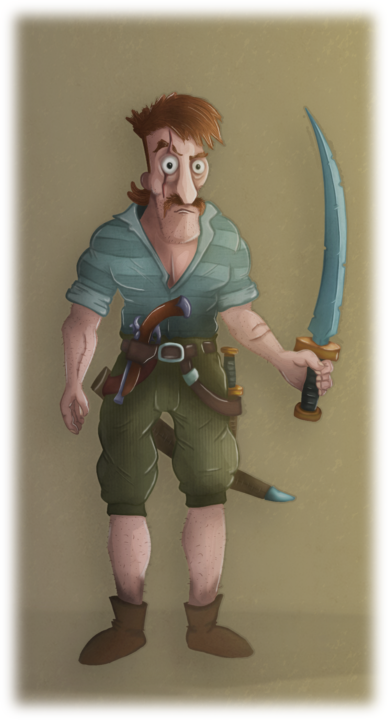
Poses are so difficult!
I've finished the illustration I talked about yesterday. Not 100% what I intended, but happy with this first try in this style of digital painting. I am aware that the biggest part of why it is not a complete success is the pose. Poses are so difficult!
0 likes • Dec '25
@Henric Aryee that's the problem, my imagination and poor focus makes me go in too deep top fast. I Can't see in simple shapes, I always see in what I think the end result should be. Which ironically is not good for said end result. 😅 I came across some tutorials of a Guy saying you need to understand what bodyshapes are made up from, so you can Imagine how they look from different Angles. That keeps you from always drawing front Angles of failing at different Angles. I think poses, proportions and Angles are definatly my weak spot. I've built my entire side-hustle around that: Card design (a lot of it is front of slightly turned Angle), simple style and shapes and minimale, caricature style (ability to go for less realistic proportions). The problem is these three are going to take time to learn correctly. 2 things I lack is Time and Patience! Al though it will save me time in the long run offcourse... Definatly starting with you simple shape losing tip!
Nov '25 •
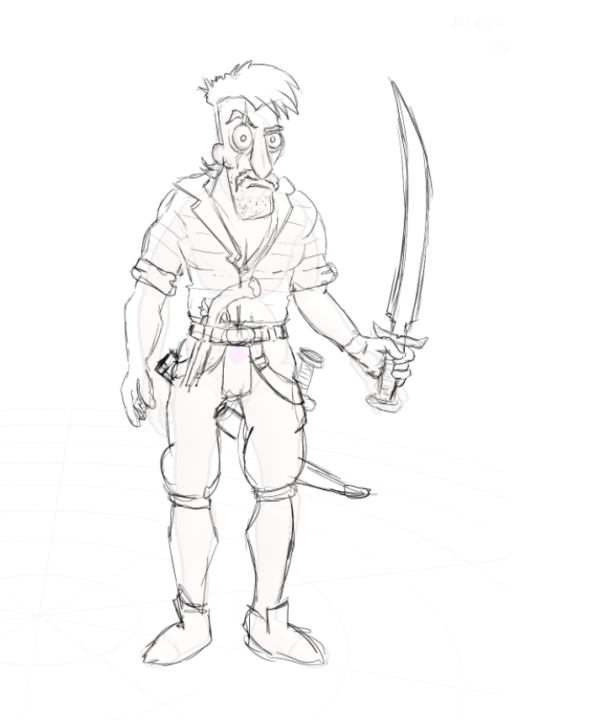
Trying something new!
Between jobs I like experimenting with new styles in my personal work. Not planning on changing my main style (that’s what gets me card-drawing gigs), but it’s fun to see what else I can do. Pirate themes have always been my go-to for drawing from imagination. No idea why, the era just fascinates me. I started the sketch today, and over the next few days I’ll try finishing it. Wish me luck! Question for the group: I learned a rule once in a course: 80% of character art is the character itself, 20% is making it stand out with gear, strange features, special equipment. What do you think?
Poll
2 members have voted
1 like • Nov '25
@Zachary Brown thanks for the tip! I did try that sometimes, bur I think my imagination goes too fast sometimes 😅 I'm going to look into that technique again!
1-10 of 14
@gert-jan-feijens-6625
Graphic designer turned developer, passionate illustrator for card and board games—both personal projects and client commissions.
Active 107d ago
Joined Nov 10, 2025