Activity
Mon
Wed
Fri
Sun
Jan
Feb
Mar
Apr
May
Jun
Jul
Aug
Sep
Oct
Nov
Dec
What is this?
Less
More
Memberships
The You World Order
134 members • Free
The AI Identity Lab
123 members • Free
We Book Coaches on Podcasts
40 members • Free
Freedom Empire by Maggie Giele
5.4k members • Free
ChatGPT Users
12.6k members • Free
The Podcast Network Premium 🎙
1.2k members • Free
Women Speakers Launchpad
718 members • $37/m
The Insta Growth Club
5.3k members • Free
Entrepreneur Expansion Game
257 members • $97
18 contributions to The AI Identity Lab

🔥
12d •
Day 20 - Prompt - A - Day - Challenge
If you are new here - WELCOME!! Go into the Classroom ---> 🎨 21-Day Prompt-a-Day Challenge (Start Anytime!) for all the details. "triggerword standing further outside Starbucks, sign logo in the background, holding an iced coffee, wearing a white ribbed tank, royal blue knitted cardigan, light-wash jeans. Brown medium wavy hair, center part, soft curls toward the ends with bangs. Wearing glasses. Natural glam makeup: glossy lips, warm bronzer, fluffy brows. Blue almond-nails holding the cup. All silver jewelry. Add realism: flyaways around hairline, natural smile lines, tiny shadow under chin, visible pores, subtle uneven texture on décolletage. Golden hour lighting casting warm glow, storefront behind her slightly blurred, reflections in windows, faint smudge on lens. Shot on iPhone 15 Pro Max, candid influencer-style photography. --ar 9:16 --style raw" REMEMBER to change up the description to match you. Change your outfit and have fun! If attaching a photo - "Using my photo I attached" instead of triggerword. And add "Keep the woman’s facial features the same as the photo, unchanged, sharp and visible" at the end.


5 likes • 11d
#promptaday Jumping into this today - just 2 FAL images
0 likes • 10d
@Mercedes Choufoer Thank you
🔥
11d •
Final Day - Day 21 - Prompt - A - Day - Challenge
If you are new here - WELCOME!! Go into the Classroom ---> 🎨 21-Day Prompt-a-Day Challenge (Start Anytime!) for all the details. You DID IT!! You made it to the final day of the Prompt A Day Challenge. What incredible images you have made, played and practiced. I am so proud of each of you!!! 💓 Here is your FINAL prompt!! "triggerword stands triumphantly on a snow-dusted mountain peak at sunrise, December 1st glowing across the horizon. The sky blazes with streaks of gold and fire-orange as the cold wind whips your jacket, your arms lifted wide in celebration. Wearing a royal blue jacket, black gloves holding a sign that says WE MADE IT. Behind you lies the winding path of your journey—marked by gear, weathered signs, and footprints etched into the frost. Your face is flushed with joy and exhaustion, eyes sparkling as you take in the breathtaking view. The sun crowns your silhouette, casting a powerful glow that makes you look larger than life. This moment is yours—a culmination of everything you’ve overcome. Photorealistic, cinematic composition, wide-angle lens, high-detail textures on skin, snow, fabric, and sky, with dramatic rim lighting emphasizing victory and solitude." REMEMBER to change up the description to match you. Change your outfit and have fun! If attaching a photo - "Using my photo I attached" instead of triggerword. And add "Keep the woman’s facial features the same as the photo, unchanged, sharp and visible" at the end.

2 likes • 10d
It refuses to put Dec 1 but otherwise I like it
🔥
18d •
✨ 5 Day Manifestation Challenge Starts Dec 1st - Only $11✨
Some of you have met @Megan Cleland before — but here’s my story. When I opened the AI Identity Lab back in September, Megan jumped into the 5-Day Visibility Challenge like she had rocket fuel in her backpack. I didn’t know what her business was. I didn’t know her background. I just felt her energy. Her curiosity. Her “I’m in — let’s see what I can create” vibe. Then we started talking more — Facebook threads, 8–10 minute voice notes back and forth, a call that felt like we’d known each other for years. And one day she messaged me with a download she received… And I said yes before she even finished explaining it. Because some collaborations don’t come from logic. They happen because your soul recognizes something before your mind does. And this one? It’s THAT kind of collaboration. Together we are hosting a 5-Day Manifestation Challenge — mixing Megan’s manifestation + energy work with my AI identity, visual coding, and neuroscience-backed Future Self activation. This is the exact fusion I’ve been craving........ Future Self + identity + imagery + nervous system alignment + manifestation. It is ONLY $11 - Come and join this next level. Some of you already have your AI Avatars. Some of you already have mind-blowing Future Self images that made you cry. But this challenge? It’s the moment where you stop flirting with your potential and start pursuing it with F*CK YES energy. I recently did this exact manifestation process with Megan and… holy shit. It made me see what I actually wanted — not the version I thought I “should” want. And that’s why I’m sharing part of my own scripting with you — my “perfect day,” the one I visualized, wrote out, and then built AI imagery to anchor into my brain. Manifestation tells us your energy has to meet your intention. This challenge brings it all together. Align. Amplify. Activate. That's the entire vibe.

0 likes • 11d
OMG, this sounds amazing.
Oct 26 •
I need your help
Hey friends, I got an unexpected opportunity to speak at the Grateful Growth Summit, so the last ten days went into writing my talk and other preparations. The irony is that it's an audio summit, but I love the concept that's so different from other summits. It runs from Nov. 1-25 and presents around 50 talks in an incredible variety, some about AI as well. But this is not a typical summit - all the talks are available throughout the 25 days, and the length is limited to 15 mins., so if you listen to 2 per day, it's not more than 30 mins and you'll walk away with wisdom, momentum, and practical tools you can actually use. There's a lot more, but maybe you'll just have a look for yourself. And here's why I need your help: I need to have a certain number of registrations, ideally over 25. So whoever registers or shares my affiliate link helps me get there. Here it comes: https://go.eventraptor.com/summit/grateful-growth-summit-2511/gaiafraukegirusnowoczyn And before I forget: My talk is called "The Energy Myth - How Human Design helps you become Burnout-Proof" All the speakers and topics are listed on the registration page, so please have a look and let me know if you joined. Thanks so much Good night from Spain 🤗 @Lindsay Hack you said I should tag you. Will do it tomorrow as well on Facebook
1 like • Oct 28
@Lindsay Hack Yay, I'm sure it's gonna be really good.
0 likes • Oct 28
@Beth Andress Thank you for joining ❤️
🔥
Oct 22 •
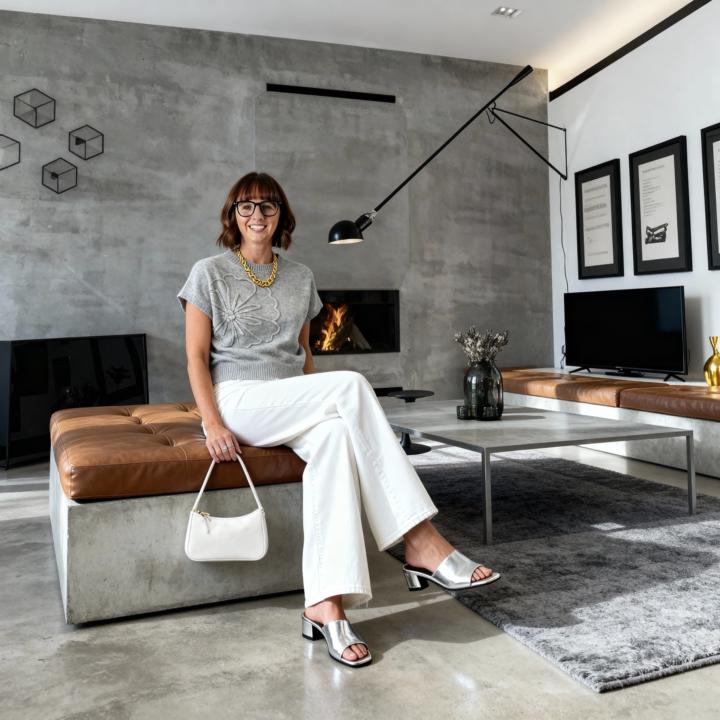
Become an ✨AI sorceress✨ in 4 steps
Here’s how to do it: 1️⃣ Open OpenArt.ai Click over to the Models tab. Scroll until you see Seed Dream—that’s the magic machine we’re using today. Click it. 2️⃣ Upload your images Pop in the photo of you, the sofa, the outfit—whatever combo you’re trying to manifest into your dream life. 🛋👗✨ 3️⃣ Use the Prompting Tool Take the vibe of my prompt (from the photo above) and paste it into the prompting tool. Then just ask it: “Can you turn this into a JSON prompt?” Boom. It formats it beautifully for Seed Dream. 4️⃣ Copy, paste, and ✨watch magic unfold✨ Paste your JSON into Seed Dream. Hit generate. Then tweak the wording, test a few variations, and refine until you’re squealing with joy like I was. Here is the prompt I used: { "project_name": "Modern Fashion Editorial Scene", "description": "Combine the person, outfit, and background references into a seamless, photorealistic image that captures modern elegance and interior minimalism.", "inputs": { "person_reference": "upload_person_image.jpg", "outfit_reference": "upload_outfit_image.jpg", "background_reference": "upload_background_image.jpg" }, "settings": { "style": "photorealistic, cinematic, modern editorial", "camera": { "angle": "eye level", "lens": "35mm wide-angle", "depth_of_field": "shallow", "lighting": "soft diffused natural light" }, "mood": "minimalist, calm, elegant, modern luxury", "color_palette": ["gray", "white", "taupe", "warm leather brown", "gold accents"] }, "prompt": { "detaile
1 like • Oct 26
One day...
1-10 of 18

@gaia-g-9393
Hi I'm Gaia, Human Design guide and transformational coach, helping women overcome trauma and old patterns and create a well-paying business.
Active 9d ago
Joined Sep 27, 2025
INFP
Spain
Powered by